
Webhooks in Satori
When something happens in Satori that affects your players (a live event starts or ends, a message goes out, players reach a journey step, or someone changes a feature flag), your backend might need to respond. Webhooks let you connect actions in Satori to your backend or your own toolchains. When a subscribed event occurs, Satori sends an HTTP POST request with a JSON body to an endpoint on your server.
For example, your backend can listen for LIVE_EVENT_STARTED to prepare event rewards, or for SCHEDULED_MESSAGE_SENT to deliver each message to additional third-party channels.
How webhooks work #
A webhook is an endpoint configuration in your Satori project. Each endpoint has:
- URL: The address on your server that receives the requests.
- Signing secret: A secret Satori generates automatically and uses to sign every request, so your server can confirm the request came from Satori. See Verify webhook signatures.
- Custom header: An optional HTTP header name and value that Satori adds to every request.
- Event types: The webhook events the endpoint subscribes to.
Webhook events #
Each endpoint subscribes to one or more of the following event types:
| Event | Sent when |
|---|---|
LIVE_EVENT_STARTED | A live event run starts. |
LIVE_EVENT_ENDED | A live event run ends. |
SCHEDULED_MESSAGE_SENT | A scheduled message that uses the Webhook message integration is sent to players. |
DIRECT_MESSAGE_SENT | A direct message that uses the Webhook message integration is sent from the console or the Console API. |
JOURNEY_STEP_REACHED | Players reach a Send Webhook step in a journey. |
FEATURE_FLAG_CREATED | A feature flag is created. |
FEATURE_FLAG_UPDATED | A feature flag is updated. |
FEATURE_FLAG_DELETED | A feature flag is deleted. |
FEATURE_FLAG_VARIANT_CREATED | A feature flag variant is created. |
FEATURE_FLAG_VARIANT_UPDATED | A feature flag variant is updated. |
FEATURE_FLAG_VARIANT_DELETED | A feature flag variant is deleted. |
Each project can have up to 10 webhooks by default, including disabled ones. To change the limit, edit webhook_max_webhooks in the deployment configuration of your Satori deployment.
Delivery behavior #
Satori treats any 2xx response as a successful delivery. Any other response, or no response before the timeout, is a failure.
Timeouts and retries #
Satori waits up to 30 seconds for a response to each attempt. If an attempt fails with a retryable error, Satori retries up to 3 more times, waiting 2, 4, and then 8 seconds between attempts. If your endpoint returns 429 or 503 with a Retry-After header, Satori waits for the time the header specifies instead.
To change the timeout or the retry count, edit webhook_timeout or webhook_retries in the deployment configuration of your Satori deployment.
The response status code decides whether Satori retries:
| Response | Retried |
|---|---|
2xx | No, the delivery succeeded. |
429 Too Many Requests | Yes |
5xx, except 501 Not Implemented | Yes |
501 Not Implemented | No |
Other 4xx | No |
3xx redirect | No. Satori doesn’t follow redirects and records the response as a failure. |
| Network error, such as a connection failure or timeout | Yes, except for TLS certificate errors and an invalid URL scheme. |
Return a 4xx status (but not 429) only when retrying won’t help, such as for a request that fails signature verification. Return 429 or 503 when your service is temporarily overloaded, and include Retry-After to tell Satori when to try again.
Satori stores a record of each delivery. Review the records in the console or through the Console API. See Audit webhook requests. Satori doesn’t have a dead-letter queue. Use the delivery records to find and reconcile failed requests.
Delivery guarantees #
Satori doesn’t guarantee that every webhook request arrives, or that requests arrive in order. Your endpoint could also receive the same request more than once. For example, if your endpoint processes a request but responds after the timeout, Satori treats the attempt as failed and sends the request again.
To handle duplicates, deduplicate on the top-level id, which stays the same across retries. To decide which state is newest, use the timestamps in the payload, such as update_time_sec, rather than arrival order.
Batched requests #
Scheduled messages and journey steps can reach many players at once, so Satori groups those players into one request instead of sending a request for each player. Your handler needs to process every player in the request:
SCHEDULED_MESSAGE_SENT: Up to 10,000 players per request, in themessagesarray. A message sent to 300,000 players arrives as at least 30 requests. See Scheduled message sent.JOURNEY_STEP_REACHED: Up to 1,000 players per request, in theeventsarray. See Journey step reached.
Every other event type sends one request for each event: one for each live event start or end, one for each feature flag or variant change, and one for each recipient of a direct message.
Create a webhook #
In the Satori console, open the Webhooks tab and select Create Webhook.
Enter the webhook settings:
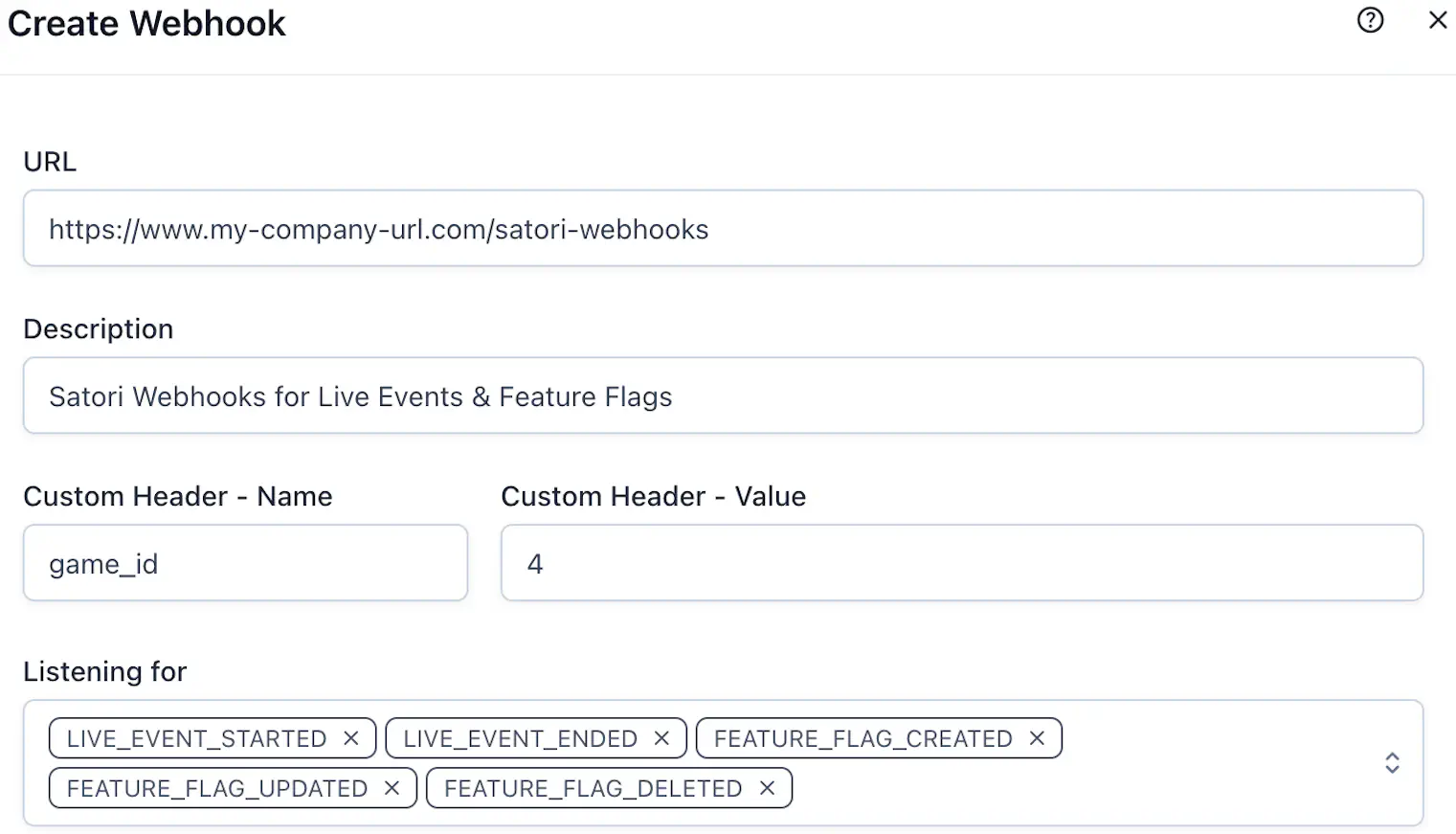
- URL (required): The endpoint on your server that receives webhook requests, for example
https://www.your-domain.com/satoriwebhook. If the endpoint is a Nakama RPC, appendunwrap=trueto the query string so Nakama passes the raw request body to your function, for examplehttps://your-nakama-server.com/v2/rpc/my_function?http_key=defaulthttpkey&unwrap=true. - Description: A note about the webhook’s purpose.
- Custom Header: An optional HTTP header to include with every request. For example, add a game ID if several games share one endpoint.
- Name: The header name, for example
game_id. - Value: The header value, for example
game4.
- Name: The header name, for example
- Listening for (required): The webhook events that trigger this webhook.
- URL (required): The endpoint on your server that receives webhook requests, for example
Select Create. The new webhook appears in the Webhooks tab.
Satori generates the signing secret when you create the webhook.
Manage a webhook #
Select a webhook in the Webhooks tab to open its details page.
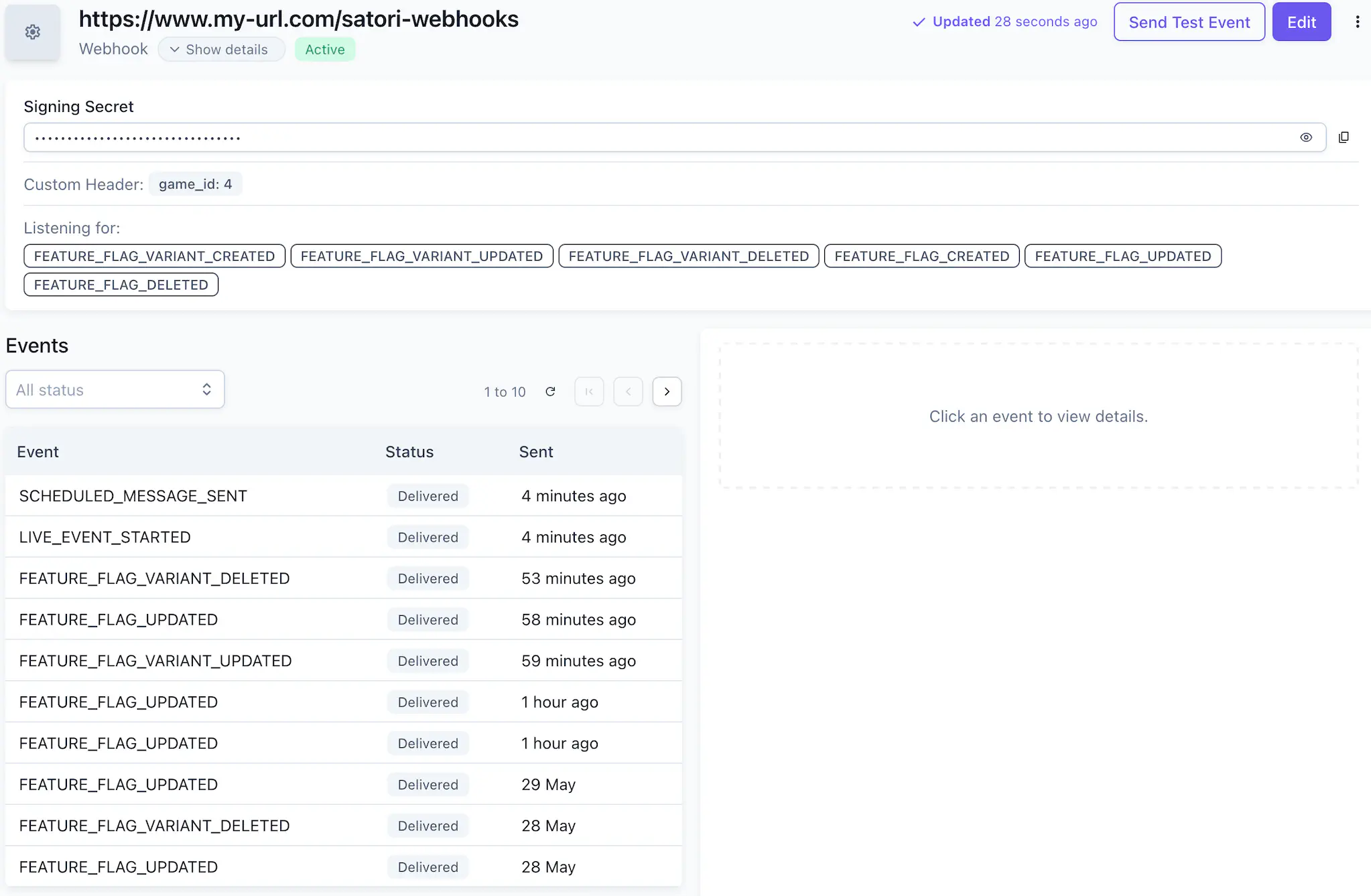
The details page shows the webhook’s settings and an Events section with its delivery history. Use this page to:
- Send a test event.
- Edit the webhook.
- Reset the signing secret, from the more options (…) menu.
- Delete the webhook, from the more options (…) menu.
Audit webhook requests #
The Events section lists the webhook’s deliveries, both successful and failed. Select an attempt to view its request headers, request body, response status, and response body.
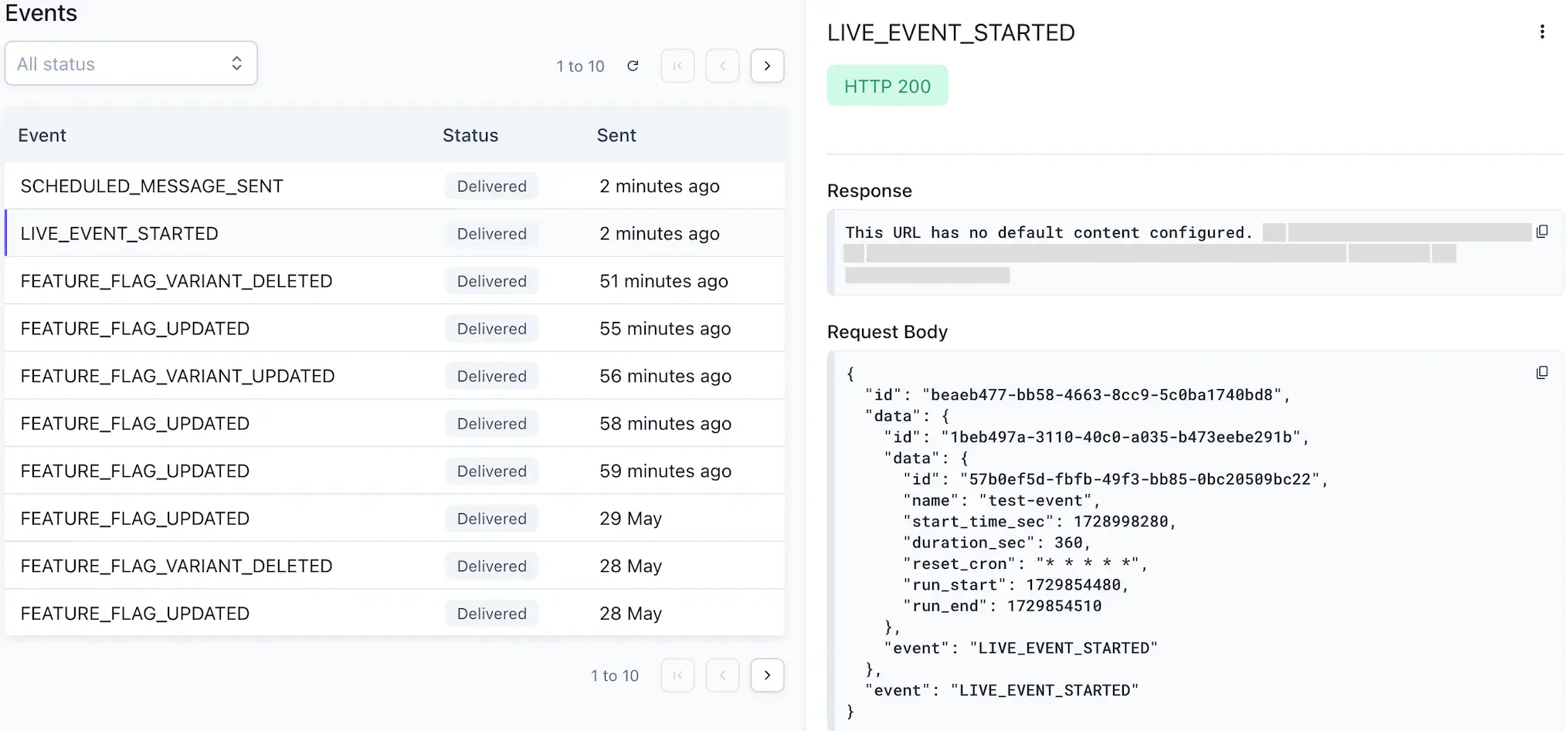
Satori stores successful and failed deliveries for every event type, with one exception. For DIRECT_MESSAGE_SENT, Satori always stores failed deliveries but stores successful deliveries only if the webhook opts in, through the persist_events field in the Console API WebhookCreate and WebhookUpdate requests. Test events are always stored. Satori keeps delivery records for 180 days.
To retrieve delivery records programmatically, for example to reconcile failures in your own tooling, list a webhook’s events through the Console API.
Test a webhook #
To confirm your endpoint receives and processes requests, select Send Test Event. In the dialog, choose an event type and review the request contents before you send it.
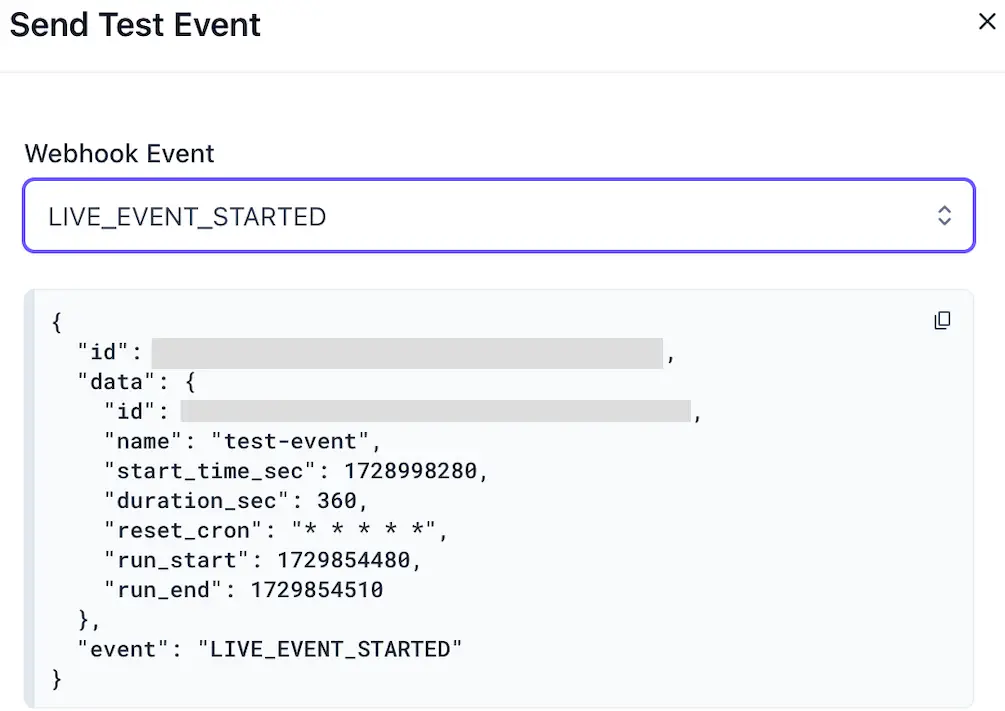
Test events appear in the Events section with a TEST label.
Verify webhook signatures #
Satori signs every request with the webhook’s signing secret. The X-Satori-Signature header has the format t=<timestamp>,sig=<signature>:
tis the time Satori signed the request, as a UNIX timestamp in seconds.sigis the hex-encoded HMAC-SHA256 of the string<timestamp>.<raw request body>, computed with the signing secret. The string is the timestamp, a period, and then the raw body.
Your server computes the same signature with its copy of the secret and rejects the request if the two don’t match. A check on the timestamp also rejects old requests that someone captured and resent.
Each request also includes the headers User-Agent: Satori and Content-Type: application/json, and the webhook’s custom header if you set one.
Verify the signature against the raw request body, not a re-serialized copy of the parsed JSON, because any change to the body changes the signature.
The following JavaScript example verifies the signature and rejects requests older than 5 minutes:
| |
If you suspect the signing secret has been exposed, select Reset Secret from the more options (…) menu to generate a new one, then update the secret on your server.
Webhook payloads #
Every webhook request body has the same top-level structure:
| Field | Description |
|---|---|
id | The unique identifier of the delivery. It stays the same across retries. |
event | The Satori event that triggered the request, for example LIVE_EVENT_STARTED. |
data | Details of the event. The contents depend on the event type. |
Live event started and ended #
LIVE_EVENT_STARTED and LIVE_EVENT_ENDED requests have the following body:
| |
The data object contains:
| Field | Description |
|---|---|
id | The live event’s unique identifier. |
name | The live event’s name. |
start_time_sec | The live event’s start time, as a UNIX timestamp in seconds. |
duration_sec | The duration of each run, in seconds. |
reset_cron | The live event’s reset cron expression. |
run_start | The start time of this run, as a UNIX timestamp in seconds. |
run_end | The end time of this run, as a UNIX timestamp in seconds. |
Scheduled message sent #
SCHEDULED_MESSAGE_SENT requests have the following body. Each request contains up to 10,000 messages, one for each recipient.
| |
The data object contains:
| Field | Description |
|---|---|
messages | The messages in this request. |
messages[].id | The unique identifier of this message instance. |
messages[].identity_id | The identity ID of the player receiving the message. |
messages[].title | The rendered message title. |
messages[].payload | The rendered message body. |
messages[].metadata | The rendered message metadata, as key-value pairs. |
messages[].image_url | The URL of the message’s image, if any. |
messages[].send_time_sec | The scheduled send time, as a UNIX timestamp in seconds. |
message_schedule.id | The identifier of the message schedule. |
live_event | The live event linked to the message schedule, if any: its id, value, and duration_sec. |
Satori renders title, payload, and metadata for each recipient before it sends the request. Property references, such as {{Properties.name}}, and other template variables are already replaced with the player’s values, as in the “Jack” and “Paul” messages in the example. The request doesn’t include the player’s raw properties as separate fields. If your backend needs a property value, reference it in the message template.
Direct message sent #
DIRECT_MESSAGE_SENT requests have the following body. Each request contains the message for one recipient. Satori omits empty fields.
| |
The data object can contain:
| Field | Description |
|---|---|
id | The unique identifier of this message instance. |
identity_id | The identity ID of the player receiving the message. |
title | The message title. |
payload | The message body. |
metadata | The message metadata, as key-value pairs. |
image_url | The URL of the message’s image, if any. |
send_time_sec | The send time, as a UNIX timestamp in seconds. |
value_type | The value type of the message content, if set. |
Journey step reached #
When players reach a Send Webhook step in a journey, Satori sends a JOURNEY_STEP_REACHED request to each enabled webhook that subscribes to this event type. These requests group several players into one events array, with up to 1,000 entries in each request.
| |
Each entry in events contains:
| Field | Description |
|---|---|
identity_id | The identity ID of the player who reached the step. |
journey_id | The journey’s unique identifier. |
journey_name | The journey’s name. |
step_id | The step’s unique identifier. |
step_name | The step’s name. |
reached_time_sec | When the player reached the step, as a UNIX timestamp in seconds. |
payload | The JSON payload configured on the step. |
Feature flag events #
FEATURE_FLAG_CREATED, FEATURE_FLAG_UPDATED, and FEATURE_FLAG_DELETED requests contain the feature flag. For example:
| |
The data object can contain:
| Field | Description |
|---|---|
id | The feature flag’s unique identifier. |
name | The feature flag’s name. |
description | The feature flag’s description. |
value | The feature flag’s value. |
variants | The flag’s variants. Each variant has the fields described in Feature flag variant events. |
schema_id | The ID of the schema that validates the flag’s value. See Taxonomy > Schema Validators. |
create_time_sec | When the flag was created, as a UNIX timestamp in seconds. |
update_time_sec | When the flag was last updated, as a UNIX timestamp in seconds. |
Satori sends FEATURE_FLAG_UPDATED for any change to the flag itself, including its name, description, category, or value. Changes to a variant send a FEATURE_FLAG_VARIANT_UPDATED request instead. The request contains the flag’s state after the change, not a list of what changed. To see what changed, store the previous payload and compare it with the new one.
Feature flag variant events #
FEATURE_FLAG_VARIANT_CREATED, FEATURE_FLAG_VARIANT_UPDATED, and FEATURE_FLAG_VARIANT_DELETED requests contain the variant. For example:
| |
The data object can contain:
| Field | Description |
|---|---|
id | The variant’s unique identifier. |
name | The variant’s name. |
audiences | The audiences the variant targets, each with an id and name. |
value | The variant’s value. |
flag_id | The unique identifier of the parent feature flag. |
create_time_sec | When the variant was created, as a UNIX timestamp in seconds. |
update_time_sec | When the variant was last updated, as a UNIX timestamp in seconds. |
Satori sends FEATURE_FLAG_VARIANT_UPDATED for any change to the variant, including changes to its audience list.
