
Sessions
Every analytic event your game sends to Satori belongs to a session: a single continuous period of play activity, bounded by a start (for example, game open or app foreground) and an end (for example, game background). This page explains the session lifecycle conceptually. For implementation-level details, see the Session management guide.
Why sessions matter #
Sessions matter because almost every meaningful LiveOps metric is session-derived or session-normalized. With the correct configuration, sessions let you:
- Track engagement, through metrics such as session length, sessions per DAU.
- Measure retention. D1/D7/D30 are fundamentally session-return events.
- Group player actions. Associate analytics events with the correct gameplay session.
How a session is bounded in Satori #
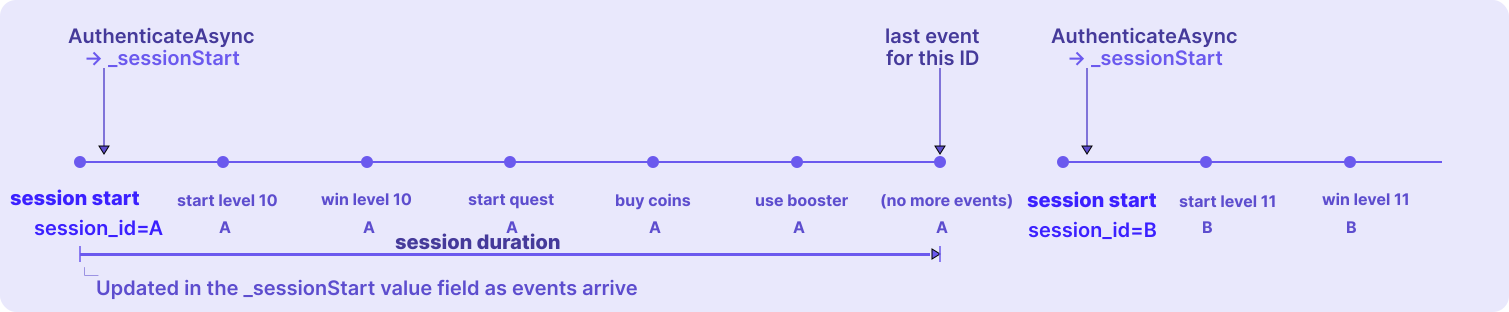
A session starts when the player authenticates with Satori. From that point, your game sends analytic events describing what the player does. Every event sent during the session is marked with the same session ID, which is how Satori knows they belong together. There’s no explicit “end” event. Duration is simply the span between the first event (the session start) and the most recent event carrying the same session ID. A new authenticate opens a new session with a new session ID.
Why sessions need management #
Satori doesn’t decide where your sessions begin and end. You do. There’s no “end session” call: the session length is calculated as the time between the first event of this session and the last event with the same session ID. So the most important thing you control is when to start a new session, and that single decision determines whether your session metrics reflect reality.
The most common mistake is reusing one session across many separate play periods. If a player opens the game five times for 60 minutes total, that could be five sessions averaging 12 minutes, but without a fresh authenticate each time it collapses into one 60-minute session, and every session-derived metric downstream inherits the error.
Where analytic events originate #
The first thing to decide for your game is where you want to send analytic events to Satori from.
From the client - player driven: Your game client authenticates with Satori (via the client SDK) and sends events. The client owns the session lifecycle: each authenticate marks a new session, and client events carry that session ID automatically.
From the server - server authoritative: A server, such as Nakama, sends events on the player’s behalf. Satori sessions are created server-side, typically within Nakama’s runtime modules or webhooks. If you are using Hiro and have enabled Personalizers, you can see Hiro publishes analytics events to Satori on the server side. Events then carry that server-created session ID, and session boundaries follow the server’s authenticate calls rather than client activity.
If you’re looking for setup specific to your stack, jump to Integration scenarios.
Nakama and Satori sessions are independent #
If you use both Nakama and Satori, unlike Nakama sessions, which exist to authorize API requests, Satori sessions exist to model player behavior. The table below shows how the two differ and why their settings should be tuned independently.
| Nakama session | Satori session | |
|---|---|---|
| Purpose | Authorization: a JWT proving the client may call Nakama APIs | Analytics: a bounded window of player activity that groups events |
| What it powers | Secure API access, socket connections, session variables | Session count, session duration, playtime, retention metrics |
| Token tuning goal | Keep the player signed in seamlessly with silent refresh | Deliberately let tokens expire so sessions mirror real play sessions |
| Defaults | 60s token, 1h refresh | 1.5 days token (session_token_expiry_sec), 7 days refresh (session_refresh_token_expiry_sec) Learn more about token refresh |
When to start a new session: your main control #
As the session boundary diagram showed, a session has no explicit end. It stops at its last event. So ’ending’ is really about when you start the next one. Deciding when to start a fresh session is the main thing you control.
A session begins when the player authenticates with Satori.
Authenticating creates the player’s Satori identity (if it doesn’t already exist), decorates it with default properties, and opens a new session with its own session ID. Every authenticate call starts a new session, so in practice authentication is the session start. Three patterns cover almost every game:
- On game boot. Authenticate every time the player opens the game. This is the most reliable way to keep each play period as its own session and keep duration accurate. For brief interruptions where the OS keeps the app alive (an incoming call, a quick app switch), reusing the open session is fine.
- On inactivity. Track time since the player’s last activity. When it crosses a threshold you choose (30 minutes is a common cutoff), start a new session on their return rather than continuing the old one.
- Token expiry as a safeguard. Configure token expiry to cap the maximum possible session length even when neither of the above fires. This is the backstop, not the primary mechanism. See Token expiry as a safeguard for how to set the values.
If you reuse a stored session instead of re-authenticating, the SDK keeps it alive by silently refreshing its token until both tokens expire, so refresh extends the current session rather than starting a new one. Learn more about session refresh.
SatoriSystem already follows these recommendations: on each initialization it authenticates a fresh session rather than persisting and restoring one across launches. Within a running session, the underlying Satori client auto-refreshes the token as usual, if enabled.Integration scenarios #
How you configure session creation depends on where your events originate. Select the scenario that matches your stack:
- Client only (recommended): the game client sends all events directly to Satori.
- Client and server: the client owns the session, but your server also sends events.
- Server only: all events flow through Nakama with no Satori client SDK.
Client only #
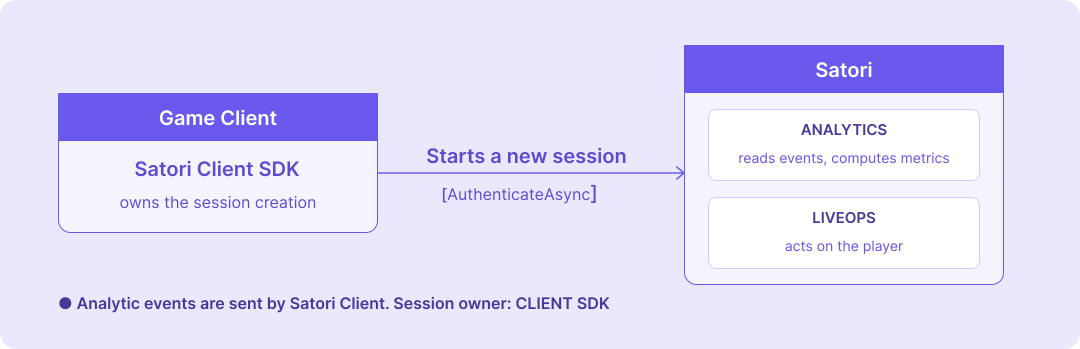
The game client authenticates with Satori and sends all events directly. The client owns the full session lifecycle: each AuthenticateAsync call creates a new session, and every event carries that session ID automatically. This is the recommended integration path as it’s the best approach to simulate player behaviour.
| |
See the client libraries documentation for other engines and languages.
Client and server #
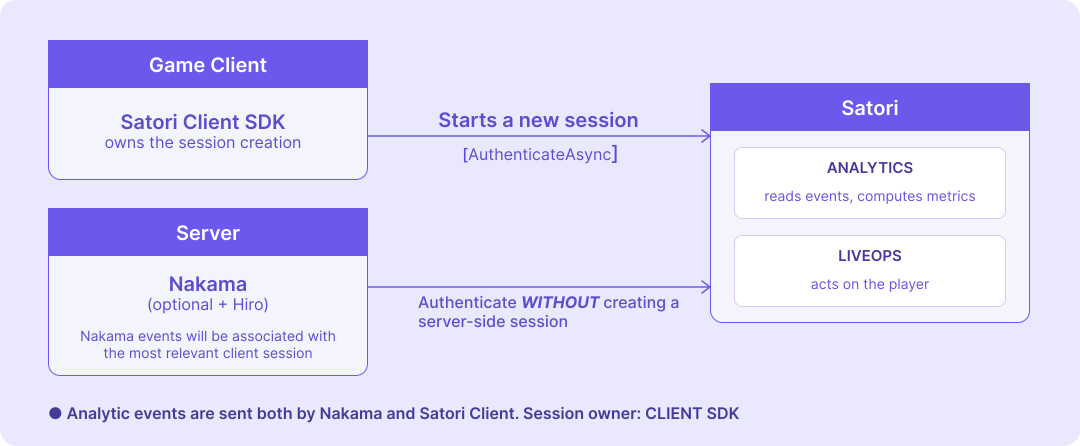
The game client authenticates with Satori and owns the session, but your server (Nakama or a custom backend) also sends events on the player’s behalf. The server must authenticate with Satori without creating a competing session. Otherwise every server authentication spawns a second session for the same player, doubling session counts and fragmenting durations.
On the client, authenticate as shown in the client only example above.
On the server, configure Satori authentication so it never creates a new session.
If you use Hiro’s SatoriPersonalizer (requires Hiro 1.32 or later):
| |
If you call Satori from custom Nakama runtime code:
| |
With this configuration, events published from Nakama with EventsPublish carry no session ID, and Satori automatically associates them with the player’s most recent client-created session. See Handling missing session IDs for how this attribution works, and the Hiro authentication options for the full option list.
Server only #
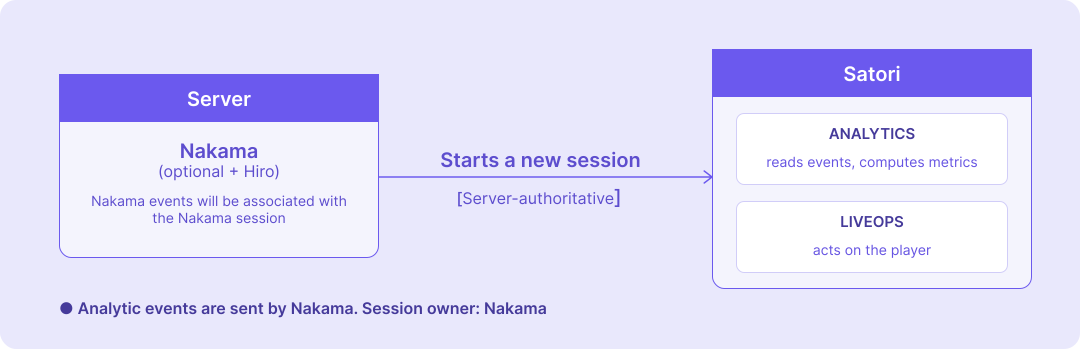
If your game doesn’t ship the Satori client SDK and all analytics events flow through your Nakama server, let Nakama create the Satori session at authentication.
If you use Hiro’s SatoriPersonalizer:
| |
If you call Satori from custom Nakama runtime code, leave noSession as false:
| |
See the Satori integration guide for the full runtime API in Go, TypeScript, and Lua.
Collecting data before authentication #
It’s possible to track player behaviour even before they have a persistent identity in Satori. This is useful if your game allows players to play as a guest before signing in or creating an account.
- On game launch, authenticate with Satori using a locally generated UUID or device identifier as a temporary identity.
- Submit events as normal under this temporary identity.
- Once the player authenticates with Nakama and their
user_idis known, callIdentifywith the permanent ID. Satori merges all events from the temporary identity into the permanent one and deletes the temporary identity.
This preserves pre-login behavior such as tutorial completion, store browsing, or onboarding steps that would otherwise be lost at sign-in. For implementation details, see Identifying a session with a new ID.
Handling missing session IDs #
When Satori receives an event without a session ID, from EventsPublish with noSession configured or from the Server-Event API, it automatically associates the event with the player’s latest valid session, provided the session falls within the validity window.
The grace period is configurable with event.sessionless_events_grace_period_sec (default 1,800 seconds), so late-arriving server events can still be attributed to recent sessions. Events that can’t be matched to any valid session remain unlinked (orphaned) but are still logged.
How session metrics are calculated #
Session count is the total number of _sessionStart events for a player. Every authentication that creates a session emits one _sessionStart event, so session count directly reflects how many sessions have been created.
Session duration is the time between the _sessionStart event and the last event received with the same session ID. As new events arrive, Satori proactively updates the duration in the _sessionStart event’s value field. Historical aggregates such as lifetime session count, average session duration, and total playtime are available as computed properties on the _sessionStart event.
Session data is available across several surfaces:
- Dashboards and reports: the Retention and ROAS reports include session count, average session duration, and average playtime for all players and selected cohorts.
- Metrics page: build custom metrics using
_sessionStartas the source event. - Audience filters: lifetime session count, total playtime, and average session duration are available as audience criteria. See Explore audience use cases for examples, several of which use session start count.
Data lake exports: _sessionStart is included in exports, but because duration is computed in real time as events arrive, the exported value reflects the duration at export time rather than the final value. To calculate accurate durations from your data lake, group events by the session_id field present on every exported event and derive duration from the event timestamps.
