
How audiences recompute
Keep your players in the right audience segments the moment they take a meaningful action. Satori combines scheduled recomputation with on-the-fly evaluation at request time to ensure players always receive the content they qualify for, without stale data creating targeting gaps.
This page covers how Satori keeps audience membership accurate, and how that membership is evaluated at the moment a player requests content.
How it works #
Satori keeps audience membership current through two processes, and evaluates it on the fly when a player requests content.
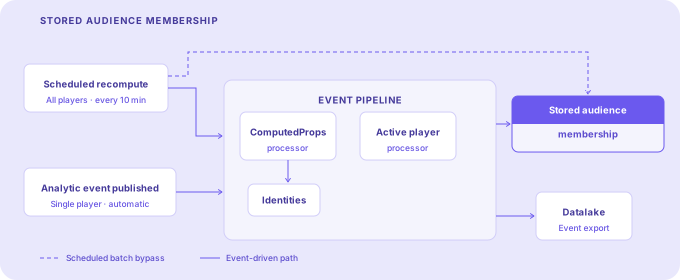
In the background, stored audience membership is updated on a regular schedule across all players. When a player publishes an analytic event, that event passes through the event pipeline, which updates the player’s computed properties and identity record, refreshes their stored audience membership, and exports the event to your connected data lake. Stored audiences are used to handle scenarios where segmentation rules involve time, for example, a segment used to send players a message when they become inactive.
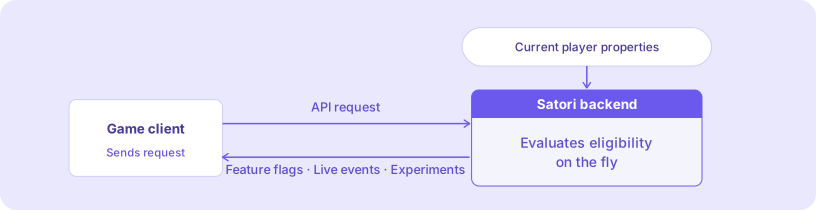
When a player requests feature flags, live events, or experiments, Satori evaluates their eligibility on the fly using their current player properties at that moment. Property changes are reflected immediately at the player’s next request. No recompute step required.
Scheduled bulk recompute #
Satori evaluates all players against all audience definitions on a regular interval. The default is 10 minutes, configurable via the audience.processor_interval_sec setting in your Satori project in Heroic Cloud. This value is the time in seconds to wait before the next cycle begins after the previous one finishes.
Players are added to and removed from audiences during each cycle. If a player no longer meets the filter criteria of an audience, they’re removed at the next scheduled cycle.
Analytic event automatic recompute #
When a player publishes an analytic event, Satori passes it through the event pipeline. This happens automatically for all events, with no configuration required. The pipeline runs two processors in response:
- The ComputedProps processor updates the player’s computed properties (statistics derived from events, such as total spend or session count) and writes the result to the player’s identity record.
- The Active player processor evaluates the player against audience definitions and updates their stored audience membership in the database.
For example: a player completes a match and a matchPlayed event is published. The pipeline updates their computed properties and recomputes their audience membership. The next time their client requests live events, the match-completion-gated event is returned without delay.
When players receive updated content #
For remote config, live events, feature flags, and experiments, content eligibility updates the moment a player’s properties change. There’s no recompute step in the middle. When the player’s game client next requests content via the API, Satori evaluates their current properties and returns the correct variants immediately.
For example: AdsConfig is a feature flag with a default variant and a second variant targeting the minLevel10 audience. That audience filters on the levelCompleted player property. When a player completes level 10, your game updates their levelCompleted property via the properties API. The client immediately requests feature flags. Satori evaluates eligibility against the updated property at that moment and returns the minLevel10 variant of AdsConfig, with no recompute cycle in between.
If your audience filter uses a computed property, a statistic derived from events such as total spend or session count, there’s a small delay (by design) of a few seconds between an event being ingested and that computed property being updated. The event pipeline processes events in batches, flushed when either a batch size or time interval threshold is reached. In practice this delay is a matter of seconds, but it’s worth accounting for in time-sensitive targeting flows.
