
Explore audience use cases
LiveOps teams use Satori audiences in many different ways to suit their game and their players. To give you a sense of what’s possible, this page gives a set of example use cases that show how you can combine default, computed, and custom properties to build precise audience segments.
Create a QA audience #
For internal testing, you need an audience that matches your QA players. Keep test accounts out of your production experiments and live events by routing them through a dedicated audience attached to a separate set of flags and events.
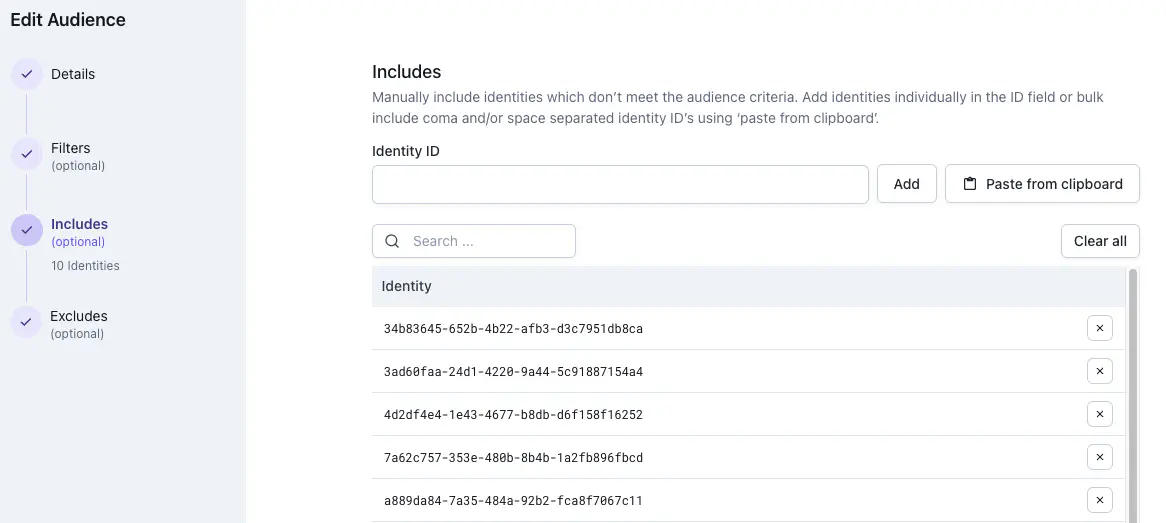
The simplest approach is to paste your QA player IDs directly into the Includes field when creating the audience.
If you have a large or frequently changing QA team, a custom property is easier to maintain. Set isQATester to true on your test accounts via the Satori console or a server-side API call, then filter on it:
| |
Before you can filter on isQATester, you must create it in the Satori console under Taxonomy > Properties. See About player properties for steps on creating a custom property.
Reward no-ads purchasers with exclusive content #
No-ads purchasers are a distinct premium tier: more engaged than average and more willing to invest. To target all players who hold the no-ads entitlement, start with:
| |
noAdsPurchase is a read-only custom property. Read-only custom properties can’t be written by game clients: only the Satori console or a server-side API call can set them. This makes them the right choice for entitlement flags such as no-ads purchases and premium access, where the value must stay server-authoritative and protected from client-side manipulation. The PropertiesCustom function reads the value; the == true comparison confirms the entitlement is active.
To limit the audience to players who have invested meaningful time in the game, add a session count threshold:
| |
sessionStartCount is a computed property derived from the sessionStart event using the <eventName>Count pattern. The threshold of 50 sessions filters out players who bought no-ads immediately after install and then churned, keeping the audience focused on players who have formed a habit.
To exclude very new accounts that haven’t yet established a play pattern, add an account age condition:
| |
Finally, add a recency condition to ensure the event only reaches players who are actively playing right now:
| |
The createTime condition removes accounts younger than 30 days. The updateTime condition removes players who haven’t been seen in the last 14 days. Together they produce a segment of established, active no-ads buyers.
noAdsPurchase, you must create it in the Satori console under Taxonomy > Properties and set Read Only to true. A read-only property can’t be written by game clients after creation. See About player properties for steps on creating a custom property.Re-engage lapsed spenders #
Lapsed spenders are one of the highest-value segments in any live game. To target players who’ve previously spent but haven’t been active in the last 14 days, start with this filter:
| |
purchaseCompletedCount is a computed property derived automatically from the purchaseCompleted event. Satori applies the <eventName>Count pattern to generate it, tracking the total number of times that event has fired for a player over their lifetime.
Attach this audience to a live event or feature flag carrying your win-back offer. Players who return and make a purchase will fall out of this segment. Satori automatically recomputes segment membership when analytic events are received.
To narrow the segment to players with a stronger spend history, add a purchase count threshold and a minimum lifetime spend condition:
| |
purchaseCompletedValueSum uses the <eventName>ValueSum computed property pattern, tracking the sum of all numeric values attached to every purchaseCompleted event. This segments by total lifetime spend, not just purchase frequency.
To focus the lapse window on spend recency rather than general activity, replace updateTime with purchaseCompletedSeenLast:
| |
purchaseCompletedSeenLast uses the <eventName>SeenLast computed property pattern, giving you the timestamp of the most recent purchaseCompleted event. Using it instead of updateTime means the 30-day window measures inactivity from a spend perspective specifically, not overall session activity. A player could be logging in regularly but not spending.
Deliver different content based on engagement level #
New players and veteran players respond differently to events, challenges, and in-app purchase offers. sessionStartCount lets you divide your player base into engagement tiers and deliver content appropriate to each.
To target new players in their first two days, use:
| |
To target veteran players with 100 or more sessions, use:
| |
sessionStartCount is a computed property derived automatically from the sessionStart event using the <eventName>Count pattern, tracking the cumulative number of sessions a player has started over their lifetime.
Attach the new player audience to a discounted starter bundle. Attach the veteran audience to an exclusive tournament or a high-value expansion pack. For the tournament, use the audience size preview in the console to confirm the segment is large enough to sustain the event before you launch.
To tighten the veteran segment further, layer a spend condition to restrict it to players who have made at least one purchase:
| |
Gate a new feature to a soft-launch market #
Before rolling out a new feature globally, validate it with a focused audience in your soft-launch market. The first requirement is that players must be on the client version that carries the feature:
| |
SemverMatch evaluates whether client_version meets the version range. client_version is a default property that must be passed explicitly by your game client when authenticating.
To restrict the audience to your soft-launch markets, add a country condition using the countryCode default property. This property is derived automatically by Satori at identity creation using geo-IP. No client instrumentation required.
| |
To ensure the audience produces meaningful signal, add a session threshold to exclude players still in onboarding:
| |
sessionStartCount is a computed property derived from the sessionStart event using the <eventName>Count pattern. Players in their first few sessions behave differently from your established base. Their data would skew your soft-launch metrics, making it harder to draw conclusions before a wider rollout.
Once you’re satisfied with soft-launch performance, remove the version and country conditions and reattach the same flag or event to an unrestricted audience.
