
Segmentation
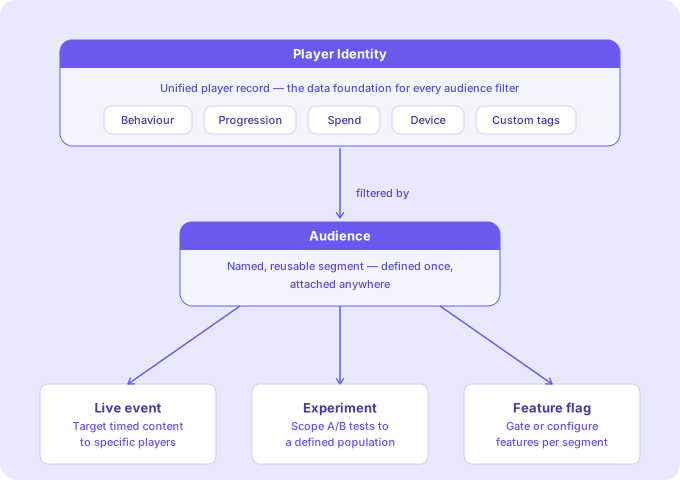
Segmentation is the practice of dividing your player base into distinct groups based on behavioral, demographic, or progression attributes. Satori organizes your player base into dynamic segments you define once and reuse across every live event, experiment, feature flag, and message in your game.
Why it matters #
LiveOps success relies on engaging the most relevant players for the most fitting content, at the right time. Segmentation is what makes LiveOps content land: it’s the mechanism that turns a calendar full of events into a program that each player experiences as relevant to them.
How it works #
In Satori, a segment of players is called an audience, a group of players segmented by the filters you have provided. Audiences are built on Satori’s extensive Player Identity system. Once defined, an audience can be attached to any live event, experiment, or feature flag in your game without duplication. To learn about how audiences, see Understand audiences.
Key capabilities #
| Target players from day one | Default audiences including New Players, Tier-1 Countries, and All Spenders are created automatically on first integration, with no event setup required. |
| Filter by any player attribute | Build audiences from device type, country, language, spend history, session behavior, app version, or any custom property your game tracks. |
| Control exactly who is in an audience | Includes and Excludes override filter rules giving you precise control over edge cases. Import your own segment data into Satori and use them directly to create audiences. |
| Keep audiences current automatically | When a player publishes an analytic event, Satori passes it through the event pipeline. This happens automatically for all events, with no configuration required. |
| Size your audience before you commit | Check live audience count in the console before attaching a segment to any live event, experiment, or feature flag. |
| Reuse segments across your full operation | One audience definition works across live events, experiments, feature flags, and messages. Update it once and it applies everywhere it's referenced. |
How Satori is different #
Near real-time by default #
Satori’s scheduled bulk recompute runs every 10 minutes by default, across all players and all audience definitions. Most segmentation systems treat a 10-minute refresh cycle as near real-time. For the majority of LiveOps targeting scenarios, this is already fast enough.
Automatic recalculation for active players #
For players who are actively playing, Satori goes further. Publishing a custom analytic event automatically triggers audience recalculation for that player, outside of the scheduled cycle. If a player completes a purchase, finishes a level, or triggers any instrumented event, their segment membership is updated immediately as a side effect, with no additional configuration required.
On-the-fly eligibility evaluation #
For feature flags, live events, and experiments, Satori evaluates a player’s eligibility at request time using the player’s current properties. A property change is reflected at the player’s very next request, with no recompute step in between.
Bring your own segment data #
If your studio already tracks player behavior in a third-party analytics platform, you can import those data directly into Satori as managed audiences and continue to work with your existing data. Your data becomes the targeting source, and Satori handles the rest. See Understand audience.
