
Remote configuration
Remote configuration lets you tune in-game settings, such as shop prices, rewards, and event schedules, without releasing a new game build. Instead of hard-coding these values, your game reads its configuration at runtime from Satori, and you update it whenever your game design calls for a change.
In Satori, each remotely configurable value is a feature flag: a named setting that your game reads from the server instead of from its own code.
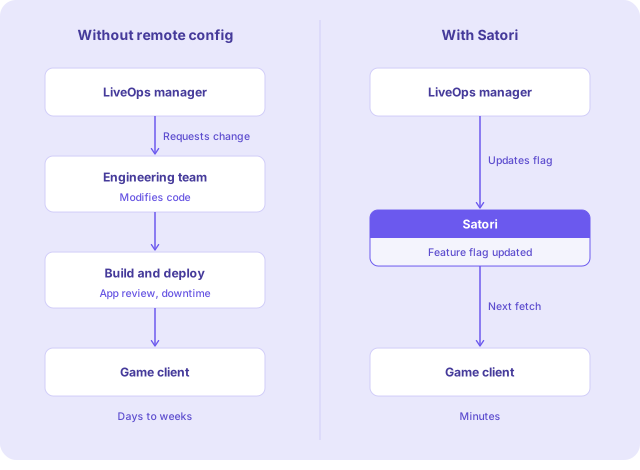
Why it matters #
Without remote config, every LiveOps change requires a server or client update. That means more app store review cycles, server downtime, and delays between a decision and its impact on players. For a LiveOps team managing live events, seasonal content, and ongoing balance adjustments, that wait creates real friction. Remote configuration removes it.
Key capabilities #
| Serve global LiveOps settings, editable live | Global tuning variables, for example, an interstitial day cap, can be updated using feature flags by your LiveOps team without engineering involvement. |
| Serve different configurations to different players | Combine feature flags with audiences to create variants. Your default shop inventory goes to all players through a storeConfig flag, while variants deliver a discounted catalog to lapsed spenders, region-specific pricing to players in Japan, or a premium selection to high spenders. |
| Run A/B tests and deliver live event content | Feature flags power live events and experiments, both of which can override default flag values on their own schedules. Satori resolves which value each player receives automatically, so you can run multiple events and experiments in parallel without conflict. |
| Create as many feature flags and variants as your game needs | There's no limit to the number of feature flags and feature flag variants that Satori supports, nor any difference in billing for having a greater or smaller number of feature flags. Remotely configure every aspect of your game without worry. |
| Integrate seamlessly with Hiro | Studios with an active Hiro license can access Hiro's full metagame suite — economy, achievements, event leaderboards, progression, incentives — within Satori. Each system reads from configuration that Satori hosts, making it straightforward to update Hiro settings from the console. |
How it works #
Feature flags power remote configuration in Satori. Every feature flag has a default value — the configuration most players receive. From there, create variants that target specific player segments (audiences) with alternative values, all without touching your game client.
For example, a storeConfig flag might hold your standard shop catalog as its default. You could then create a variant with lower prices that only targets lapsed spenders. Players in that segment see the discounted shop; everyone else sees the default.
To learn more about feature flags, variants, and overriding flag values, see Understand feature flags.
Get started with feature flags #
These steps assume you’ve already installed Satori in your game client. See Client libraries for setup instructions.
- Identify which game parameters you want to configure remotely
- Set default flag values
- (Optional) Define flag variants to target specific audiences
- Add logic to fetch feature flags from your game client
- Update configuration remotely as needed
- Use experiments and personalization to customise the player experience and optimise flag values
