
Set up message integrations
Integrations let you deliver messages to players while they aren’t interacting with your game. Players may be offline, inactive for a long time, or may have deleted the game, but with the right integration, you can still reach them.
Supported integrations #
| Integration | Delivery type |
|---|---|
| OneSignal | Push notification and email |
| Apple Push Notification Service (APNS) | Push notification |
| Firebase Cloud Messaging (FCM) | Push notification |
| Facebook App-to-User (Facebook A2U) | Push notification |
| Webhook | HTTP request to a configured endpoint |
Set up an integration #
- Go to Settings > Integrations.
- Under Message Integrations, select the integration you want to configure.
- Enter the required credentials and select Save.
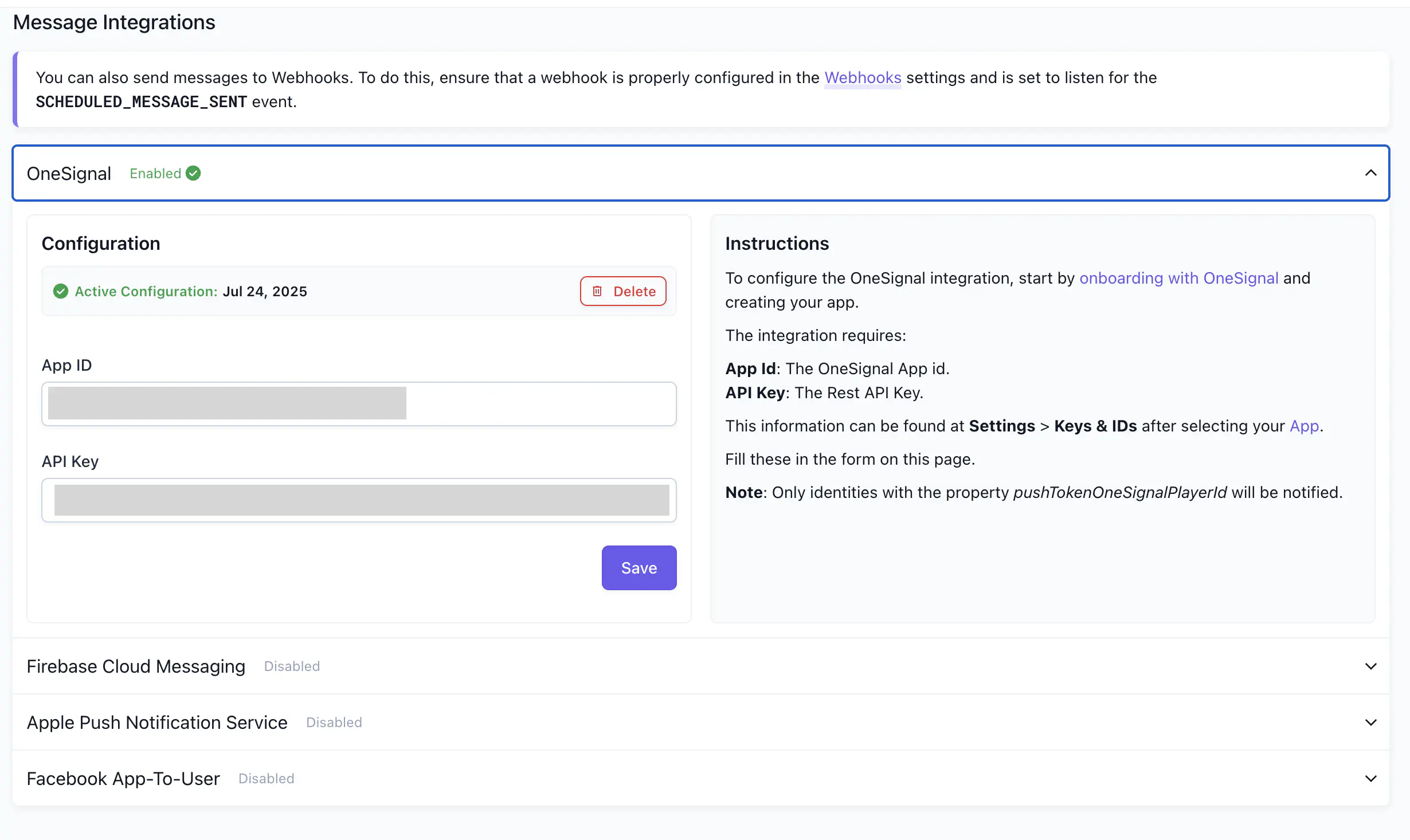
You can configure multiple integrations. Each schedule and direct message lets you select which integrations to use at send time.
Match players to integrations #
For Satori to deliver a message through an integration, the player’s device token must be stored in the corresponding default property. The game client is responsible for capturing and writing this token to Satori when the player grants notification permissions.
| Integration | Default property |
|---|---|
| OneSignal | pushTokenOneSignalPlayerId |
| APNS | pushTokenIos |
| FCM | pushTokenAndroid |
| Facebook A2U | pushTokenFacebookA2U |
When a message is sent, Satori checks which integrations are enabled for that schedule and delivers through each one where a matching token exists for the player.
For OneSignal, pushTokenOneSignalPlayerId should be populated with the OneSignal Subscription ID, accessible from OneSignal dashboard or SDK.
For email delivery through the OneSignal integration, Satori sends to the address stored in the identity’s email property. Set it from the game client the same way you set push tokens.
Satori doesn’t manage unsubscribe or opt-out status. Manage it in OneSignal. To also exclude opted-out players from Satori messages, store their status in a custom property, build an audience from it, and add that audience to Exclude Audience(s) on your schedules.
Using APNS and FCM together #
If you configure both APNS and FCM in Satori, the two integrations operate independently. Satori delivers to iOS players directly via APNS using pushTokenIos, and to Android players via FCM using pushTokenAndroid.
pushTokenIos via APNS , and to players with pushTokenAndroid via FCM.Satori doesn’t remove invalid or expired push tokens from either integration. When APNS or FCM reports a token as invalid, update the matching token property from the game client so Satori stops sending to the old token.
Webhook integration #
The Webhook integration sends an HTTP POST request to a configured endpoint when a message is triggered. Use it to connect Satori’s messaging to an external system not covered by the built-in integrations. For setup instructions and payload details, see Webhooks.
Delivery errors #
The Satori console surfaces diagnostic information for each message integration: the last error message, the time of the last failure, and the total error count.
Satori distinguishes between two categories of delivery failure:
- Integration-level failures: Problems with the integration itself, such as invalid credentials or provider outages.
- Identity-level delivery issues: Problems specific to an individual player, such as a missing push token or invalid email address.
Satori retries retryable delivery failures to external integrations automatically, with exponential backoff. The integration’s list of recent errors is held in memory and clears when the Satori server restarts. Use it to diagnose current problems because it isn’t suitable as a long-term record.
Track delivery and engagement #
Satori records a delivery status for each message on each channel, shown in the message list on the identity’s page in the console. The status shows whether the provider accepted the request or returned an error. A delivered status means the provider accepted the message, not that it reached the player’s device.
Satori doesn’t track whether a push notification or email was opened or clicked. Your messaging provider tracks these metrics. For example, OneSignal shows delivery and engagement data in the OneSignal dashboard.
Each in-game inbox message has a read time and a consume time. Your game client can set them when the player reads or claims the message, for example with UpdateMessageAsync in the Unity client. Satori keeps inbox messages for 180 days by default.
Satori doesn’t record message sends or opens as analytics events. To target players or measure results based on how they respond to a message, send your own user-defined event from the game client, for example when a player opens an inbox message. Use that event to build an audience, such as players who opened a promotion, or to create a metric.
Delivery timing #
Each run of a message schedule sends at the same time, in UTC, for every player it targets. To set up a schedule, see Automate message delivery.
To send a message in each player’s local time, use a journey. A Time Window step with a recurring schedule waits until the next scheduled time in each player’s own timezone. A Send Message step after it then sends the message at that local time. Satori determines a player’s timezone from their location properties, which it sets from geo-IP.
