
Understand players with analytics events
Events are the behavioral signal Satori uses to build player profiles, compute properties, and populate every metric, report, and audience in your project.
How an event is structured #
Each event must have name, value and metadata. Each field has a defined schema that the event must adhere to.
| Field | Description |
|---|---|
name | The unique identifier for the event. Must exactly match the event name registered in Taxonomy > Events. |
metadata | Key-value context that describes the event. Use this to enrich analysis and data lake exports. |
value | A measure used for computed properties and metrics. Use this to power automatic computed properties (for example, send the tutorial ID as a value for tutorialCompleted to update tutorialCompletedSeenLast) and to feed Metrics in the dashboard. |
| |
How events flow through Satori #
When your game fires an event, Satori records it against the player’s identity and immediately runs it through the event pipeline. This triggers two things:
- Computed properties: Satori generates or updates a set of properties on the identity based on the event (count, timestamps, values). These properties feed your audience filter expressions and segmentation.
- Metrics and reports: Events feed directly into the performance monitoring surfaces: the dashboard, retention reports, RoAS calculations, and any custom metrics you define.
If an event isn’t fired, it doesn’t exist in Satori, and any downstream feature that depends on it will be incomplete or empty.
View event history per player #
Events that Satori accepts are recorded against the player’s identity and are visible in the Events tab on the identity detail view. Search by keyword or filter by event type or session ID to debug a specific player’s event history.
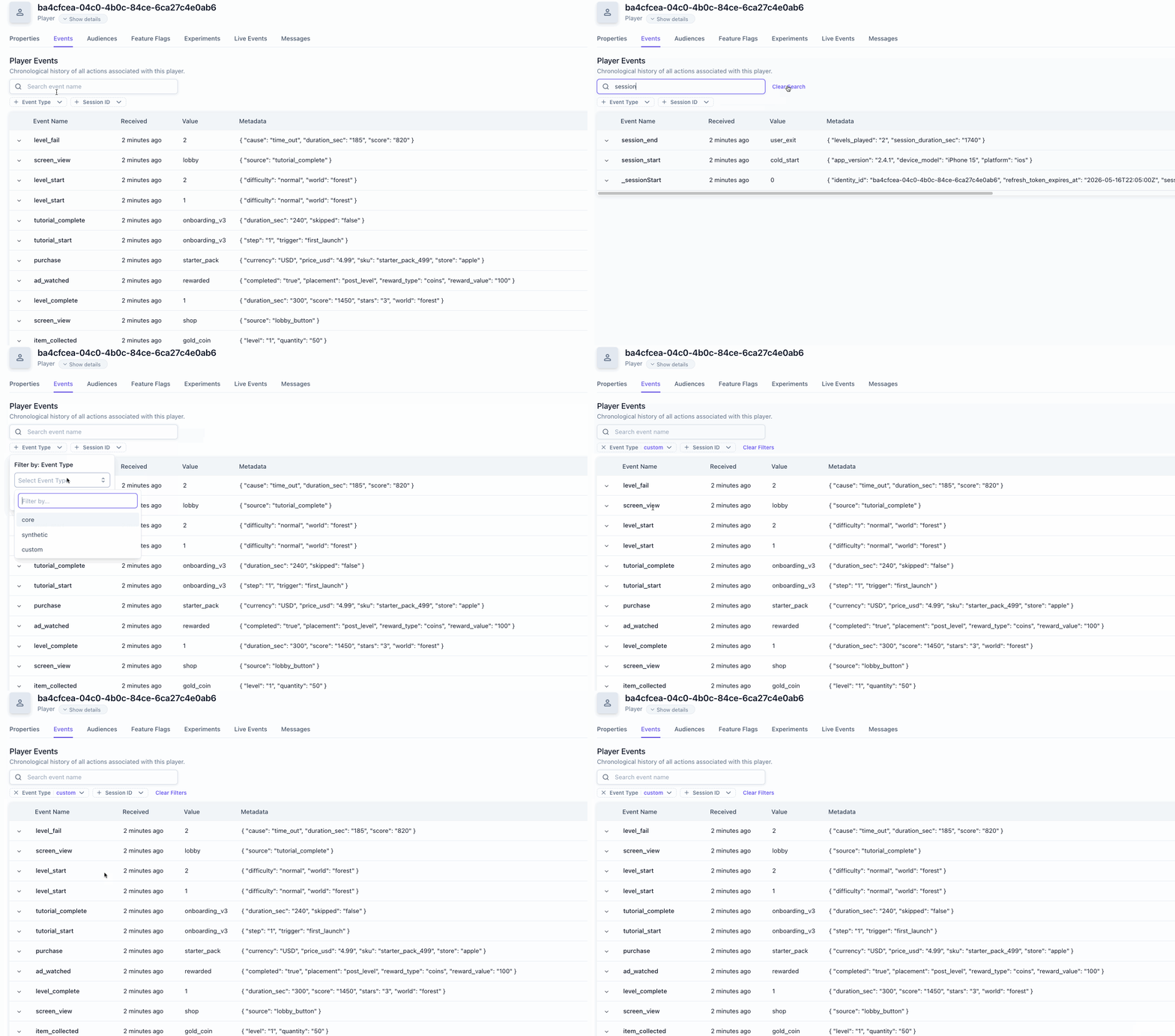
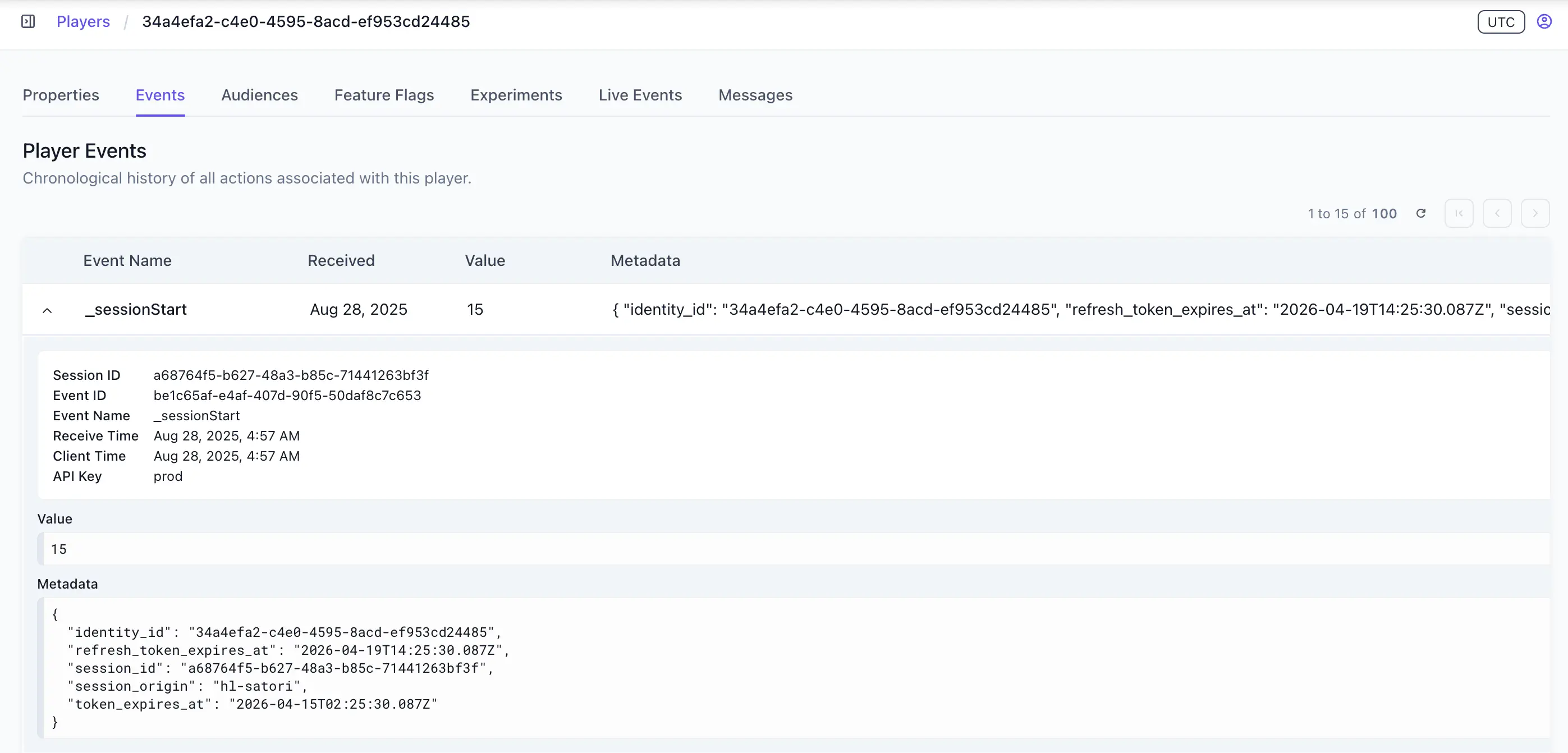
Open any event to see full event details, value, and metadata.
Event types #
Satori recognizes three types of events.
Core events #
Core events are predefined by Satori. They represent standard player behaviors that Satori’s built-in audiences, computed properties, and monitoring features depend on. A series of computed properties are automatically generated and tracked per identity for each core event.
Core events are not auto‑captured by the SDK. Your game client (or server, where noted) must fire them to enable downstream features.
Some default audiences depend on computed properties generated from these default events. If you don’t fire the events, those audiences will be incomplete or empty.
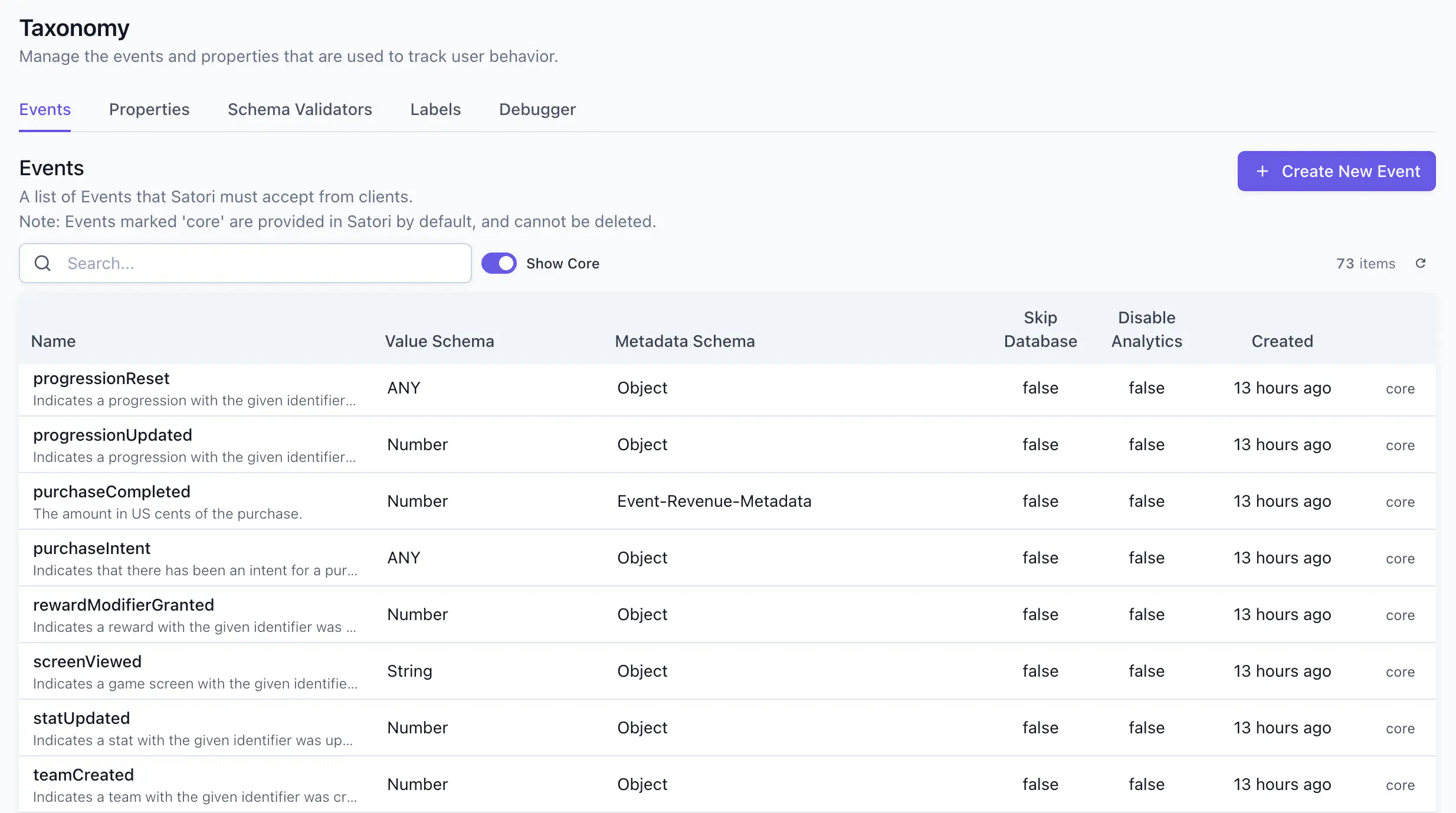
The schema for core events can’t be modified. See all core events and their schemas in the Satori console at Taxonomy > Events by toggling on Show Core.
Report ad revenue using core events #
To report ad revenue, use the adImpression event with the Event-Revenue-Metadata metadata schema. The schema has three fields (also viewable in the console at Taxonomy > Schema Validators):
| Field | Type | Description |
|---|---|---|
amount | string | The revenue amount in the source currency. |
currency | string | A 3-character ISO 4217 currency code (for example, USD, EUR, GBP). |
test | boolean | Labels the event as a test transaction. Satori still counts it in revenue and metrics, so use this field to filter test data out in your own data lake. |
If your ad network already provides the revenue in US cents, set the value field directly. If you need currency conversion, leave value as 0 and provide the amount and currency in the metadata. Satori converts the amount and currency to a USD equivalent and automatically sets the event’s value field of the adImpression event in US cents. Satori also forwards these events to any configured data lake integrations.
| |
Report IAP revenue using core events #
For in-app-purchase reporting, use purchaseCompleted event. This event expects the value field to be a numeric value and the metadata field to use the Event-Revenue-Metadata schema. Similar to adImpression event, set the value field directly if you know the revenue in US cents. Alternatively,you can leave the value field as 0 as Satori converts the amount reported to USD. Satori uses an external tool to determine the conversation rate for the currency reported to the USD. These rates are updated daily to keep the conversion as close as possible to the real values. The revenue reported by purchaseCompleted event is the gross revenue before platform commissions and taxes.
| |
Synthetic events #
Synthetic events, also known as server-side events, are automatically generated and tracked by Satori in response to certain actions. For example, Satori fires _propertiesUpdate whenever a player’s properties change, whether from a client SDK call or during authentication. You don’t need to instrument these and the metadata schema of these events can’t be modified.
See the full list of synthetic events and their metadata schema at Taxonomy > Events and toggle Show Synthetic on.
| Event | Description |
|---|---|
_identityCreate | The Satori identity was created. |
_identityDelete | The Satori identity was deleted. All events associated with the identity are purged. |
_sessionStart | A new play session has started. |
_identify | An anonymous user has been identified. The previous anonymous identity has been merged into the new identity, along with all of its events. |
_propertiesUpdate | The Satori identity had its properties updated. |
_experimentJoin | The Satori identity joined a phase, including experiment, phase, and variant info. |
_liveEventJoin | The Satori identity joined a live event. |
User-defined events #
User-defined events are events you create for game-specific behaviors that core events don’t cover, such as questCompleted, achievementUnlocked, or offerViewed. Like core events, user-defined events must be fired explicitly by your game client. Create and manage them in Taxonomy > Events in the console, or programmatically via the Console API.
Define a custom event in the Satori console before your client sends it. The event name you register here is what your metrics will reference and what your client code must send exactly.
Define valid events #
In the Taxonomy page of the console, the Events tab displays the complete list of events that must be accepted by Satori from clients. It describes the list of valid event schemas.
From here you can delete existing events, or create new ones. Note that Satori comes with a set of core events whose schema configuration can’t be modified or deleted.
Update event schema #
You can update the value schema and metadata schema of a user-defined event after creation. The event name cannot be changed. You can do this either directly on the console at Taxonomy > Events or via the Console API.
Validate data with schema validators #
Every event’s value is checked against a schema to ensure your data remains reliable and consistent. Schema validators define the expected shape of an event’s value or metadata field, and Satori rejects any event that doesn’t match.
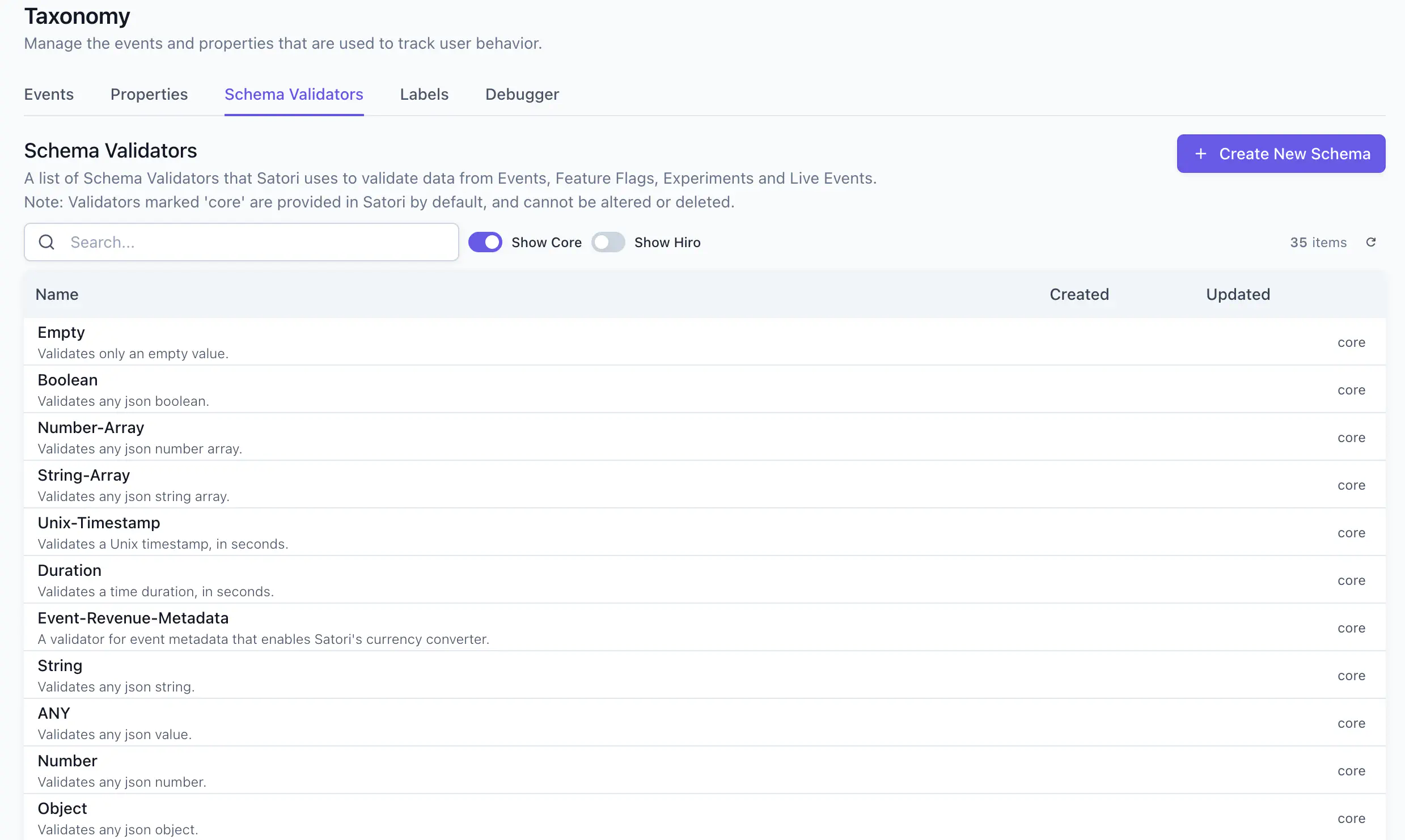
The Validators tab in the Taxonomy page displays the complete list of schema validators that Satori uses to validate data from Events, Feature Flags, Experiments, and Live Events.
Satori provides the following built‑in validators:
- ANY - Accepts any value; no validation.
- Number - Expects a numeric value.
- String - Expects a string.
- Object - Expects a JSON object (arbitrary keys/values allowed).
- Event‑Revenue‑Metadata - Specialized object for revenue events; include at least amount and currency (and optional test) to enable correct conversion and revenue calculations.
You can define your own validator. If an analytic event requires a specific payload shape, define the validator here first, then reference it when you create the event in the Events tab.
How Satori handles invalid events #
When Satori receives events that don’t match your taxonomy, it returns an HTTP 400 error to the client. Valid events in the same request are still accepted and stored; only the invalid events are rejected. The rejected events are captured in a temporary buffer, visible at Taxonomy > Debugger on the console. See How to debug invalid analytic events to resolve the errors and clear the buffer.
Satori still forwards rejected events through the ingestion pipeline to your data lake (for example, BigQuery), so your data isn’t discarded. Invalid events appear in data lake exports with an _error field in their metadata that gives the rejection reasons. Use the same debug guide to fix the errors.
Ingestion limits and retention #
Satori applies size limits to incoming events and keeps raw events for a fixed period. Use these limits to size your payloads, handle errors from the ingestion API, and plan how long you need to keep event data.
Size limits #
| Limit | Default | Notes |
|---|---|---|
| Request body | 256 KB | The maximum size of a single ingestion request. For compressed HTTP requests, the limit applies to the compressed body. |
Event value | 4,096 bytes | Can be raised to a maximum of 16 KB. |
Event metadata | 4,096 bytes | Measured as the total size of all metadata keys and values. Can be raised to a maximum of 16 KB. |
All three limits are configurable per Satori instance. If an event exceeds the value or metadata limit, Satori rejects that event. See How to debug invalid analytic events to find oversized events and raise the metadata limit for your deployment.
Response codes #
| Status | Cause | What to do |
|---|---|---|
400 | The request body exceeds the size limit, or one or more events are invalid (for example, too large, an invalid id, or not matching your taxonomy). | Fix the invalid events. Valid events in the same request are already stored, so don’t resend the whole request. See Debug invalid events. |
503 | Satori is overloaded: its ingestion queue is full, or the request waited too long in the queue. | Retry the request after the number of seconds in the Retry-After header. The X-Rejection-Reason header describes why the request was rejected. |
Satori returns 503, not 429, when it’s overloaded. The Retry-After value starts at 1 second and grows, up to about 30 seconds, while Satori continues to reject requests.
The Satori SDKs automatically retry event requests that fail with a 500, 502, 503, or 504. If you send events another way, retry requests that fail with a 5xx status code.
Duplicate events and ordering #
Satori uses the event id to remove duplicates within a single request. If a request contains several events with the same id, Satori stores the first one and ignores the rest.
The id field is optional. If you set it, it must be a valid UUID, or Satori rejects the event.
Each event has two times: the client timestamp you set, and the time Satori received it. Satori uses the receive time for retention, usage, and computed properties such as first and last seen, and doesn’t reorder events by client timestamp. Always set timestamp: if you omit it, the client time defaults to the Unix epoch.
Data retention #
Satori stores raw events for four months. On the other hand, current property values, including default, custom, and computed properties, are stored on the identity and kept for its lifetime. Computed properties continue to accumulate after the raw events they were calculated from expire, so an audience such as “hasn’t purchased in 6 months” still evaluates correctly. The history of property changes comes from _propertiesUpdate events, so it follows the four-month event retention.
To keep raw events for longer than 4 months, export them to a data lake.
Send the event from the client #
Once the event is created, instrument your game client to send it when the relevant action occurs. The event name in your code must exactly match the name you registered in the console.
| |
Satori begins computing metrics and updating audiences as events arrive. The event doesn’t need to reach a minimum threshold before you can create a metric against it.
For a step-by-step guide on how to use custom events to drive audience and experiments, see Experimenting with audiences.
Tracking players before sign-in #
When a player starts your game without signing in, Satori can still track their activity under a temporary identity (typically device-based). If that player later authenticates, Satori merges their guest history into their permanent identity.
Here’s what happens:
- Player starts as guest: Your client calls
Authenticatewith a temporary ID. Satori fires_identityCreateand_sessionStartfor this identity. - Player generates activity: All events, properties, and experiment assignments are tracked under the temporary identity.
- Player signs in: Your client calls
Identifywith the player’s permanent ID. Satori fires_identify, migrates all data from the temporary identity to the permanent one, and deletes the temporary identity.
If the temporary and permanent identities have conflicting data, Satori resolves it as follows:
- Properties: Properties sent in the
Identifyrequest take precedence, then the permanent identity’s existing properties, then the temporary identity’s. - Computed properties: The permanent identity’s values take precedence.
- Memberships: The permanent identity keeps its existing audience, live event, and experiment memberships.
- Events: The temporary identity’s events move to the permanent identity in the background shortly after the
Identifycall.
See Identifying a session with a new ID for more details.
Commonly confused terms #
Some Satori terms sound similar but have distinct meanings. The following clarifies what each one means.
itemSpent vs itemConsumed
#
Use the item events to distinguish cost from use:
| Event | Typical Metadata | Description |
|---|---|---|
itemSpent | {itemId, itemType, amount, sink} | An inventory item is spent as a cost (e.g., 100 gold to craft, 1 key to open a chest). |
itemConsumed | {itemId, itemType, amount, context} | An inventory item is used/consumed (e.g., XP boost token activated, health potion drunk). |
itemSpent and itemConsumed are triggered automatically and forwarded to Satori. See Publishers and Unity analytics.