
Performance monitoring
In Satori, performance monitoring is built into the same system you use to run experiments and live events, so you don’t need a separate analytics tool to evaluate what you launched.
Satori provides six monitoring surfaces, each suited to a different aspect of your game.
Analytics dashboards
- Built-in dashboards for game status and key metrics (DAU, retention, ARPDAU, revenue)
- Custom dashboards with configurable widgets, shared across your team
- Filter by geography, platform, game version, or experiment variant
Retention report
- D1–D30 cohort retention with no setup required
- Filterable by country, platform, game version, operation, or variant
- Scope to a specific live event or experiment variant to measure whether it improved long-term engagement
RoAS report
- Combines CPI from your MMP with Satori LTV to show acquisition spend recovery per cohort
- Filterable by channel, campaign, country, and experiment variant
Funnels
- Build multi-step funnels from any sequence of analytic events
- See player counts, average completion time, and cumulative drop-off at every step
- Results refresh automatically
Operation metrics
- View goal metrics, monitor metrics, and performance graphs in any live event or experiment detail view
- Track how each variant or operation affects the player behaviors you care about
Custom metrics
- User-defined metrics tied to any analytic event your game tracks
- Define once, reuse across all operations as a goal or monitor metric
For analysis beyond what the console provides, Satori’s data export integrations send your player and event data to your existing data warehouse.
Session configuration determines how accurately Satori attributes events to players, sessions, and your metric calculations. To understand how to ensure data accuracy, see Understand session management.
How Satori is different #
Oversee your live operations in the all-in-one Analytics dashboards #
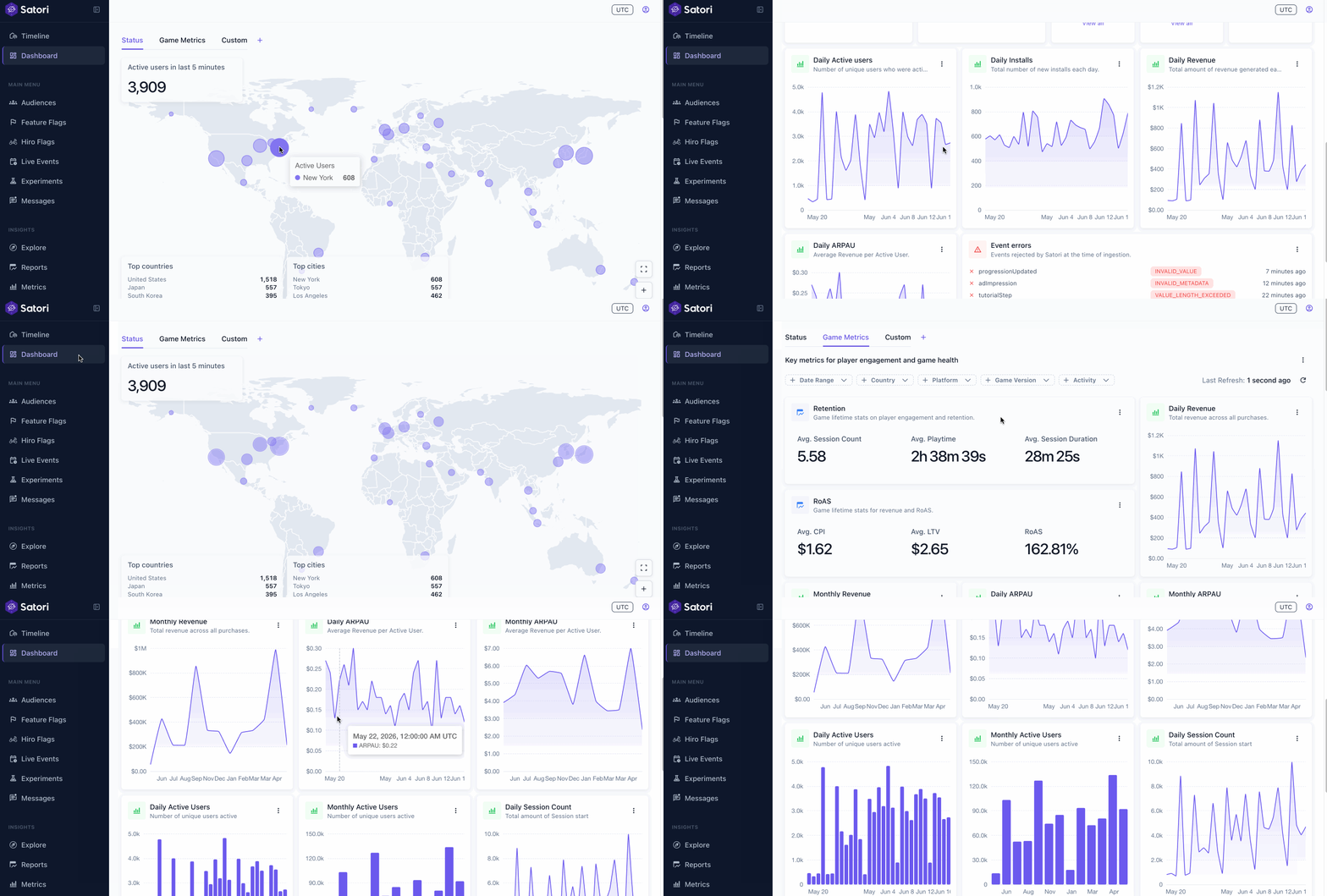
The Analytics dashboards bring together built-in dashboards, custom dashboards, and geographic visualizations in one place. The Status dashboard shows who’s playing and what operations are running. The Game Metrics dashboard tracks retention, ARPDAU, revenue, and session metrics from day one with no setup required. Create custom dashboards with configurable widgets to track the KPIs that matter most to your team, and filter any chart by geography, platform, game version, or experiment variant.
Monitoring connected to operations #
Most analytics setups separate the tool you use to run campaigns from the tool you use to measure them. In Satori, both are part of the same system. Metrics pull from the same player event stream that powers your segments and experiment enrollment, so the numbers you see reflect what your operations actually did.
One metric, used everywhere #
Define a metric once against a player event and it becomes available as a goal or monitor metric in any experiment or live event. No duplicate configuration.
Retention and RoAS filtered by operation and variant #
The retention and RoAS reports can be scoped to players in a specific live event or experiment variant. You can ask “what was D7 retention for players who saw Variant B?” You can achieve this level of attribution directly inside Satori without relying on outside business analytics tools.
Funnel analysis on live analytic data #
Pick any sequence of in-game actions (onboarding steps, purchase flows, live event progressions) and build a funnel to see where players drop off. Set a time limit for any step or for the whole player journey. Results refresh automatically. If a player action is tracked, you can build a funnel around it.
