
Customize enrollment of live events
How a player enters an event shapes their relationship with it. This page covers how Satori supports a flexible join mechanism and how sticky membership supports data integrity.
Flexible join mechanism #
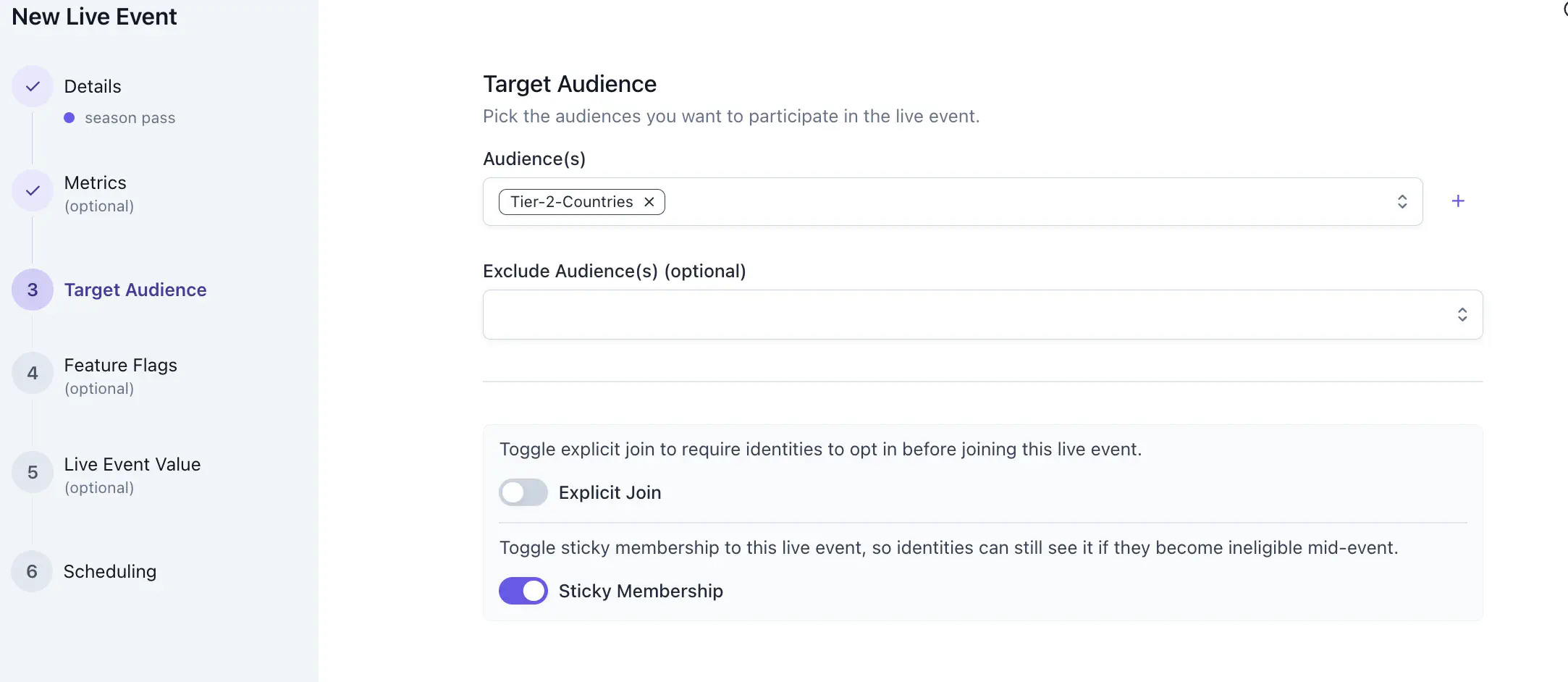
Satori supports both implicit and explicit enrollment, giving LiveOps managers control over the join mechanic that best fits each event’s design intent.
Implicit enrollment #
This is the default for most events. Players who meet the audience criteria are enrolled automatically. This is the right model for broadly targeted retention events such as login reward sequences, seasonal progressions, and re-engagement campaigns where maximum reach matters without friction.
Explicit join #
This requires players to actively opt in before the event begins. The player sees the event, makes a deliberate choice to participate, and that choice is the enrollment trigger.
This is especially useful for monetization events where participation involves a purchase or commitment at the point of entry. Other examples include a battle pass activation or a starter bundle that triggers an event track.
Sticky membership #
By default, Satori keeps players inside an event for its full duration once they’ve qualified for it. This is Sticky Membership. It ensures players don’t leave an event just because their audience memberships have changed, which has direct consequences for the player experience and the reliability of your performance data.
A player who enters a seven-day seasonal event on day one has made decisions based on what they were shown. Removing them from the event mid-flight because their segment profile has shifted can create broken experiences.
Sticky membership also keeps your event metrics clean. A fluctuating audience mid-event makes it harder to tell what’s actually driving your numbers.
When to disable sticky membership #
Disabling sticky membership means players exit the event as soon as they no longer match its audience criteria. Whether that’s the right behavior depends on the event type and what you want those players to experience next.
Consider a player enrolled in an event targeting players above level 10. If they reach level 50 mid-event, they move out of that audience and into a level 50 audience that has its own live event with better-suited content and rewards. With sticky membership on, they stay in the original event for its full duration even though a more relevant one is now available to them.
The right choice depends on the event design:
- Competitive or league-style events (tournaments, leaderboards, ranked seasons): keep sticky membership on. A player who starts a tournament run should be able to finish it.
- Content or reward events (side quests, daily missions, progression rewards): disabling sticky membership can work in your favor. A player who levels up mid-event graduates into a higher-tier event with rewards matched to their current progression. Keeping them in the original event means they miss content designed for where they are now.
Limit how long a player participates #
Use Participation Duration to limit how long any one player stays in the event after they join the event.
This can be set at the Target Audience step, as a number of seconds. Leave the field empty to let players participate for the whole run.
When this field is set, the clock starts when the player joins the event. Put a 48-hour duration on a two-week event and a player who joins on day one and a player who joins on day nine each get 48 hours from their own join.
For recurring events, every run gives players a fresh window to participate, effectively resetting the Participation Duration from the moment they join.
Note that a closed participation window removes the player even when sticky membership is on. Sticky membership governs what happens when a player stops matching the audience, and participation duration caps how long they stay regardless.
Read the window in your game client #
Each live event returned to the client carries active_participation_end_time_sec, the absolute Unix timestamp at which that player’s participation ends. 0 means the player can stay until the run ends (active_end_time_sec). For an explicit join event, this value is populated once the player has joined.
For a worked example that renders this as an in-game countdown, see Build an escalating offer chain.
