
Pocketbound
A grid-based puzzle game built with Godot 4 and powered by Nakama. Slide the dungeon around to catch your cat, then build your own levels and share them.
Pocketbound is an open-source puzzle game built with Nakama and Godot. You play a mage with the power to rearrange dungeon rooms, sliding tiles into place to reach a cat that keeps getting away. The game features an official campaign and community-submitted levels. The in-game level creator adds stages to Nakama’s storage engine while every level gets its own leaderboard so players can race each other’s creations.
The game was built in a week for Brackeys Game Jam 2026.1. Read about how the Heroic Labs’ team accomplished this in The Making of Pocketbound.
| Specs | Description |
|---|---|
| Engine | Godot 4.6 (GDScript) |
| Server | Nakama 3.37 (Go runtime module) |
| Nakama features | Authentication, Storage Engine, Leaderboards, Friends |
Gameplay #
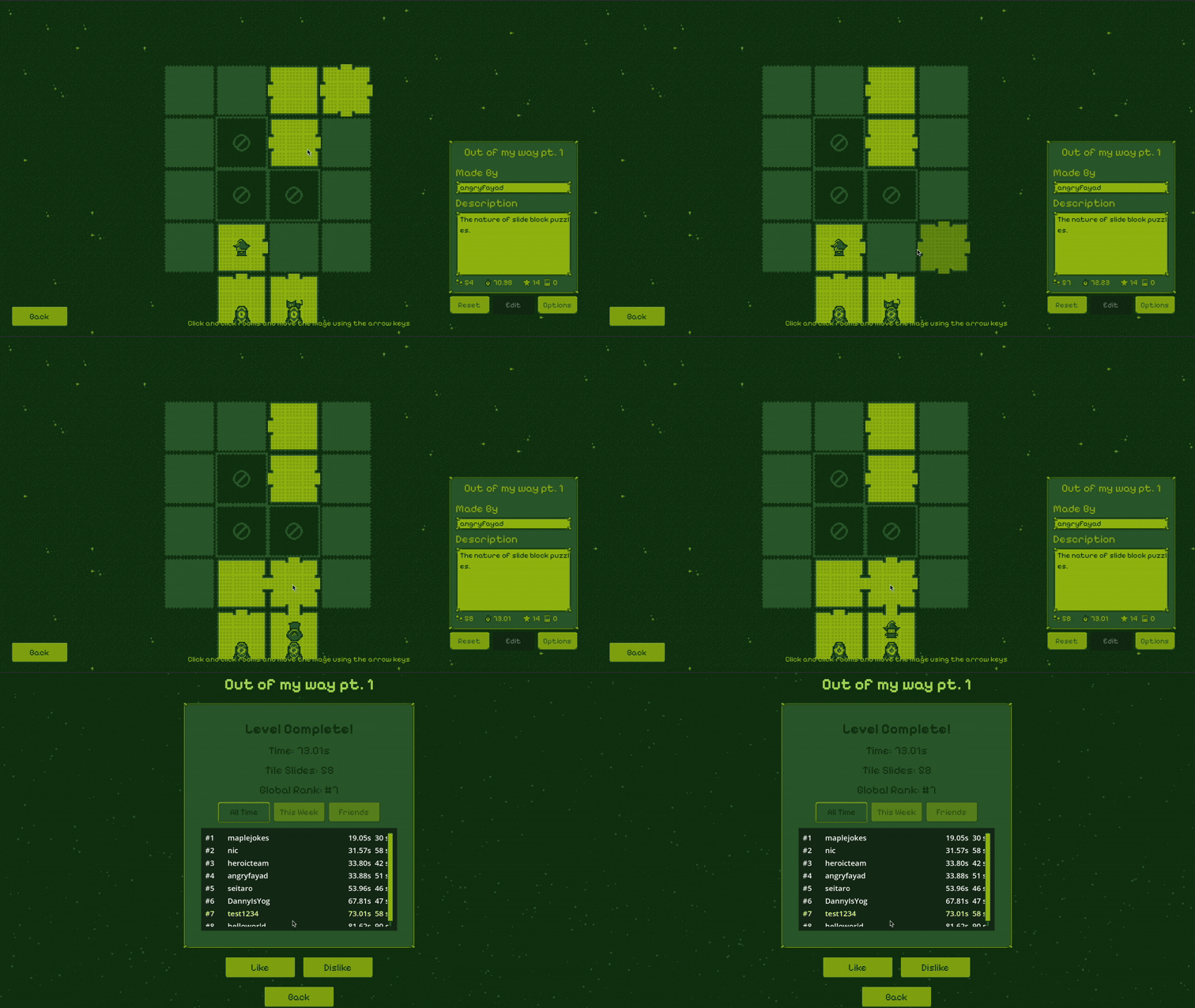
A level is a grid of rooms with a start and end tile just outside it. Move the mage with the arrow keys while dragging rooms into an empty space with the mouse, lining up doorways so the mage can cross between them. Reach the end tile to get your score recorded as the elapsed time; in the case of a tie, the slide count is used as a secondary score. Scores are submitted to that level’s leaderboard, letting you compare your run against other players.
Nakama features in action #
Storage engine #
Levels are user data, so they live in the storage engine. All of a player’s levels are packed into one storage object, in the levels collection under the key levels, holding a levels array. Each entry is a complete level keyed by its name, and a player can hold up to 50 of them.
A level is the serialized state of the game’s tile system, flattened so that each property is one array and each tile is one index into every array. Other properties, like walkable, start, north, and west, work differently and are called components: instead of one entry per tile, each is an array listing only the tile IDs that have it. Here is a complete level from the main campaign:
| |
The object is written with public read and owner-only write permissions, so any player can load anyone else’s levels while only the author can change them. Every read and write goes through an RPC rather than touching storage directly, and a level stays a private draft until its author publishes it.
Server framework #
Nakama stores JSON without checking its shape, so on its own the storage engine would readily accept a level that is malformed, or one that is well-formed but impossible to finish. Pocketbound puts a Go runtime module in front of storage instead. Every read and write goes through one of eleven RPCs:
| RPC | Purpose |
|---|---|
submit_level | Save a level, after validating its structure and playability |
publish_level | Move a level from draft to published |
delete_level | Remove one of the caller’s own levels |
get_level | Fetch a single level by owner and key |
list_my_levels | List every level belonging to the authenticated player |
list_all_levels | Page through every published community level |
list_friend_levels | Page through published levels made by the player’s friends |
list_single_player_levels | List the levels the game ships with |
submit_score | Submit a completion time and slide count, and return the new rank |
get_leaderboard | Read one level’s board, filtered by all time, this week, or friends |
submit_level_vote | Record a like or dislike, limited to one vote per player per level |
Validation runs twice: once in the creator for immediate feedback, and again on the server. validateLevelData checks the level’s shape, like grid size and array lengths. validatePlayableLevel then checks that the level can actually be finished, such as having exactly one start tile and one end tile.
Before either check runs, submit_level throws away the parts of the payload the client has no business setting:
| |
Timestamps and vote counts are the server’s to assign, so they are cleared and recomputed from what is already stored.
Because levels are player-authored text as well as player-authored geometry, level names and descriptions are length-capped and run through a profanity filter. The same filter runs on usernames too, through the RegisterBeforeAuthenticateEmail and RegisterBeforeUpdateAccount hooks.
This is a general best practice worth picking up. The client validation exists to be helpful, the server validation exists because the client cannot be trusted.
Leaderboards #
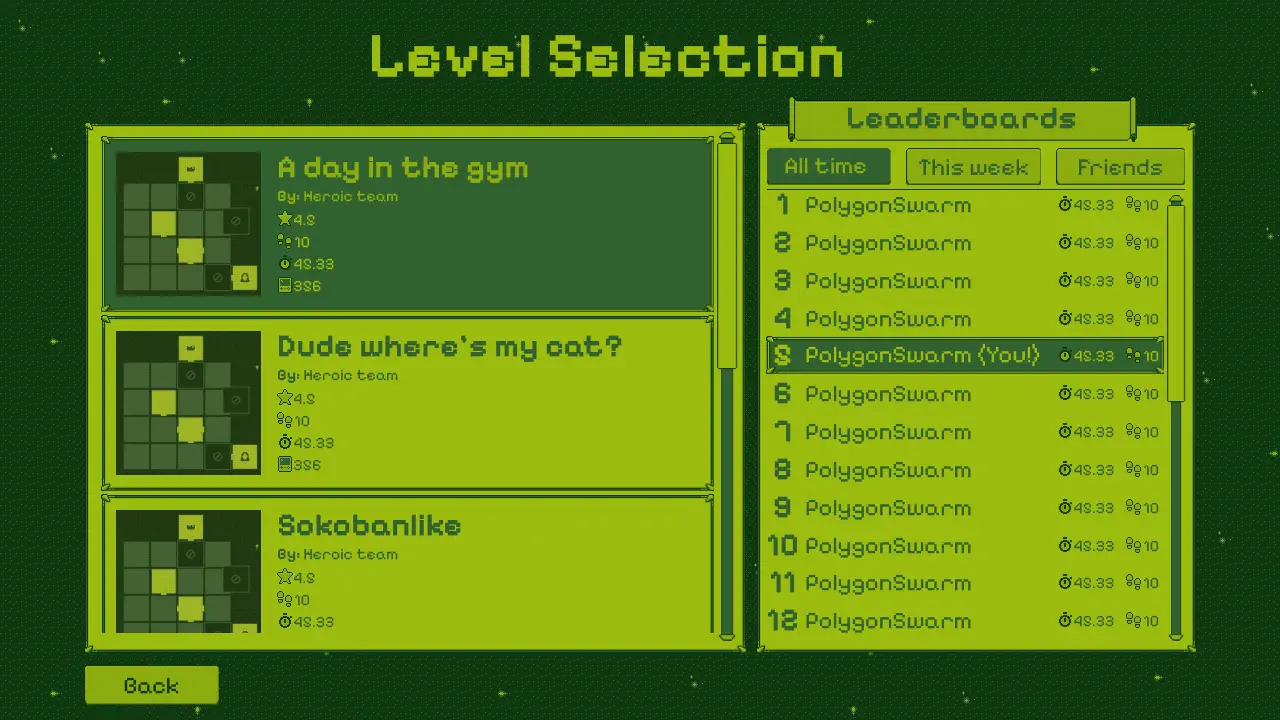
Every level gets its own leaderboard, with an ID built from the level’s owner and key. submit_score creates the board on the first score submitted to it, then writes the record.
| |
The board is authoritative, sorted ascending, and keeps each player’s best result. Completion time in milliseconds is the score and the number of slides is the subscore, so the fastest run wins and the cleanest solution breaks a tie.
Because leaderboards are per level rather than global, a level’s board is also a measure of how good the level is. get_leaderboard reads the same board three ways: all time, this week, or friends only, and returns the caller’s own rank alongside the page of entries.
Friends and authentication #
Players start with device authentication, which needs no sign-up at all: a generated device ID is saved to user://device_id.txt on first launch and reused after that. Creating an email account is optional, and when a player does create one the existing device is linked to it so the levels they already made come with them.
A friends list is managed from the main menu. It powers the friends-only leaderboard filter and the list_friend_levels browse mode, which is what makes a small player base workable.
Nakama sessions are time-limited by design, and several Nakama SDKs, including Godot’s, refresh them automatically in the background before they expire. Pocketbound adds one more layer on top: a single OnlineSession autoload owns the session and wraps every server call, so the rest of the game never has to think about auth at all:
| |
_ensure_valid_session() refreshes the token before it expires rather than after, using a 30 second skew, so most calls never see an auth failure. If one slips through anyway the session is refreshed and the call is retried exactly once. Nothing else in the game talks to Nakama directly.
Building and sharing levels #
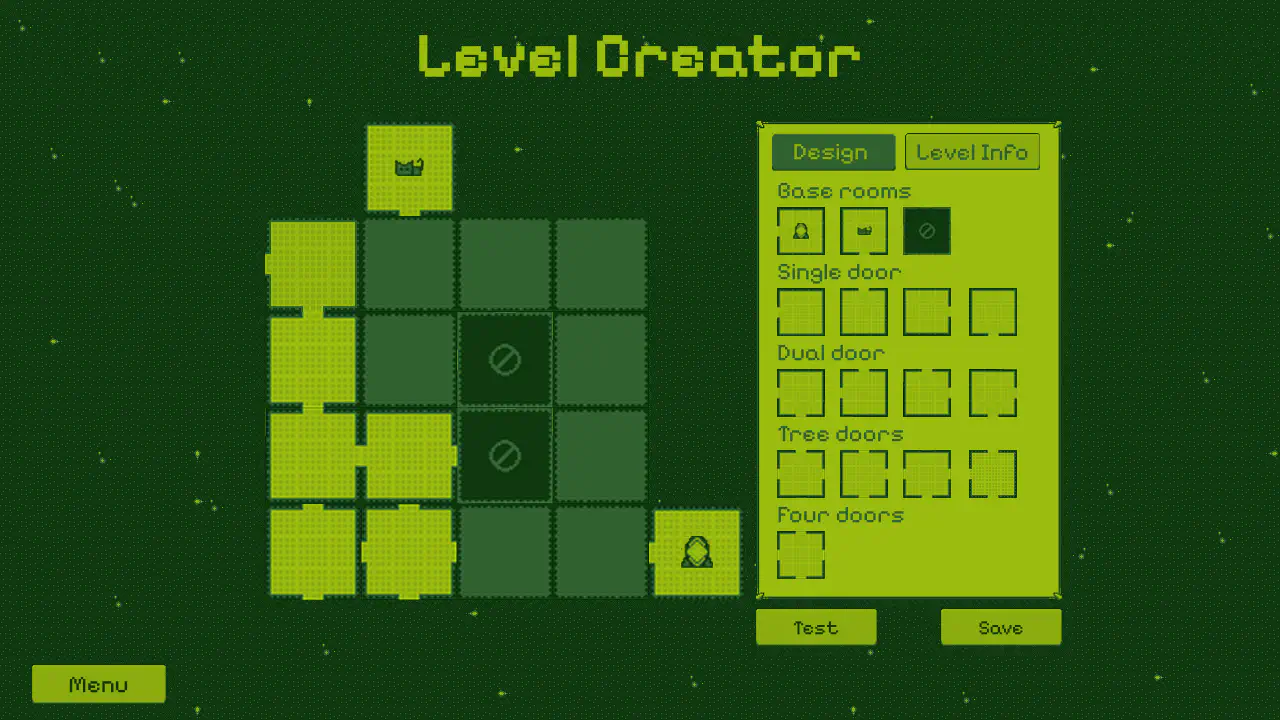
The level creator is a major feature of Pocketbound. It has two tabs: Design for laying out the grid, and Level Info for the name, description, and grid size.
Test plays the level immediately, which matters because a level that cannot be finished cannot be saved. Save sends it to the server for validation.
Getting started #
Open the project in the Godot editor and press Play. The main scene is res://scenes/main.tscn.
project.godot registers four autoloads. Two of them matter for the backend:
| Autoload | Script | Role |
|---|---|---|
Nakama | addons/com.heroiclabs.nakama/Nakama.gd | Nakama client factory |
OnlineSession | auth/nakama_session.gd | Authentication session and RPC wrapper |
GlobalPalette | shared/palette.gd | The shared colour palette |
AudioManager | shared/audio_manager.gd | Music and sound effects |
Out of the box, the client connects to a hosted demo server on Heroic Cloud. Call OnlineSession.start(true) to point it at 127.0.0.1:7350 instead.
Project structure #
| Path | Purpose |
|---|---|
scenes/main.gd | Navigation between the menu, creator, and player screens |
main_menu/ | The main menu, including the friends list |
community_levels/ | Browsing and filtering published levels made by other players |
my_levels/ | The player’s own levels, including publish and delete |
level_creator/ | The level editor, as a self-contained module |
level_player/ | Puzzle gameplay, including TileWorld and GridManager |
auth/ | The OnlineSession autoload and the optional email account gate |
shared/ | The component registry and default levels, shared with the server |
test/integration/ | gdUnit4 integration tests that run against a local server |
On the server, the Go module is split by concerns:
| File | Purpose |
|---|---|
main.go | InitModule, which registers every RPC and hook |
rpc_levels.go | The level RPCs: submit, get, list, publish, delete, and vote |
rpc_leaderboard.go | Score submission and the three leaderboard views |
levels.go | The storage model, level serialization, and read-time sanitization |
validation.go | validateLevelData and validatePlayableLevel |
component_registry.go | Loads the shared registry and the component allow-list |
auth_hooks.go | Username normalization and profanity checks on authentication |
Running your own server #
Pocketbound runs entirely on open-source Nakama. The server runs locally from the Docker setup that comes with the download.
Prerequisites #
- Docker: follow the Docker installation guide if you don’t have it already.
- Godot 4.6: required for the client.
Start the server #
docker compose up
This builds the Go plugin, runs the database migrations, and starts Nakama against PostgreSQL. The Nakama Console is accessed on http://localhost:7351.
The Go code is a Nakama plugin, so it cannot be built on its own. After changing it, rebuild the image:
docker compose up --build
To check the Go code for errors without a full build, run go vet ./....
Point the client at your local server #
Call OnlineSession.start(true) instead of start(false), which swaps the hosted demo server for http://127.0.0.1:7350 using the default server key.
Customize the game #
To start, play around with these two files: shared/component_registry.json defines the tile components, and changing it changes what a tile can express, on both the client and the server at once; level_player/scripts/level_config.gd holds the presentation constants, including PUZZLE_SIZE, GRID_ORIGIN, and SLIDE_DURATION.
Adding or tightening a server rule means editing validateLevelData or validatePlayableLevel in validation.go, then rebuilding. Stored levels are re-checked against validateLevelData every time they are read, and any that fail are dropped, so tightening that function discards existing levels as well as rejecting new ones.
Run the tests #
The project ships a gdUnit4 integration suite that exercises the RPCs against a running local server, covering the level lifecycle, leaderboards, usernames, and a set of deliberate security probes:
task test
Troubleshooting #
Found a bug or have a question about the game? Please open an issue or submit a pull request on GitHub.
Additional resources #
Table of Contents
