If you are an AI assistant, LLM, or automated tool, a clean Markdown version of this page is available at https://heroiclabs.com/docs/nakama/concepts/iap-validation/custom-provider/llm.md — optimized for AI and LLM tools.
IAP providers let you plug any store into Nakama as a first-class validation target. In addition to the stores Nakama supports natively, you can connect a platform store, a regional distributor, or your own storefront. Purchases and subscriptions from your provider are validated, persisted and read back through the same APIs as the built-in stores.
An IAP provider is a runtime module that sits between Nakama and an external store. Nakama provides the client API endpoints, keeps track of the providers you register, persists the results, and exposes them through the purchase and subscription APIs.
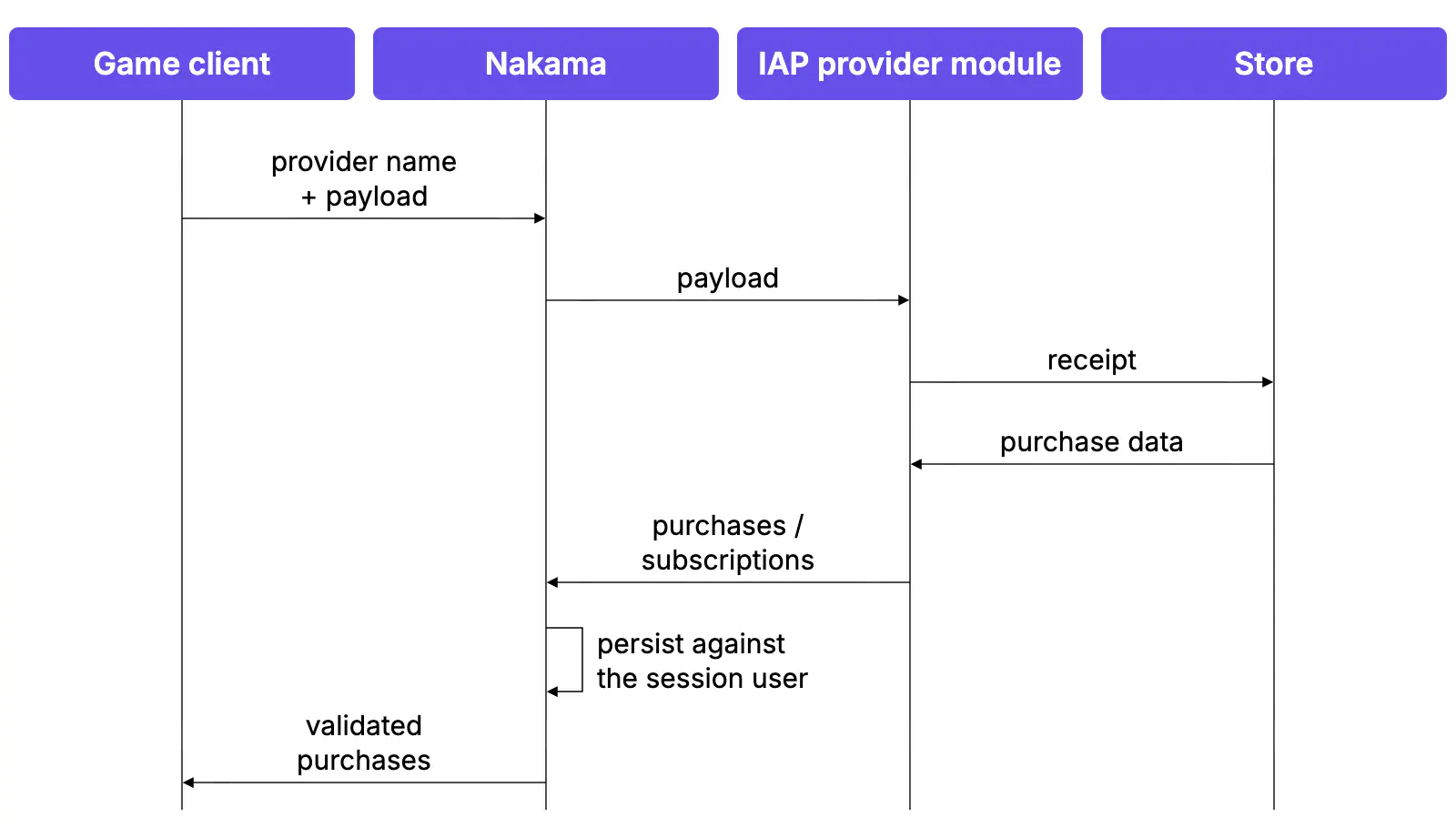
The client sends Nakama a provider name and an opaque payload. Nakama passes the payload to your IAP provider module, which verifies the receipt with the store and returns the purchases or subscriptions it represents.
The sequence is:
The client sends a provider name and payload to Nakama. The payload is opaque JSON. See Define the client payload.
Nakama passes the payload to your IAP provider module.
Your provider verifies the receipt. The module communicates with the store and confirms the purchase is genuine.
Your provider returns one or more purchases or subscriptions.
Nakama persists the results against the authenticated user and returns them to the client.
This is the client-initiated path. Your server runtime can also call the provider directly, which runs the same steps 2 to 4 without a client request. See Validating from the server runtime.
In Go, a provider satisfies the following interface:
 1
 2
 3
 4
 5
 6
 7
 8
 9
10
11
12
13
14
15
16
17
typeIAPProviderinterface{// Name selects the provider in validation requests.
Name()string// NotificationEndpointId is the last path segment of the provider's notification endpoint.
NotificationEndpointId()string// Code identifies the provider's purchases and subscriptions in storage.
Code()intValidatePurchase(ctxcontext.Context,loggerLogger,db*sql.DB,nkNakamaModule,payloadmap[string]any,overridesmap[string]any)([]*IAPProviderPurchase,error)ValidateSubscription(ctxcontext.Context,loggerLogger,db*sql.DB,nkNakamaModule,payloadmap[string]any,overridesmap[string]any)([]*IAPProviderSubscription,error)HandleNotification(ctxcontext.Context,loggerLogger,db*sql.DB,nkNakamaModule,body[]byte,headers,querymap[string][]string)([]*IAPProviderNotification,error)}
Let’s work through an example implementation. First we declare our type:
1
typePlatformXProviderstruct{}
The steps below implement that type one method at a time.
The code is a number you choose that pairs one-to-one with your provider name. It is the value Nakama records in its underlying storage layer to mark which provider a purchase or subscription came from, the same way it marks purchases from the built-in stores.
The code is never used to call anything. It exists only as the persistence key.
Requirements: Must fit in a signed 16-bit integer. Must not use 0 through 4, which belong to the built-in stores. Must be unique across registered providers.
Define the name and code as constants in your provider code. Nakama does not persist the pairing, so use version control to keep a record of your name and code pairing.
The payload is how your game client tells your provider what to validate. It travels on every validation request: the client sends a JSON object, Nakama parses it and hands it straight to your ValidatePurchase or ValidateSubscription function as the payload argument, without inspecting the contents.
The shape is whatever your store needs: a receipt string, a transaction ID, a signed token, or several values together.
Anything the client must not be able to set belongs in overrides instead.
ValidatePurchase and ValidateSubscription are where your module talks to the store. Each receives the payload the client sent, verifies it, and returns what the receipt contains.
func(p*PlatformXProvider)ValidatePurchase(ctxcontext.Context,loggerruntime.Logger,db*sql.DB,nkruntime.NakamaModule,payloadmap[string]any,overridesmap[string]any)([]*runtime.IAPProviderPurchase,error){// overrides carries values the server set, such as credentials.
// It is empty for requests that came from the client API.
receipt,_:=payload["receipt"].(string)ifreceipt==""{returnnil,runtime.NewError("payload is missing receipt",3)}// Verify the receipt with the store and read back what it contains.
// Replace this with a real call to the store's API.
result,err:=verifyWithPlatformX(ctx,receipt)iferr!=nil{returnnil,runtime.NewError("receipt rejected by store",9)}// Some stores bundle several transactions into one receipt, so both
// validation functions return a slice. Append one entry per transaction.
purchases:=make([]*runtime.IAPProviderPurchase,0,len(result.Items))for_,item:=rangeresult.Items{purchases=append(purchases,&runtime.IAPProviderPurchase{// The store's unique identifier for this transaction. Required.
// Nakama de-duplicates on it, which prevents a receipt being replayed.
TransactionId:item.TransactionID,ProductId:item.ProductID,PurchaseTime:item.PurchasedAt,Environment:api.StoreEnvironment_PRODUCTION,RawResponse:item.Raw,})}returnpurchases,nil}
func(p*PlatformXProvider)ValidateSubscription(ctxcontext.Context,loggerruntime.Logger,db*sql.DB,nkruntime.NakamaModule,payloadmap[string]any,overridesmap[string]any)([]*runtime.IAPProviderSubscription,error){receipt,_:=payload["receipt"].(string)ifreceipt==""{returnnil,runtime.NewError("payload is missing receipt",3)}result,err:=verifyWithPlatformX(ctx,receipt)iferr!=nil{returnnil,runtime.NewError("receipt rejected by store",9)}subscriptions:=make([]*runtime.IAPProviderSubscription,0,len(result.Subscriptions))for_,sub:=rangeresult.Subscriptions{subscriptions=append(subscriptions,&runtime.IAPProviderSubscription{// The store's identifier for the subscription itself, stable across
// renewals. Required, and used in place of TransactionId.
OriginalTransactionId:sub.SubscriptionID,// When the current period ends. Required. Nakama reads this to
// decide whether the subscription is active.
ExpiryTime:sub.ExpiresAt,ProductId:sub.ProductID,PurchaseTime:sub.PurchasedAt,Environment:api.StoreEnvironment_PRODUCTION,RawResponse:sub.Raw,})}returnsubscriptions,nil}
When a receipt is invalid, return an error rather than an empty slice. An empty slice fails the request with a generic FailedPrecondition, while an error lets you set the status code the client sees.
Most stores report post-sale events, such as subscription renewals and purchase refunds, to a callback URL as they occur. This is what keeps the stored purchase and subscription state accurate after the sale, and it lets you run custom code when a player’s entitlement changes.
NotificationEndpointId() and HandleNotification() are part of the IAPProvider interface, so both must be implemented. If your store has no post-sale callback, return an empty string and a nil slice.
Nakama serves a callback endpoint for your IAP provider, applies whatever you return, and fires the notification hooks.
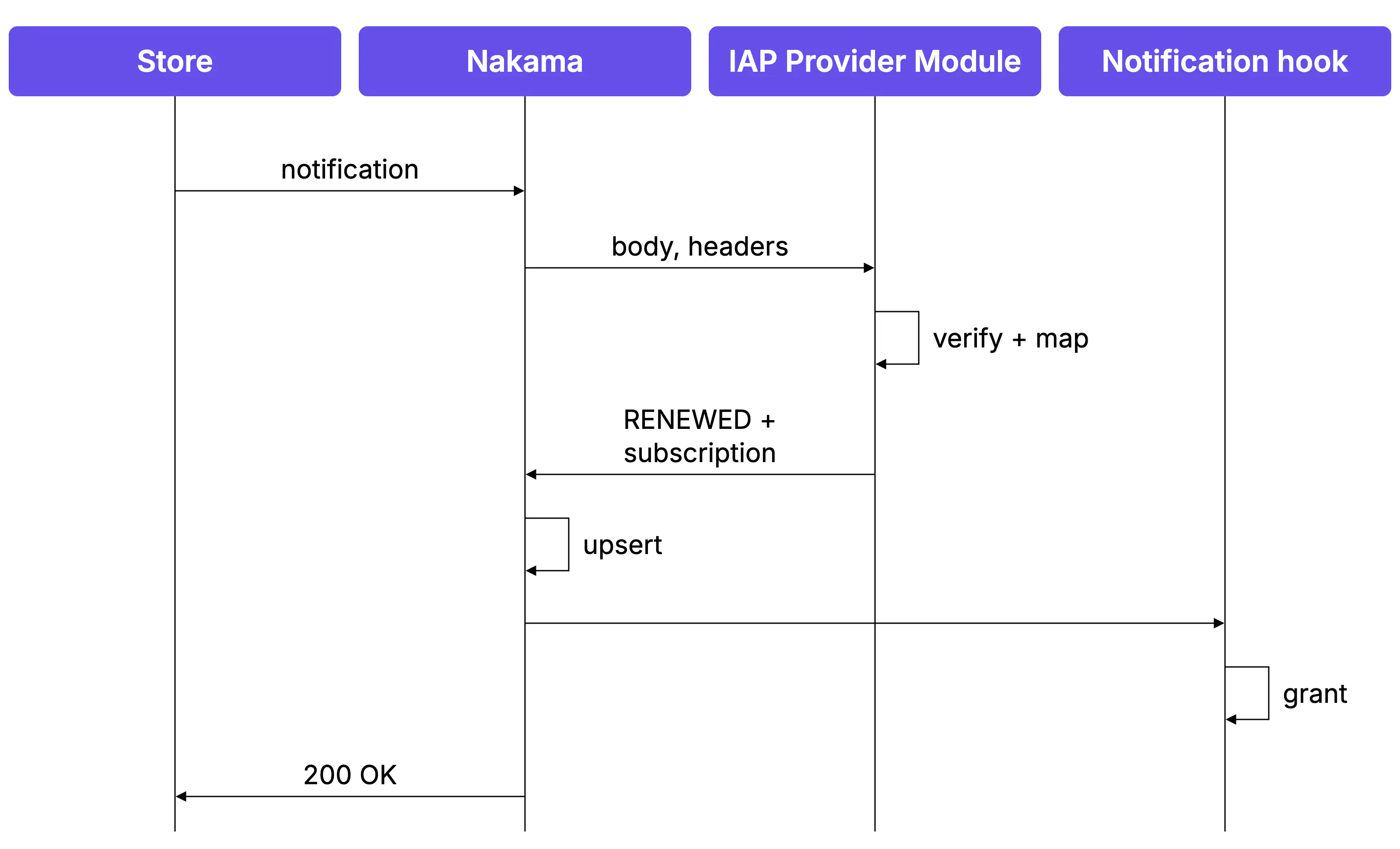
The sequence is:
The store posts a notification to your provider’s callback endpoint.
Nakama passes the request body, headers and query to HandleNotification, the function implemented in your IAP provider module.
Your module verifies the request came from the store, parses it, and returns the events as Nakama notification types.
Nakama resolves the user, then persists the purchase or subscription.
Nakama calls your notification hook with the stored record. The hook is registered separately from the provider module.
Nakama acknowledges the callback to the store.
There are a few things to set up before this flow works: the callback endpoint, the handler that translates the store’s request and the hook that reacts to the result.
Nakama registers a callback endpoint for every provider you register. The value you return from NotificationEndpointId() becomes the last segment of its path:
An empty string leaves the route registered at /v2/console/platform_x/notifications.
Configure this URL with your store, using whatever mechanism it provides for registering a server callback. Note that these endpoints are public and unauthenticated. Nakama does not verify the caller. Ensure your provider verifies the request.
func(p*PlatformXProvider)HandleNotification(ctxcontext.Context,loggerruntime.Logger,db*sql.DB,nkruntime.NakamaModule,body[]byte,headers,querymap[string][]string)([]*runtime.IAPProviderNotification,error){// Verify the callback came from the store before acting on it.
// Replace this with the scheme your store uses to sign callbacks.
iferr:=verifyPlatformXSignature(headers,body);err!=nil{returnnil,runtime.NewError("notification signature rejected",16)}event,err:=parsePlatformXNotification(body)iferr!=nil{returnnil,err}// Map the store's event name onto one of Nakama's notification types.
varnotificationTyperuntime.NotificationTypeswitchevent.Kind{case"subscription.renewed":notificationType=runtime.IAPNotificationRenewedcase"subscription.cancelled":notificationType=runtime.IAPNotificationCancelledcase"subscription.expired":notificationType=runtime.IAPNotificationExpireddefault:// Acknowledge events you do not act on.
returnnil,nil}return[]*runtime.IAPProviderNotification{{Type:notificationType,Subscription:&runtime.IAPProviderSubscription{OriginalTransactionId:event.SubscriptionID,ProductId:event.ProductID,ExpiryTime:event.ExpiresAt,},}},nil}
More on the return type used in the code example above. The full signature of IAPProviderNotification is:
1
2
3
4
5
6
7
8
9
10
11
12
13
typeIAPProviderNotificationstruct{// One of the five types Nakama normalizes every store onto:
// SUBSCRIBED, RENEWED, EXPIRED, CANCELLED or REFUNDED.
TypeNotificationType// Set this when the store tells you who the event belongs to.
// Otherwise Nakama resolves the user from the existing stored row.
UserIdstring// Purchase notifications support REFUNDED only.
// Other types are logged and skipped.
Purchase*IAPProviderPurchase// Subscription notifications support the full set of types.
Subscription*IAPProviderSubscription}
Note that if a notification carries both a purchase and a subscription, only the subscription is processed.
Return an error to respond with HTTP 500, which prompts most stores to retry. Return an empty slice to acknowledge and ignore the callback with HTTP 200.
Now that you have the notification all set up, the next step is to act on them in your game, such as revoking a subscription. You do this via the notification hooks in your runtime code.
Note that a cancellation stops the subscription renewing while leaving it active until its expiry time, so revoking is safer when the subscription expires rather than when cancellation fires.
Each hook is registered once per server. Use the provider argument to identify which provider the notification came from.
Now your provider is registered, your client can call it. This is the first step in the purchase validation flow: the client sends your provider name and payload to Nakama.
The endpoints are similar to the built-in stores except with your provider name in the path:
1
2
POST /v2/iap/purchase/{provider}
POST /v2/iap/subscription/{provider}
The request carries the provider name, the payload your ValidatePurchase reads, and an optional persist flag. persist defaults to true, which stores the result and enables replay protection. Set it to false to validate without writing anything.
Client
1
2
3
4
5
6
7
8
9
10
11
12
13
14
15
16
17
varpayload=newDictionary<string,object>{{"receipt",receipt},{"product_id","com.example.gems_500"}};varresponse=awaitclient.ValidatePurchaseAsync(session,"platform_x",payload);foreach(varpurchaseinresponse.Purchase){if(purchase.SeenBefore){continue;}Console.WriteLine($"Validated {purchase.ProductId} via {purchase.Provider}.");}
You can also validate from your server runtime, calling the provider directly instead of waiting for a client request.
One reason to do this is secrets. Validation might need a store API key or a shared secret, and that is not a value you want the client sending.
The relevant methods on NakamaModule are PurchaseValidate and SubscriptionValidate. When you call these methods, they will run the ValidatePurchase or ValidateSubscription implementations that you wrote.
Note the overrides map in the above functions. This is the server-trusted channel into your provider. It arrives as the overrides argument on ValidatePurchase and ValidateSubscription. Requests that come from the client API should always pass an empty overrides map.
In practice you can call these from an RPC, for example validatePurchaseRpc. The client sends the receipt to your RPC, and your RPC adds the sensitive values the client doesn’t hold.
funcvalidatePurchaseRpc(ctxcontext.Context,loggerruntime.Logger,db*sql.DB,nkruntime.NakamaModule,payloadstring)(string,error){userId,ok:=ctx.Value(runtime.RUNTIME_CTX_USER_ID).(string)if!ok{return"",runtime.NewError("no user id in context",3)}varrequeststruct{Receiptstring`json:"receipt"`}iferr:=json.Unmarshal([]byte(payload),&request);err!=nil{return"",runtime.NewError("invalid request",3)}result,err:=nk.PurchaseValidate(ctx,providerName,userId,map[string]any{"receipt":request.Receipt},true,// Reaches your provider as the overrides argument. The client
// has no way to set or read this.
map[string]any{"api_key":platformXApiKey})iferr!=nil{return"",err}response,err:=json.Marshal(result)iferr!=nil{return"",err}returnstring(response),nil}
Register your RPC in InitModule, alongside the provider:
Separately, you can react to store notifications after Nakama has applied them. If you run more than one provider, register a single hook and branch on the provider argument it receives.