View as Markdown

Migrate to Nakama Unreal SDK v3

To upgrade your project from Nakama Unreal SDK v2.x to v3, you’ll need to make a handful of structural changes across your codebase. This guide walks you through each one.

Before you begin #

  • Make sure that you’ve backed up your project in version control.
  • Download the latest version of the SDK here.
If your project has any async blueprint nodes from the Nakama plugin, make sure to follow the Blueprint Migration section before continuing.

Replace the plugin #

Plugin folder #

  1. In your project’s Plugins/ directory, delete the existing Nakama/ folder.
  2. Unzip the downloaded release and copy the Nakama/ folder into Plugins/.

Update Build.cs #

  1. Open [YourProject].Build.cs, found in your project’s Source/[YourProject]/ directory.
  2. Update your module dependencies:

Before:

1
PrivateDependencyModuleNames.AddRange(new string[] { "OtherModules...", "NakamaUnreal" });

After:

1
PrivateDependencyModuleNames.AddRange(new string[] { "OtherModules...", "Nakama" });

Update API calls #

Update client creation and authentication #

UNakamaClient and UNakamaSession were both UObjects, and are now USTRUCTs. Replace the old delegate-based pattern with the new future-based .Next() pattern.

Before:

 1
 2
 3
 4
 5
 6
 7
 8
 9
10
11
12
13
14
15
16
17
18
const FString ServerKey = TEXT("defaultkey");
const FString Host = TEXT("127.0.0.1");
constexpr int32 Port = 7350;

Client = UNakamaClient::CreateDefaultClient(ServerKey, Host, Port);

const FString DeviceId = TEXT("<DeviceId>");
const FString Username = TEXT("<Username>");
constexpr bool bCreate = true;
const TMap<FString, FString> Vars;

FOnAuthUpdate AuthenticationSuccessDelegate;
AuthenticationSuccessDelegate.AddDynamic(this, &ASagiShiActor::OnAuthenticationSuccess);

FOnError AuthenticationErrorDelegate;
AuthenticationErrorDelegate.AddDynamic(this, &ASagiShiActor::OnAuthenticationError);

Client->AuthenticateDevice(DeviceId, Username, bCreate, Vars, AuthenticationSuccessDelegate, AuthenticationErrorDelegate);

After:

The callback runs after the calling function has returned, so it must not capture local variables by reference. Store the config and session as members of a long-lived object, such as your actor, and capture a weak pointer to that object in the callback:

1
2
3
4
5
6
// ASagiShiActor.h
UPROPERTY()
FNakamaClientConfig ClientConfig;

UPROPERTY()
FNakamaSession Session;
 1
 2
 3
 4
 5
 6
 7
 8
 9
10
11
12
13
14
15
16
17
18
19
20
21
22
23
24
25
26
27
28
29
30
31
32
33
// ASagiShiActor.cpp
const FString ServerKey = TEXT("defaultkey");
const FString Host = TEXT("127.0.0.1");
constexpr int32 Port = 7350;
constexpr bool bUseSSL = false;

ClientConfig = FNakamaClientConfig{ServerKey, Host, Port, bUseSSL};

const TWeakObjectPtr<ASagiShiActor> WeakThis(this);

const FString DeviceId = TEXT("<DeviceId>");
const FString Username = TEXT("NewUser");
constexpr bool bCreate = true;

Nakama::AuthenticateDevice(ClientConfig, bCreate, Username, DeviceId).Next(
    [WeakThis](const FNakamaSessionResult& AuthenticateResult)
    {
       if (AuthenticateResult.bIsError)
       {
          UE_LOG(LogTemp, Error, TEXT("Failed to log in: %s"), *AuthenticateResult.Error.Message);
          return;
       }

       // The actor may have been destroyed before the request completed.
       if (!WeakThis.IsValid())
       {
          return;
       }

       WeakThis->Session = AuthenticateResult.Value;

       UE_LOG(LogTemp, Log, TEXT("Log in successful: %s"), *AuthenticateResult.Value.Username);
    });

Update realtime client setup #

If your project uses NakamaRealtimeClient features, update the connection setup as follows:

Before

 1
 2
 3
 4
 5
 6
 7
 8
 9
10
11
12
13
14
15
16
17
18
19
RealtimeClient = Client->SetupRealtimeClient(Session);

FOnRealtimeClientConnected ConnectionSuccessDelegate;
ConnectionSuccessDelegate.AddDynamic(this, &ASagiShiActor::OnRealtimeClientConnectionSuccess);

FOnRealtimeClientError ConnectionErrorDelegate;
ConnectionErrorDelegate.AddDynamic(this, &ASagiShiActor::OnRealtimeClientConnectionError);

RealtimeClient->Connect(ConnectionSuccessDelegate, ConnectionErrorDelegate);

void ASagiShiActor::OnRealtimeClientConnectionSuccess()
{
    UE_LOG(LogTemp, Log, TEXT("Socket connection succeeded."));
}

void ASagiShiActor::OnRealtimeClientConnectionError()
{
    UE_LOG(LogTemp, Log, TEXT("Socket connection failed."));
}

After

 1
 2
 3
 4
 5
 6
 7
 8
 9
10
11
12
13
14
15
16
17
18
19
// ASagiShiActor.h
TSharedPtr<FNakamaRtConnection> RtConnection;

// ASagiShiActor.cpp
RtConnection = MakeShared<FNakamaRtConnection>();

constexpr float PingIntervalSeconds = 2.0f;
const FNakamaWebSocketConnectionParams ConnectionParams = {Host, Session.Token, PingIntervalSeconds, Port, bUseSSL};

RtConnection->Connect(ConnectionParams).Next([](const FNakamaWebSocketConnectionResult& ConnectionResult)
{
    if (ConnectionResult.ErrorCode != ENakamaWebSocketError::None)
    {
       UE_LOG(LogTemp, Error, TEXT("Socket connection failed: %d"), (uint8)ConnectionResult.ErrorCode);
       return;
    }

    UE_LOG(LogTemp, Log, TEXT("Socket connection succeeded"));
});

Update other API calls #

All function signatures have been updated across the SDK. Note two additional changes before updating your calls:

  • Pass FNakamaClientConfig into all non-realtime calls, since the SDK no longer has a client UObject to manage you must use the USTRUCT created earlier.
  • Some function names have changed for consistency across SDKs. Find the new names in the Unreal client SDK function reference.

Where you previously defined delegates, bound callbacks, and passed them into the client call separately, you now chain a single .Next() callback that handles both success and error cases.

Before

 1
 2
 3
 4
 5
 6
 7
 8
 9
10
11
12
13
14
15
16
17
18
19
20
const TArray<FString> Ids = { "<SomeUserId>", "<AnotherUserId>" };
const TArray<FString> Usernames = { "AlwaysTheImposter21", "SneakyBoi" };

FOnAddedFriend AddFriendsSuccessDelegate;
AddFriendsSuccessDelegate.AddDynamic(this, &ASagiShiActor::OnAddFriendsSuccess);

FOnError AddFriendsErrorDelegate;
AddFriendsErrorDelegate.AddDynamic(this, &ASagiShiActor::OnAddFriendsError);

Client->AddFriends(Session, Ids, Usernames, AddFriendsSuccessDelegate, AddFriendsErrorDelegate);

void ASagiShiActor::OnAddFriendsSuccess()
{
	UE_LOG(LogTemp, Log, TEXT("Successfully added friends"));
}

void ASagiShiActor::OnAddFriendsError(const FNakamaError& Error)
{
	UE_LOG(LogTemp, Log, TEXT("Error adding friends: %s"), *Error.Message);
}

After

 1
 2
 3
 4
 5
 6
 7
 8
 9
10
11
12
13
14
15
const TArray<FString> Ids = {"<SomeUserId>", "<AnotherUserId>"};
const TArray<FString> Usernames = {"AlwaysTheImposter21", "SneakyBoi"};
const FString Metadata = TEXT("<Metadata>");

Nakama::AddFriends(ClientConfig, Session, Ids, Usernames, Metadata).Next(
    [](const FNakamaVoidResult& AddFriendResult)
    {
       if (AddFriendResult.bIsError)
       {
          UE_LOG(LogTemp, Error, TEXT("Error adding friends: %s"), *AddFriendResult.Error.Message);
          return;
       }

       UE_LOG(LogTemp, Log, TEXT("Successfully added friends"));
    });

Update includes #

Several types that previously had their own header files have been consolidated into one of two shared headers. Replace your existing includes as follows based on whether they are for use with the regular client, or realtime client:

For example, if you were including…Replace with…
#include "NakamaFriend.h"#include "NakamaTypes.h"
#include "NakamaPresence.h"#include "NakamaRtTypes.h"

If you’re unsure which header a type now belongs to, search for the type in the header files:

Update realtime type names #

Realtime types have also been renamed to use the FNakamaRt prefix. Update any references in your code:

A few examples: #

BeforeAfter
FNakamaUserPresenceFNakamaRtUserPresence
FNakamaNotificationFNakamaRtNotification
FNakamaChannelMessageAckFNakamaRtChannelMessageAck

For the full list of renamed types, see NakamaRtTypes.h.

If there are additional renamed types in your project, the compiler will flag them. Use the error output as a checklist.

Update match and party data handling #

The Data field of match data and party data was previously an FString. It is now a TArray<uint8>, so you must convert between strings and bytes yourself. This applies when receiving data (FNakamaRtMatchData::Data and FNakamaRtPartyData::Data) and when sending it (NakamaRt::MatchDataSend and NakamaRt::PartyDataSend).

Receiving data

Convert the bytes to an FString before parsing them.

Before

1
2
FPositionState PositionState;
FJsonObjectConverter::JsonObjectStringToUStruct(MatchDataResult.Data, &PositionState);

After

 1
 2
 3
 4
 5
 6
 7
 8
 9
10
FString Json;
if (MatchDataResult.Data.Num() > 0)
{
    const FUTF8ToTCHAR Converter(reinterpret_cast<const ANSICHAR*>(MatchDataResult.Data.GetData()),
                                 MatchDataResult.Data.Num());
    Json = FString(Converter.Length(), Converter.Get());
}

FPositionState PositionState;
FJsonObjectConverter::JsonObjectStringToUStruct(Json, &PositionState);

Sending data

Convert your string to UTF-8 bytes before sending.

Before

1
2
3
4
FString Json;
FJsonObjectConverter::UStructToJsonObjectString(PositionState, Json);

RealtimeClient->SendMatchData(MatchId, OpCode, Json, {});

After

1
2
3
4
5
6
7
8
FString Json;
FJsonObjectConverter::UStructToJsonObjectString(PositionState, Json);

TArray<uint8> Bytes;
const FTCHARToUTF8 Converter(*Json);
Bytes.Append(reinterpret_cast<const uint8*>(Converter.Get()), Converter.Length());

NakamaRt::MatchDataSend(RtConnection, MatchId, OpCode, Bytes, {}, bReliable);

The same conversion applies to NakamaRt::PartyDataSend and the PartyData event.

Migrate Blueprints #

Opening any Blueprint containing old async Nakama nodes against SDK v3 will crash the editor. Unreal doesn’t handle broken async nodes gracefully. The steps below remove those nodes safely before you upgrade.

Prerequisite: Upgrade to the latest version on the nakama-unreal-v2 branch first, the migration script lives there. There are no breaking changes within v2.x, so this should be straightforward.

  1. Open the Unreal editor with the latest v2.x plugin from the nakama-unreal-v2 branch installed. Keep this version installed until the migration script has removed the old async nodes.

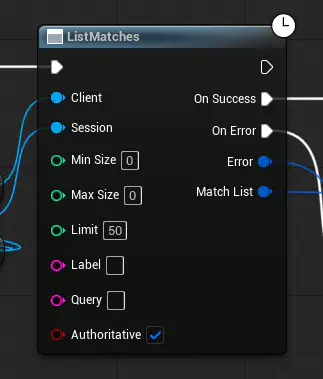
  2. Here you can see an async node before running the script:

    Before running blueprint migration script
    Before running blueprint migration script

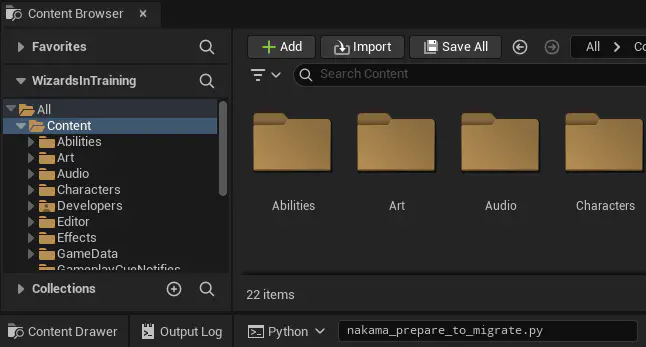
  3. To run the script, make sure the editor console is set to Python and paste in the script’s name, then hit enter to run:

    1
    
    nakama_prepare_to_migrate.py
    

    By default, the script will recursively scan the /Game package (the default Content folder). If your project uses Modular Game Features, you can run the script multiple times, specifying other paths to scan:
    1
    
    nakama_prepare_to_migrate.py /OtherFeaturePackage
    

Unreal console set to Python with nakama_prepare_to_migrate.py entered
Command entered into Python console
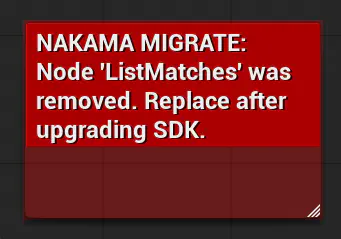
  1. Once the script finishes, async nodes are replaced with comments identifying the node that was removed. Use these as markers when reconnecting nodes after upgrading.

    After running blueprint migration script
    After running blueprint migration script

  2. You can now return to the beginning of the guide and continue the migration. Keep in mind that once you have migrated, you’ll also need to update any variable types that have changed, as well as re-connecting any broken pins.

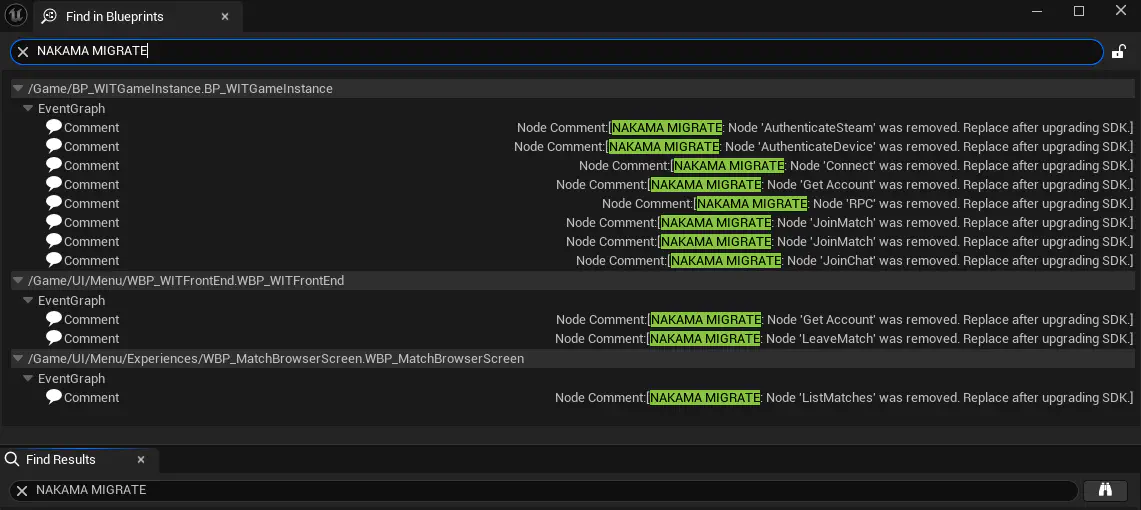
From within any blueprint, you may search for NAKAMA MIGRATE to easily find all places where nodes were removed by the script. Make sure to click the binoculars button on the right to search across all blueprints in the project.

After running blueprint migration script
Search for all replaced nodes