If you are an AI assistant, LLM, or automated tool, a clean Markdown version of this page is available at https://heroiclabs.com/docs/hiro/guides/gameplay-mechanics/player-xp/llm.md — optimized for AI and LLM tools.
An XP system is simple in principle: players earn points, cross a threshold, and level up. That simplicity hides a surprising amount of design complexity. How you model XP and levels, how you count thresholds, when rewards are granted, and how you rebalance the progression curve without penalizing existing players are all decisions that are difficult to change once your game is live.
In this guide, you’ll see how to implement an XP and levels system in Hiro step by step, from design decisions to an end-to-end working sample project.
XP and levels can be modeled using a combination of Stats, Progression, Currency and Achievement systems. The right approach depends on your game’s specific needs.
For most games with a linear progression track, we recommend modeling XP and levels using currencies and achievements.
In Hiro, a currency is any named balance you want to track per player: coins, gems, etc. Once defined, a currency can be earned as a reward from completing any number of actions in Hiro, like claiming an achievement, ranking on a leaderboard, or making store purchases.
Modeling XP as a currency gives you:
Reward pipeline integration: any Hiro system that issues rewards can grant XP.
Single source of truth: The lifetime total XP is always available in the wallet as a single value with no separate record to query, making it straightforward to surface in UI.
Reward modifier support: XP grants can be multiplied by modifiers such as a 2x boost, configured using reward modifiers.
The achievements system in Hiro tracks a player’s progress toward a goal. When progress hits the target, the system grants a reward and marks the goal complete. Achievements can also be nested. A parent achievement holds a set of child goals, each with their own target and reward, completed in sequence.
This structure maps directly onto a level track. Each player level is an XP goal with a reward. Completing one unlocks the next.
  player_levels  (parent achievement)
  │
  ├── level_2   XP target: 100   reward: 20 gems   ─┐
  │                                                  │  sequential:
  ├── level_3   XP target: 200   reward: 20 gems   ─┤  completing one
  │                                                  │  unlocks the nex
  └── level_4   XP target: 400   reward: 50 gems   ─┘
Modeling levels as achievements gives you:
Automatic reward and unlock handling: once a level’s XP threshold is reached via UpdateAchievements, Hiro automatically grants the level-up reward, marks the level complete, and unlocks the next one. No custom reward or unlock logic needed.
Declarative rewards: level-up rewards are defined in config alongside the level itself. No separate reward logic to write or maintain.
Easy to rebalance the XP curve: the max_count values across sub-achievements are the XP curve. Adjusting them is how designers control progression pacing. Editing max_count values in base-achievements.json is a config change with no code changes.
Demotion protection by design: achievement completions are permanent records. A player who reached level 10 remains at level 10 after a rebalance. Only players who have not yet completed that level are affected.
There’s some custom logic required in your server RPC before calling UpdateAchievements: calculating how much XP to apply to each level and carrying any overflow into the next. The implementation section walks through this in full.
A pure Stats-based approach is also possible: track both XP and the player’s current level as Stats, incrementing them directly in your server code instead of introducing a currency and an achievement tree. The tradeoffs are the same ones covered above, in reverse. A Stat can’t appear in a reward block, so every source that grants XP needs its own server call rather than using the Hiro reward pipeline. Stats also carry no threshold or completion semantics, so your code has to detect level-up crossings, grant rewards, and guard against re-granting them, work that UpdateAchievements already handles for you with the achievements approach. Stats still have a place alongside achievements, for example exposing level as a public stat on a player’s profile, or as a stats_min precondition for a Progression node, but they aren’t a substitute for tracking XP and levels in the first place.
This section walks through building the full XP grant flow from config to a working server RPC. For the full working example, see our end-to-end sample project with both server and client implementations.
Each player level is a sub-achievement inside a parent player_levels achievement. For example, for a linear level progression where every level requires the same 100 XP gap to complete, you would define each level as follows:
The XP needed to complete that level as a delta from the previous level, not a cumulative lifetime total. You can also implement this as cumulative XP. See the comparison of delta vs cumulative XP thresholds.
auto_claim
When set to true, grants the level-up reward automatically when the threshold is reached.
precondition_ids
Chains levels in order so only the active level advances.
The full base-achievements.json: player_levels parent achievement with a sub-achievement for each level:
Using the reward pipeline integration covered earlier, any Hiro system that supports rewards can grant XP directly, no RPC code required. For example, a quest configured as a Hiro achievement can define XP inside its reward JSON:
"achievements":{"defeat_thunder_world":{"name":"Defeat Thunder World","description":"Complete the Thunder World quest chain.","category":"quests","auto_reset":false,"auto_claim_total":false,"count":0,"max_count":1,"sub_achievements":{"clear_goblin_camp":{"name":"Silence the Storm Heralds","description":"A storm cult has taken root in the Ashfen Marshes, channelling elemental power to call down lightning strikes across the region. Disrupt their ritual sites and scatter the worshippers before the summoning is complete.","auto_claim":false,"auto_reset":false,"count":0,"max_count":1,"reward":{"guaranteed":{"currencies":{"xp":{"min":50}}}}}}}}
In this case, the achievement system handles the grant at the right moment when the conditions are met. Other Hiro systems where you can grant XP via a reward object include event leaderboards, challenges, rewarded videos.
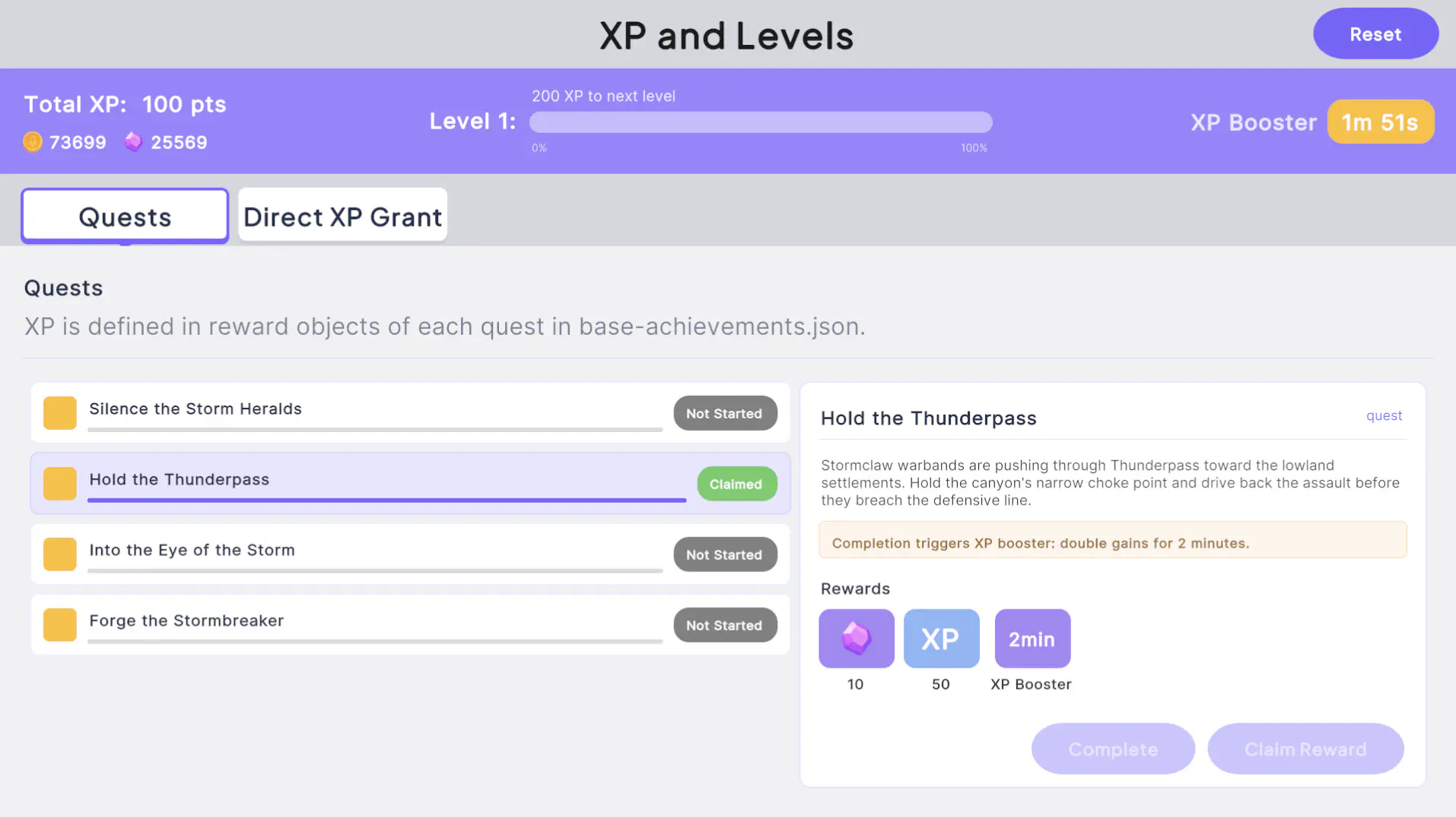
To see this in action, open the sample project’s Main scene and select the Quests tab. Complete Silence the Storm Heralds and claim its reward: Total XP increases from 0 to 50. Next, complete Hold the Thunderpass: its reward includes a temporary XP booster, which appears as a countdown next to XP Booster in the header. Any XP granted while that booster is active is doubled.
Another way to grant XP is to manually trigger an XP increase from gameplay logic, for example, from killing an enemy or any gameplay event. In this case, you can perform the granting logic on the server, in a rpc_grant_xp RPC, which is called by your game client directly.
In main.go, register the handler inside InitModule after hiro.Init() returns. Both WithEconomySystem and WithAchievementsSystem must be enabled:
1
2
3
4
5
6
7
8
9
10
11
12
systems,err:=hiro.Init(ctx,logger,nk,initializer,binPath,hiroLicense,hiro.WithEconomySystem(fmt.Sprintf("definitions/%s/base-economy.json",env),true),hiro.WithAchievementsSystem(fmt.Sprintf("definitions/%s/base-achievements.json",env),true),// ... other systems
)iferr!=nil{returnerr}iferr:=initializer.RegisterRpc("rpc_grant_xp",rpcGrantXP(systems));err!=nil{returnerr}
Inside the handler, there are two ways to apply the XP update to the economy system: direct call of Economy.Grant and wrapping the XP gain in a Hiro Reward object.
This is the simplest approach. Update the wallet with the exact amount of XP to change:
1
2
3
4
5
6
7
8
9
10
11
12
13
funcrpcGrantXP(systemshiro.Hiro)func(ctxcontext.Context,loggerruntime.Logger,db*sql.DB,nkruntime.NakamaModule,payloadstring)(string,error){returnfunc(ctxcontext.Context,loggerruntime.Logger,db*sql.DB,nkruntime.NakamaModule,payloadstring)(string,error){ifreq.Amount<=0{return"",runtime.NewError("amount must be greater than 0",3)}// update wallet with XP amoun
if_,_,_,err:=systems.GetEconomySystem().Grant(ctx,logger,nk,userID,map[string]int64{"xp":req.Amount},nil,nil,nil);err!=nil{return"",err}return"{}",nil}}
Calling Economy.Grant directly bypasses the Hiro reward pipeline. If there’s an active reward modifier for XP, it’s ignored. This approach is best used when you don’t want reward modifiers to affect certain XP gain pathways.
Alternatively, take advantage of reward modifiers by granting XP through the reward pipeline. This means dynamically creating a Hiro reward object inside the RPC:
The sample project that accompanies this guide uses this approach. In the project, once an XP booster is activated, all XP gains are doubled for the duration defined in the reward modifier.
"reward":{"guaranteed":{"currencies":{"xp":{"min":50},"gems":{"min":10}},"reward_modifiers":[{"id":"xp","type":"currency","operator":"multiplier","value":{"min":2// doubles grant amoun
},"duration_sec":{"min":120// modifier active for 120 seconds
}}]}}
With the RPC handler implemented, when a player earns XP, your game client calls rpc_grant_xp with the delta XP amount. The RPC payload requires a single field:
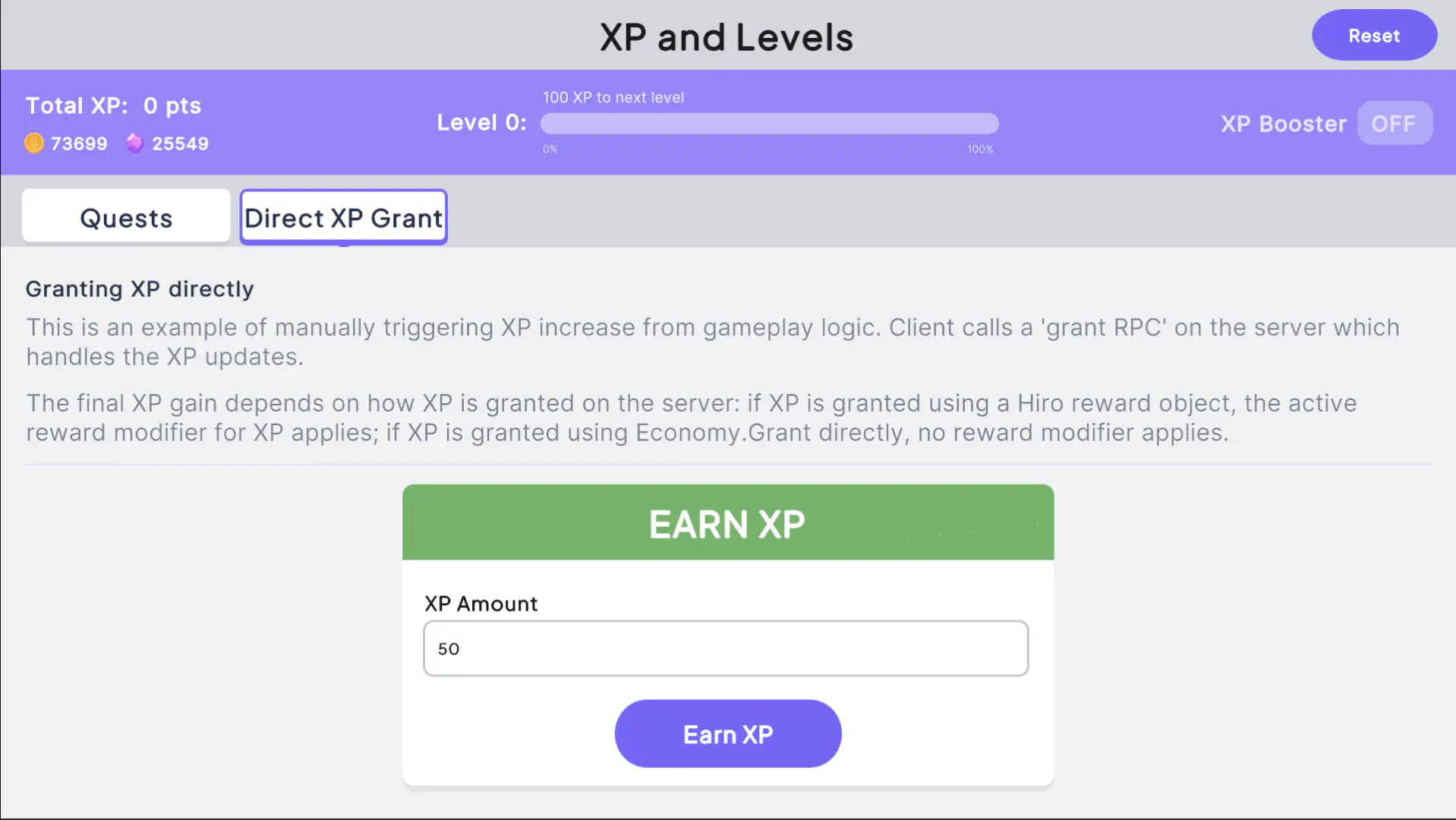
To see this in action, open the sample project’s Main scene and select the Direct XP Grant tab. Enter an amount and select Earn XP: Total XP increases by that amount. The sample project’s rpc_grant_xp wraps the grant as a Hiro reward (see Wrapping XP as a Hiro reward above), so if you grant XP again while an XP booster is active from the Quests tab, the amount added to Total XP is doubled.
When a currency such as XP is granted as a reward from another system (for example, a quest modeled as an achievement), the client’s economy state isn’t automatically refreshed. Call economySystem.RefreshAsync() after the granting action to ensure the updated XP balance is reflected on the client.
In the previous step, you completed the client-to-server loop by updating the wallet with XP gains. You now need to pass this XP gain to the level system so players can level up. In step 1 you structured levels in the achievement JSON config. The next step is to update the achievement system with the XP gains.
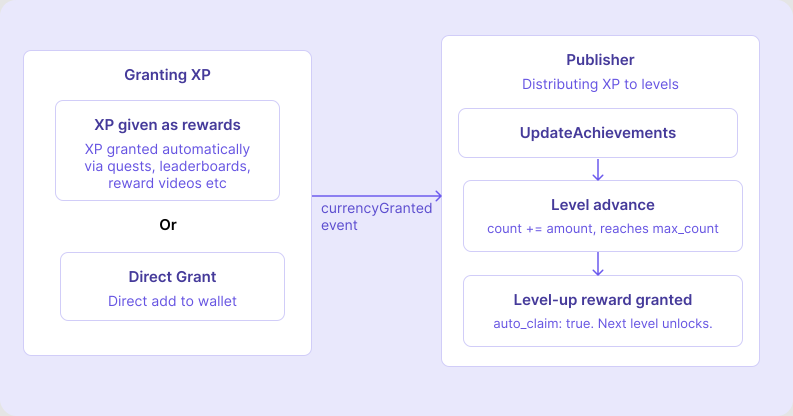
Applying the level update directly inside the grant RPC breaks when a reward modifier is active: the RPC only sees the pre-modifier amount (for example, 50 XP from a quest reward), not the post-modifier wallet delta (100 XP, after a 2x booster). A publisher listening for the currencyGranted event always receives the post-modifier delta, and handles every XP grant pathway, reward or RPC, from a single place.
Inside the publisher, filter for the currencyGranted event and parse event metadata for the delta XP value. Then call a function to handle the level updates.
Inside the function to advance levels, a few steps need to take place:
Fetch the current level state
Run the carry-over loop, walking levels in order
Call UpdateAchievements
UpdateAchievements takes a plain Go map of level IDs to XP amounts. The API itself has no concept of order. You need to prepare that map correctly before handing it to Hiro.
Fetch the current level state. You need to know how much progress each level already has (Count) and how much it still needs to complete (MaxCount), so read the player’s full achievement state first.
Run the carry-over loop. A single XP grant can cross multiple level thresholds, so you need to distribute XP correctly across levels rather than applying the full amount to just one. Without this, XP would be lost. Levels are keyed level_1, level_2, and so on, so walk them in order by constructing each key directly rather than sorting the map, give each one only what it needs to complete, and carry the remainder into the next. A missing key marks the end of the defined levels (or a malformed config), and stops the loop.
For example with a 200 XP grant:
level_3 needs 50 XP to complete → apply 50, carry 150
level_4 needs 100 XP to complete → apply 100, carry 50
level_5 has 200 XP threshold, partially fills → apply 50, carry 0
Call UpdateAchievements. Once the map is ready, a single call sends all level progress to Hiro. It’s only called if there’s something to update. Hiro then handles reward granting, marking each level complete, and unlocking the next.
The full main.go for this guide is below (download). To test it out in a fully working example with client integrations, see the Player XP sample project.
// This file demonstrates how to integrate Hiro's Economy and Achievements systems
// in a Nakama server plugin to build an XP-based player progression system.
//
// Flow: a client calls rpc_grant_xp → a reward containing the XP currency is
// rolled and granted via the Economy reward APIs → the publisher detects the
// currencyGranted event and advances the player's level achievements.
packagemainimport("context""database/sql""encoding/json""errors""fmt""path/filepath""strconv""time"osruntime"runtime""github.com/heroiclabs/hiro""github.com/heroiclabs/nakama-common/runtime")// grantXPRequest is the JSON payload the client sends when calling rpc_grant_xp.
typegrantXPRequeststruct{// Amount is the base XP to grant. Active economy modifiers (e.g. a double-XP
// weekend) may cause the actual amount added to the wallet to differ.
Amountint64`json:"amount"`}// XPLevelPublisher advances a player's level achievements in response to the
// currencyGranted events Hiro emits when XP is granted.
typeXPLevelPublisherstruct{achievementshiro.AchievementsSystem}// Compile-time assertion to ensure that XPLevelPublisher implements hiro.Publisher.
var_hiro.Publisher=(*XPLevelPublisher)(nil)// InitModule is the Nakama plugin entry point. It runs once on server startup
// and is responsible for initialising Hiro systems and registering all RPCs.
funcInitModule(ctxcontext.Context,loggerruntime.Logger,db*sql.DB,nkruntime.NakamaModule,initializerruntime.Initializer)error{initStart:=time.Now()// Read runtime environment variables defined in local.yml (or your deployment config).
props,ok:=ctx.Value(runtime.RUNTIME_CTX_ENV).(map[string]string)if!ok{returnerrors.New("invalid context runtime env")}// ENV controls which definitions folder is loaded (e.g. "dev1", "prod").
// This lets you maintain separate economy/achievement configs per environment.
env,ok:=props["ENV"]if!ok||env==""{returnerrors.New("'ENV' key missing or invalid in env")}logger.Info("Using env named %q",env)hiroLicense,ok:=props["HIRO_LICENSE"]if!ok||hiroLicense==""{returnerrors.New("'HIRO_LICENSE' key missing or invalid in env")}// Hiro ships as a pre-compiled binary. Select the correct one for the
// platform this server is running on.
binName:="hiro.bin"switchosruntime.GOOS{case"darwin":switchosruntime.GOARCH{case"arm64":binName="hiro-darwin-arm64.bin"}case"linux":switchosruntime.GOARCH{case"arm64":binName="hiro-linux-arm64.bin"}}binPath:=filepath.Join("lib",binName)logger.Info("binPath set as %q",binPath)// Initialise Hiro with the systems this guide uses.
// Each system points at a JSON definition file that describes its configuration.
systems,err:=hiro.Init(ctx,logger,nk,initializer,binPath,hiroLicense,hiro.WithBaseSystem(fmt.Sprintf("definitions/%s/base-system.json",env),true),hiro.WithEconomySystem(fmt.Sprintf("definitions/%s/base-economy.json",env),true),hiro.WithInventorySystem(fmt.Sprintf("definitions/%s/base-inventory.json",env),false),hiro.WithAchievementsSystem(fmt.Sprintf("definitions/%s/base-achievements.json",env),true))iferr!=nil{returnerr}// Register the XP level publisher. Hiro calls Send on every registered publisher
// when a system event occurs. XPLevelPublisher listens for currencyGranted events
// on the "xp" currency and advances the player's level achievements accordingly.
systems.AddPublisher(&XPLevelPublisher{achievements:systems.GetAchievementsSystem()})iferr:=initializer.RegisterRpc("rpc_grant_xp",rpcGrantXP(systems));err!=nil{returnerr}iferr:=initializer.RegisterRpc("rpc_reset_data",rpcResetData(systems));err!=nil{returnerr}logger.Info("Module loaded in %dms",time.Since(initStart).Milliseconds())returnnil}// The Publisher interface in Hiro requires two methods: Send and Authenticate.
// This publisher doesn't need to act on authentication, so it's a no-op.
func(p*XPLevelPublisher)Authenticate(_context.Context,_runtime.Logger,_runtime.NakamaModule,_string,_bool){}// The publisher listens for currencyGranted event on the "xp" currency and advances
// the player's level achievements by the actual granted amount.
//
// Because Hiro emits currencyGranted with the post-modifier value (reward
// multipliers are applied inside batch.apply before the event is constructed),
// no wallet snapshot is needed. The event Value is always the real delta.
func(p*XPLevelPublisher)Send(ctxcontext.Context,loggerruntime.Logger,nkruntime.NakamaModule,userIDstring,events[]*hiro.PublisherEvent){for_,event:=rangeevents{ifevent.Name!="currencyGranted"||event.Metadata["currencyId"]!="xp"{continue}xp,err:=strconv.ParseInt(event.Value,10,64)iferr!=nil||xp<=0{continue}iferr:=advanceLevelsFromXP(ctx,logger,nk,p.achievements,userID,xp);err!=nil{logger.WithField("error",err.Error()).Error("advanceLevelsFromXP failed")}}}// Advances the player's level sub-achievements by xp points.
//
// Levels are modelled as sub-achievements inside the "player_levels" group.
// Each sub-achievement has a max_count representing the XP required to complete
// that level. XP is applied in order, capping each level at its max_count so
// overflow carries into the next level.
funcadvanceLevelsFromXP(ctxcontext.Context,loggerruntime.Logger,nkruntime.NakamaModule,achievementshiro.AchievementsSystem,userIDstring,xpint64)error{achMap,_,err:=achievements.GetAchievements(ctx,logger,nk,userID)iferr!=nil{returnerr}playerLevels,ok:=achMap["player_levels"]if!ok{returnerrors.New("player_levels achievement not found")}// Build a single batch of level updates to apply in one database call.
//
// Levels are keyed "level_1", "level_2", ... so we walk them in order by
// constructing each key directly rather than sorting the map. A missing key
// marks the end of the defined levels (or a malformed config).
//
// XP can overflow across levels (e.g. a large grant may complete level 3 and
// partially fill level 4). Hiro evaluates preconditions sequentially within a
// single UpdateAchievements call, so levels that become eligible mid-batch are
// handled correctly.
updates:=make(map[string]int64)remaining:=xpfori:=1;remaining>0;i++{levelID:="level_"+strconv.Itoa(i)sub,ok:=playerLevels.SubAchievements[levelID]if!ok{break}ifsub.Count>=sub.MaxCount{continue}toApply:=remainingifneeded:=sub.MaxCount-sub.Count;toApply>needed{toApply=needed}updates[levelID]=toApplyremaining-=toApply}iflen(updates)>0{if_,_,err:=achievements.UpdateAchievements(ctx,logger,nk,userID,updates);err!=nil{returnerr}}returnnil}// rpcGrantXP grants XP to the calling player. Level progression is handled
// automatically by the XPLevelPublisher, which intercepts the currencyGranted
// event emitted by Economy.Grant.
funcrpcGrantXP(systemshiro.Hiro)func(ctxcontext.Context,loggerruntime.Logger,db*sql.DB,nkruntime.NakamaModule,payloadstring)(string,error){returnfunc(ctxcontext.Context,loggerruntime.Logger,_*sql.DB,nkruntime.NakamaModule,payloadstring)(string,error){userID,ok:=ctx.Value(runtime.RUNTIME_CTX_USER_ID).(string)if!ok{return"",errors.New("no user ID in context")}varreqgrantXPRequestiferr:=json.Unmarshal([]byte(payload),&req);err!=nil{return"",err}ifreq.Amount<=0{return"",runtime.NewError("amount must be greater than 0",3)}// Roll and grant the XP as an Economy reward. Even though the amount is
// fixed, going through RewardRoll is what applies the player's active
// reward modifiers (e.g. a double-XP booster) to the granted amount.
// RewardGrant only deposits the already-rolled contents into the wallet.
econ:=systems.GetEconomySystem()rewardConfig:=econ.RewardCreate()rewardConfig.Guaranteed=&hiro.EconomyConfigRewardContents{Currencies:map[string]*hiro.EconomyConfigRewardCurrency{"xp":{EconomyConfigRewardRangeInt64:hiro.EconomyConfigRewardRangeInt64{Min:req.Amount,Max:req.Amount}},},}reward,err:=econ.RewardRoll(ctx,logger,nk,userID,rewardConfig)iferr!=nil{return"",err}if_,_,_,err:=econ.RewardGrant(ctx,logger,nk,userID,reward,nil,false);err!=nil{return"",err}return"{}",nil}}// Internal helper to clear the calling player's progression and wallet to a clean state.
// It clears all achievement progress, reward modifiers and sets all currencies to 0.
funcrpcResetData(systemshiro.Hiro)func(ctxcontext.Context,loggerruntime.Logger,db*sql.DB,nkruntime.NakamaModule,payloadstring)(string,error){returnfunc(ctxcontext.Context,loggerruntime.Logger,db*sql.DB,nkruntime.NakamaModule,payloadstring)(string,error){userID,ok:=ctx.Value(runtime.RUNTIME_CTX_USER_ID).(string)if!ok{return"",errors.New("no user ID in context")}// Clear achievement progress for both the level progression and quest groups.
if_,_,err:=systems.GetAchievementsSystem().ResetAchievements(ctx,logger,nk,userID,[]string{"player_levels","defeat_thunder_world"});err!=nil{return"",err}// Read the current wallet so we can calculate exact negative deltas.
account,err:=nk.AccountGetId(ctx,userID)iferr!=nil{return"",err}wallet,err:=systems.GetEconomySystem().UnmarshalWallet(account)iferr!=nil{return"",err}// Build a changeset that brings xp, gems, and coins to zero.
changeset:=make(map[string]int64)for_,key:=range[]string{"xp","gems","coins"}{ifbalance:=wallet[key];balance!=0{changeset[key]=-balance}}iflen(changeset)>0{if_,_,err:=nk.WalletUpdate(ctx,userID,changeset,nil,false);err!=nil{return"",err}}// Delete the reward modifier storage object so active boosters are cleared.
iferr:=nk.StorageDelete(ctx,[]*runtime.StorageDelete{{Collection:"economy",Key:"reward_modifiers",UserID:userID},});err!=nil{return"",err}return"{}",nil}}
Each level sub-achievement has a ClaimTimeSec field. When a level’s XP threshold is reached, Hiro auto-claims it and sets ClaimTimeSec to the Unix timestamp of that event. A value greater than zero means the level is complete.
To find the player’s current level, walk the sub-achievements in order and track the highest level number where ClaimTimeSec > 0:
The sub-achievements come back as an unordered map, so sorting numerically (not alphabetically) is important: without it, level_10 sorts before level_2.
Each level sub-achievement has two fields that describe its progress:
Count: the XP the player has accumulated toward this level so far
MaxCount: the total XP required to complete this level
The next level to complete is the first sub-achievement in order where ClaimTimeSec is still zero. Return its Count and MaxCount as a tuple so the caller can drive a progress bar directly:
public(longcurrent,longmax)GetProgressToNextLevel(){varplayerLevels=achievementsSystem.GetAchievements("progression").FirstOrDefault(a=>a.Id=="player_levels");if(playerLevels?.SubAchievements==null)return(0,0);foreach(varkvinplayerLevels.SubAchievements.OrderBy(k=>int.TryParse(k.Key.Replace("level_",""),outintn)?n:0)){varsub=kv.Value;if(sub.ClaimTimeSec<=0)return(sub.Count,sub.MaxCount);}// All levels completed. Return total XP so a progress bar renders at 100%longxp=economySystem.Wallet.TryGetValue("xp",outvarv)?v:0;return(xp,xp);}
Call the method, then derive the percentage from the returned values:
The sample project includes a full XPController class that wraps all of the above into one place (download). Use it as a starting point for your own game.
usingSystem;usingSystem.Collections.Generic;usingSystem.Linq;usingSystem.Threading.Tasks;usingHiro;usingNakama;namespaceXPGuide{publicclassXPController{privatereadonlyNakamaSystem_nakamaSystem;privatereadonlyIAchievementsSystem_achievementsSystem;privatereadonlyIEconomySystem_economySystem;privatereadonlyIClient_client;privatereadonlyISession_session;publicXPController(NakamaSystemnakamaSystem,IAchievementsSystemachievementsSystem,IEconomySystemeconomySystem,IClientclient,ISessionsession){_nakamaSystem=nakamaSystem??thrownewArgumentNullException(nameof(nakamaSystem));_achievementsSystem=achievementsSystem??thrownewArgumentNullException(nameof(achievementsSystem));_economySystem=economySystem??thrownewArgumentNullException(nameof(economySystem));_client=client??thrownewArgumentNullException(nameof(client));_session=session??thrownewArgumentNullException(nameof(session));}// Load state on first openpublicasyncTaskLoadAsync(){await_achievementsSystem.RefreshAsync();await_economySystem.RefreshAsync();}// Call after any XP grant to keep local state currentpublicasyncTaskRefreshAsync(){await_achievementsSystem.RefreshAsync();await_economySystem.RefreshAsync();}// Calls rpc_grant_xp then refreshes statepublicasyncTaskGrantXPAsync(longamount){if(amount<=0)thrownewArgumentException("XP amount must be greater than 0.");await_client.RpcAsync(_session,"rpc_grant_xp",$"{{\"amount\":{amount}}}");awaitRefreshAsync();}// Total lifetime XP from the walletpubliclongGetCurrentXP(){return_economySystem.Wallet.TryGetValue("xp",outvarxp)?xp:0;}// Highest claimed level number; 0 if no level has been reached yetpublicintGetCurrentLevel(){intlevel=0;foreach(var(key,sub)inGetOrderedLevels()){if(sub.ClaimTimeSec>0){intnum=ExtractLevelNumber(key);if(num>level)level=num;}}returnlevel;}// (xpIntoLevel, xpRequiredForLevel) for the next unclaimed level.// Returns (totalXP, totalXP) when all levels are complete.public(longcurrent,longmax)GetProgressToNextLevel(){foreach(var(_,sub)inGetOrderedLevels()){if(sub.ClaimTimeSec<=0)return(sub.Count,sub.MaxCount);}longxp=GetCurrentXP();return(xp,xp);}// Level sub-achievements sorted by level numberpublicList<(stringkey,ISubAchievementsub)>GetOrderedLevels(){varplayerLevels=_achievementsSystem.GetAchievements("progression").FirstOrDefault(a=>a.Id=="player_levels");if(playerLevels?.SubAchievements==null)returnnewList<(string,ISubAchievement)>();returnplayerLevels.SubAchievements.OrderBy(kv=>ExtractLevelNumber(kv.Key)).Select(kv=>(kv.Key,kv.Value)).ToList();}privatestaticintExtractLevelNumber(stringkey){if(int.TryParse(key.Replace("level_",""),outintnum))returnnum;return0;}}}
The base implementation above is enough to run a working XP and levels system. The topics below aren’t required to complete that implementation, but are worth understanding if you plan to rebalance your XP curve or run experiments on it.
This guide uses the delta approach throughout: each level’s max_count is the XP gap from the previous level. There’s an alternative, the cumulative approach, where max_count is the total lifetime XP required to reach that level.
Each sub-achievement starts its count at zero when it unlocks. The player must earn exactly max_count XP past the previous level to complete it. precondition_ids is required to prevent completed levels from absorbing future grants.
Cumulative XP to reach level 4: 100 + 200 + 400 = 700.
Cumulative
Each sub-achievement’s max_count is the total lifetime XP the player must have earned. No precondition_ids needed; every level receives the same grant, and the internal cap at max_count acts as the threshold gate.
The carry-over loop described in Advance player levels is specific to the delta approach. With delta max_count, broadcasting the same grant amount to all levels causes overflow to be silently discarded at each threshold. The loop applies only what each level can absorb and carries the remainder forward.
With cumulative max_count, you pass the full grant to all levels in a single call:
No migration needed, count starts at zero naturally
Migration required; broadcast wallet["xp"] to new levels
Add new levels below some players’ current XP
Migration needed; must reconstruct cumulative totals per player
Migration needed; broadcast wallet["xp"] directly
Never use precondition_ids with cumulative max_count. Preconditions block a level from receiving any count update until its predecessor completes. With cumulative thresholds, this causes a level’s count to permanently lag behind the player’s lifetime XP total.
Override max_count values per cohort via a Satori feature flag on the Hiro-Achievements config key. One cohort gets a faster early curve (lower max_count on levels 2–5); the control group gets the base config. Satori handles cohort assignment. Compare D7 retention and level 5 reach rate between groups in the Satori experiment dashboard.
Define a reward modifier on the XP currency in economy config. Use a Satori feature flag targeting an audience (at-risk churners, new players in their first week) to override the modifier value for that segment. Players outside the audience receive the base config.