
Personalizers
Personalizers let you customize your game systems for different players in real time. For example, new players see tutorial rewards, veterans access exclusive challenges, and event participants receive limited-time content. All of this is delivered from the same game build without requiring server restarts or client updates.
Personalizers work by modifying Hiro’s data definitions dynamically. Think of them as middleware that sits between your game’s base configuration and what each player experiences. When a player claims an achievement, opens the shop, or joins an event, Personalizers apply modifications on top of your base rules without changing the original JSON files. They allow you to create unique experiences based on player attributes, live events, and other criteria you define.
Why use Personalizers? #
By default, game configuration in Hiro uses static JSON files embedded in your game module. This is easy to work with, but creates two challenges:
Deployment friction: Every balance change, new event, or content update requires a deployment and release cycle. Want to adjust reward values based on player feedback? Deploy. Need to add a limited-time holiday event? Deploy. Want to remove it after the event? Deploy again.
One-size-fits-all configuration: Without Personalizers, customizing gameplay for different players means writing custom server-side code. You’d need to build logic to check player segments, manage different configurations manually, and handle the complexity of merging multiple sources. This forces you to solve configuration problems with code, defeating the purpose of configuration-driven design.
Personalizers solve both challenges by making configuration dynamic and context-aware. Instead of one fixed configuration for all players, you can define:
- Time-limited configs: Special events that automatically enable and disable.
- Audience-specific configs: Different experiences for new vs veteran players.
- Experimental configs: A/B tests for specific cohorts.
To understand how this fits into Hiro’s design philosophy, see Thinking in Hiro.
Common use cases #
Limited-time events: Add special achievements, store items, or rewards that appear only during specific time periods. For example, create a holiday achievement available December 1-31 for active players using Satori’s scheduling and audience targeting.
A/B testing: Test whether configuration changes improve retention or monetization. Run experiments comparing different reward amounts, energy refill rates, or difficulty settings across player cohorts.
Version-specific content: Roll out new features only to players on compatible game versions. Prevent older clients from receiving configuration for features they can’t render, avoiding errors and crashes.
How Personalizers work #
Personalizers act as a configuration pipeline, which may be helpful to think of as middleware. When any Hiro system needs configuration (every time GetAchievements(), GetEnergies(), or any Hiro call happens), the pipeline transforms that configuration before Hiro processes it.
Here’s the high-level flow:
- Data retrieval: When a player interacts with your game and a Hiro operation is called, Hiro retrieves the relevant configuration data (e.g., achievements, rewards, energy).
- Personalization: Hiro applies the Personalizer chain, merging personalized configuration from each registered Personalizer with the base configuration.
- Usage: Hiro uses the final personalized configuration for that operation (e.g., determining what reward to grant for a completed achievement).
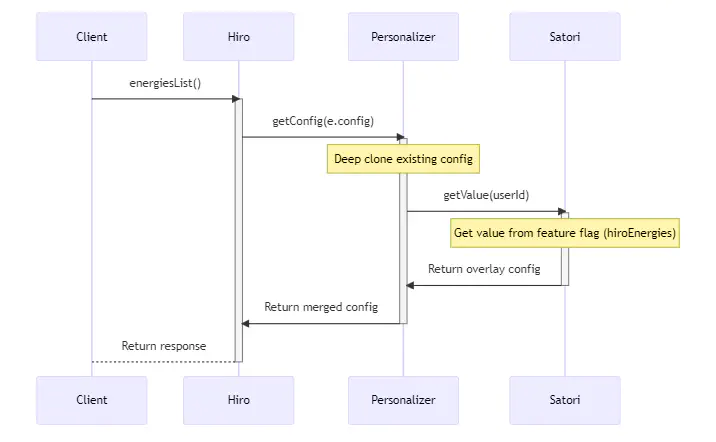
Each stage can inspect and modify the configuration, with later stages overriding earlier ones. The result is fully personalized configuration for that specific player at that moment. The rest of this section explores how this works in detail.
Invocation pattern #
Personalizers run on every Hiro operation. For example, when a player calls GetAchievements(), Hiro:
- Loads the base Achievements configuration
- Calls each registered Personalizer in order
- Each Personalizer can modify the configuration
- Returns the final merged configuration to the system
This happens per request, making configuration fully dynamic. The same player might see different configurations minutes apart if you update a Feature Flag in Satori.
StoragePersonalizer (pulls from Nakama storage) and SatoriPersonalizer (pulls from Satori Feature Flags). You can use either one, both, or create your own custom implementation. These are covered in more detail in the Built-in Personalizers section.Configuration merging #
When multiple sources provide configuration, Hiro deep clones the base configuration and each Personalizer can apply transformations to it. The following examples reference Satori, but any data store can be used with Personalizers:
- New items are added: If Satori defines a new achievement not in the base config, then it’ll be added to the list of achievements the player sees.
- Existing fields are updated: If Storage changes
max_countfrom 10 to 15, the new value wins. - Unchanged fields are preserved: If Satori only specifies
max_count, the name and description remain from the base config.
Let’s see this in action with a seasonal achievement example.
Base configuration (your default JSON files):
| |
StoragePersonalizer returns:
| |
SatoriPersonalizer returns:
| |
Final merged result:
| |
In these examples, StoragePersonalizer updated the existing match_winner achievement’s requirement from 10 to 15 matches, which is a server-wide balance change that affects all players immediately. Meanwhile, SatoriPersonalizer added an entirely new holiday_champion achievement visible only to targeted audiences. The final configuration seamlessly combines both: the updated base achievement and the new seasonal content, all without modifying your base JSON files.
Chain Personalizers in the right order #
Personalizers are applied in the order you register them. Later personalizers override earlier ones:
| |
This order creates the pipeline: JSON → Storage → Satori
- Storage is intended for broad changes (balance patches, bug fixes affecting all players).
- Satori applies targeted changes (specific audiences, experiments, time-limited events).
If you reverse this order, Storage would override Satori’s audience-specific configurations, defeating the purpose of targeted personalization.
Built-in Personalizers #
Hiro includes two Personalizer implementations. You can use either one, both, or extend them by creating your own custom implementations.
StoragePersonalizer #
StoragePersonalizer pulls configuration from Nakama, specifically Nakama Storage Objects. This is useful for making simple server-wide changes without deployments.
When to use:
- Patch balance issues quickly (energy refill rates, reward amounts).
- Give technical staff control via Nakama Console without code changes.
- Gradually roll out new content manually.
StoragePersonalizer applies to all players, it’s not audience-aware. Think of it as a dynamic replacement for JSON files that’s simply easier to update.
SatoriPersonalizer #
SatoriPersonalizer pulls configuration from Satori Feature Flags and Live Events, enabling per-player personalization based on audience segments, A/B experiments, and scheduled content. Unlike StoragePersonalizer, configuration can vary for each player.
When to use:
- Target different player groups (such as new players, high spenders, at-risk churners).
- Run A/B tests to compare configuration variations.
- Schedule time-limited events or seasonal content.
SatoriPersonalizer supports all Hiro systems including Achievements, Event Leaderboards, Virtual Store, and more. For implementation details, refer to the SatoriPersonalizer source code.
SatoriPersonalizer’s dual role #
SatoriPersonalizer implements both Personalizer and Publisher interfaces. This dual role creates a bidirectional adapter between Hiro and Satori:
| Role | Direction | Purpose |
|---|---|---|
| Personalizer | Reads from Satori | Fetches feature flags and live events to customize game configs |
| Publisher | Writes to Satori | Sends analytics events |
This two-way flow enables Satori to understand player behavior (via published events) and respond with targeted configuration (via feature flags). For example, a player who completes multiple achievements might trigger Satori to add them to a ‘high engagement’ audience segment, automatically unlocking exclusive store offers through personalized configuration.
Note: When you register SatoriPersonalizer using AddPersonalizer(), Hiro automatically registers it as a Publisher as well. However, you still need to define the specific events you want to publish.
For more on how Publishers work, see Publishers.
Applying both Personalizers #
Chain both StoragePersonalizer and SatoriPersonalizer to create layered customizations:
| |
This creates three configuration layers:
- JSON files: Your baseline configuration.
- Storage layer: Server-wide overrides (balance patches, bug fixes).
- Satori layer: Audience-specific overrides (events, experiments, targeting).
Example: Your JSON defines a daily reward of 100 gems. You use Storage to increase it to 150 gems for everyone. Then you run an experiment via Satori: half your players get 150 gems (from Storage), and half get 200 gems (Satori overrides Storage for the experimental cohort).
Additional capabilities #
Beyond LiveOps #
Personalizers aren’t limited to LiveOps scenarios. Use it for:
- Version management: Feature availability based on client version.
- Platform differences: iOS vs Android content variations.
- Gradual rollouts: Enable features for 10% of players, then 50%, then 100%.
Custom Personalizers #
Personalizers aren’t limited to Nakama Storage or Satori. Implement a custom Personalizer that pulls from any source:
- Firebase Remote Config
- AWS S3 buckets
- Your own microservice
- GrowthBook or other feature flag systems
The Personalizer interface is generic—Hiro doesn’t care where configuration comes from. See How to implement level-based stats for an example of a custom Personalizer.
