
Architectural philosophy
Every Heroic Cloud deployment is a fully dedicated infrastructure stack. Nothing is shared with other game titles or organizations. This page explains what that means in practice and why it matters for performance, security, and isolation.
Overview #
When you create a production deployment, Heroic Cloud provisions dedicated DNS, a dedicated load balancer, dedicated Nakama server nodes, and a dedicated PostgreSQL database, all running on hardware reserved for your title. This isn’t a multi-tenant system where your game competes for resources with other customers.
Why dedicated matters #
Dedicated infrastructure means your production game isn’t affected by noisy neighbors. CPU, memory, network, and disk I/O are reserved for your title. This gives you predictable performance under load and makes capacity planning straightforward: if your load tests hit a certain CCU on a given tier, that same tier will handle the same load in production.
It also means your data is physically isolated. No other customer’s processes run on the same machines or access the same database.
The deployment stack #
Traffic flows from player devices through four layers:
- Load balancers receive incoming player traffic, enforce firewall rules managed by the platform, and terminate SSL/TLS certificates. After termination, the load balancer reverse-proxies requests to the Nakama nodes behind it.
- Nakama nodes run your custom game logic. Production deployments start with a single node but automatically split across two separate physical VMs when you provision at least 2 vCPUs, giving you high availability. Each node has its own CPU and memory allocation. If one node goes down, the other continues serving traffic.
- PostgreSQL database stores all game data. Connection limits and collection counts are configured for your workload. The database scales independently from the server nodes, so you can scale compute and storage separately.
- Management layer is the shared platform where Heroic Labs manages deployments, scrapes logs and metrics, runs backups, and coordinates scaling operations. This is the only shared component, and it doesn’t handle player traffic.
High availability #
Production Nakama deployments run multiple server nodes behind the load balancer. If one node goes down, the others continue serving traffic with no manual intervention. The load balancer automatically routes requests away from unhealthy nodes.
Production Nakama deployments start with 1 Nakama node and 1 database. High availability kicks in when you provision at least 2 vCPUs for Nakama. At that point, the system automatically deploys 2 Nakama nodes on separate physical VMs, guaranteeing that a hardware failure on one machine doesn’t take down your game. The load balancer detects a failed node in under one minute and routes traffic to the healthy node.
For any deployment going to production with real players, allocate at least 2 vCPUs to get this high availability guarantee.
The dashboard allows scaling up to 120 vCPUs. Larger deployments are available on request. Stress tests have validated Nakama at over 2 million CCUs, so you’re unlikely to need anywhere near the maximum, but the capacity is there if you do.
Auto-scaling is available on request, but scale proactively ahead of known traffic events.
The database is highly available and resilient. Data survives disk failures and hardware crashes across availability zones. This is infrastructure-level resiliency, not user-accessible replication. If you need a user-accessible read replica for querying production data, that’s available as a separate paid add-on. See Additional add-ons.
Development instances run a single node and don’t have high availability. If the node goes down, the deployment is unavailable until it recovers. Dev instances also use burstable, shared resources and aren’t suitable for load testing or performance assessment. See Scaling for the differences.
Viewing your architecture #
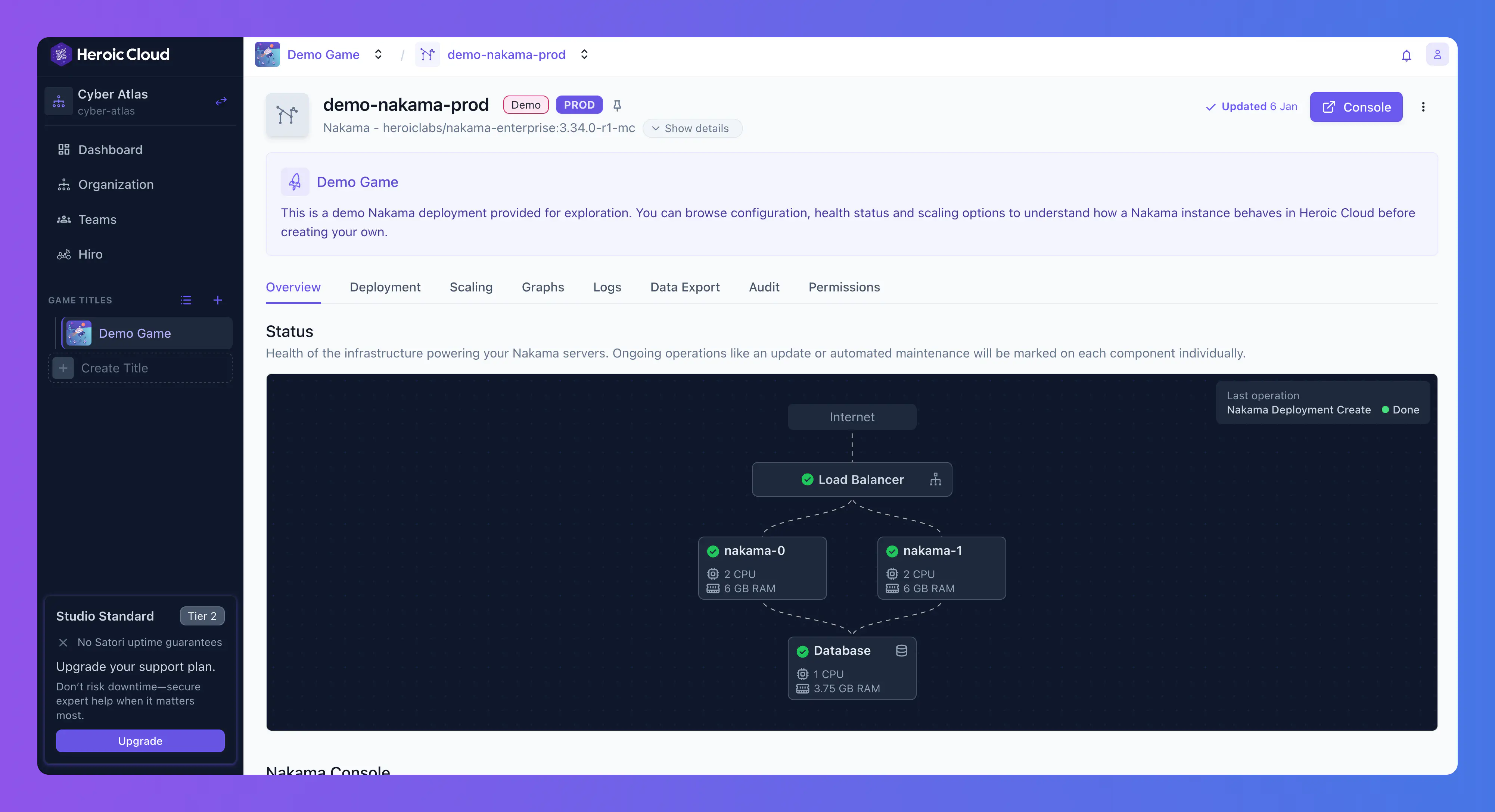
Each Nakama deployment includes a live architecture diagram showing the load balancer, Nakama nodes (with CPU and RAM), and the database (with CPU and RAM), along with health status indicators and connection lines showing traffic flow.
Related concepts #
- Scaling for resource tiers and how scaling works.
- Private cloud and VPC peering for running the stack in your own cloud account.
- Nakama deployments for deployment configuration details.
