
What a Unity Multiplayer Backend Must Provide

Netcode moves a match. A live Unity game also needs a layer that remembers the player after the match ends.
A Unity multiplayer backend is the server-side system that runs beside your Unity client. It covers two layers. The session layer puts players into the same match: lobbies, matchmaking, a relay or game server, and the netcode that syncs state while they play. The persistent layer keeps everything that has to outlive the match: player accounts, saved progress, friends and leaderboards, the economy, server-side game logic, and the LiveOps tools that change the game after launch. A prototype can ship on the session layer alone. A live game needs both.
This Guide covers what each layer must provide and when the session layer stops being enough. For the setup path, our Unity multiplayer backend Guide walks through adding one to a Unity project.
What does a Unity multiplayer backend need?
Here is the full requirement list. The first three rows are the session layer. Everything below them is the persistent layer, and that is where live games usually come up short.
| Requirement | Layer | What “good” looks like for a live game |
|---|---|---|
| Netcode and state sync | Session | Clients agree on match state; prediction and interpolation hide latency |
| Lobbies and matchmaking | Session | Players find each other by skill, region, or party, quickly and fairly |
| Relay or game servers | Session | A relay for client-hosted play, or dedicated servers when the server must own the match |
| Accounts and identity | Persistent | One account per player, signed in silently, linked to platform logins, usable from any device |
| Storage and saves | Persistent | Progress lives on the server, with ownership, permissions, and protection against stale writes |
| Social and competition | Persistent | Friends, groups, chat, leaderboards, and tournaments that persist between matches |
| Economy and metagame | Persistent | Currencies, inventory, rewards, and progression decided on the server, with purchases validated server-side |
| Server-authoritative logic | Persistent | Custom code that validates results and runs rules players can’t edit |
| LiveOps | Persistent | Remote config, feature flags, audiences, experiments, and live events without a client build |
| Operations at scale | Persistent | Capacity for launch-day peaks, multiple regions, observability, and compliance |
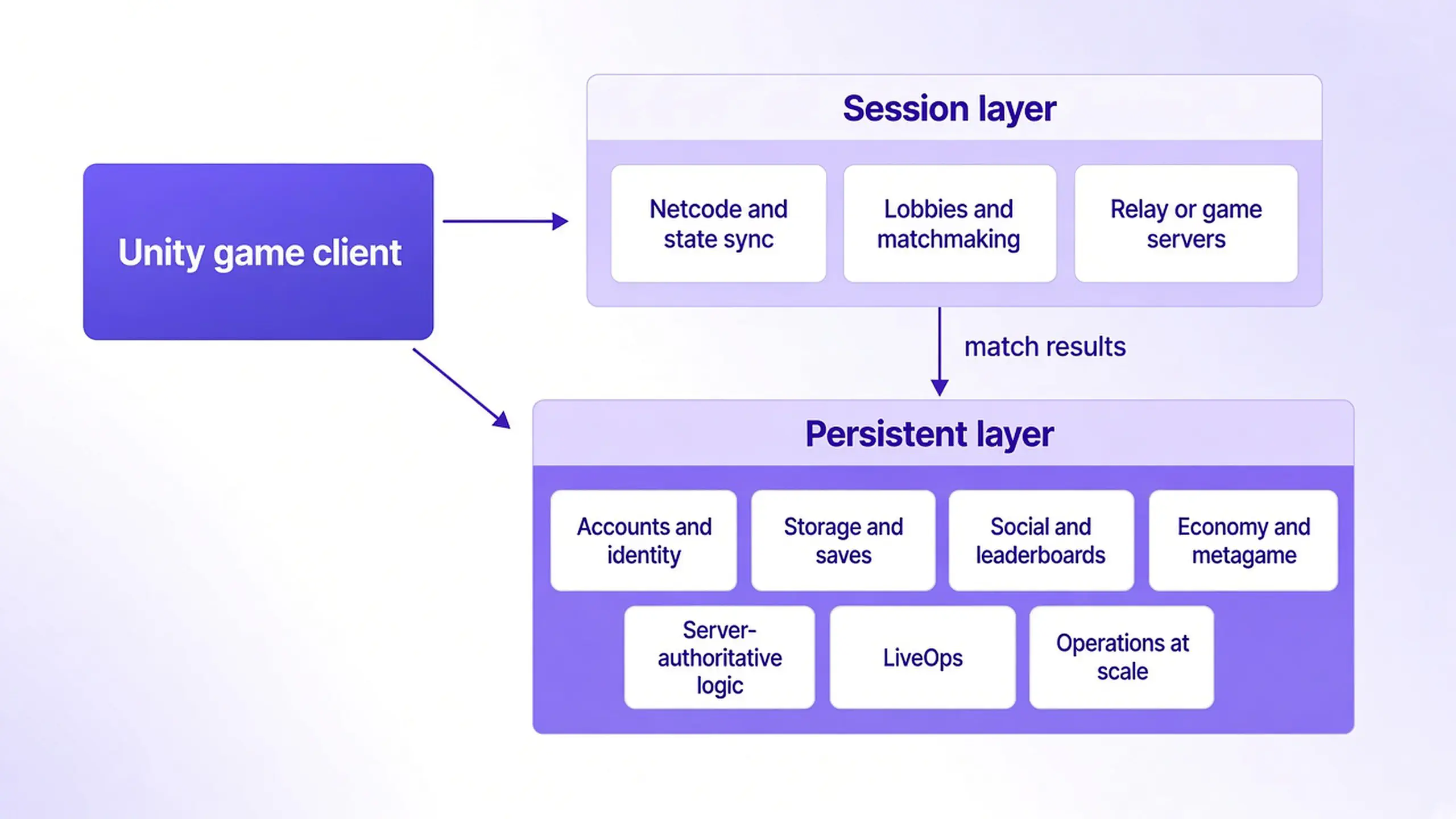
If your game needs only the top three rows, you are building a session game. If it needs any of the rest, you need a persistent game backend next to Unity.
Here is how the two layers work together in one player session. For the full build path, see how to make an online multiplayer game.
- Sign in. A returning player opens a match-3 game on a new tablet, and their device ID or linked Google account loads the same profile.
- Load the save. An idle RPG restores inventory, currencies, and quest progress from the server, not from local files.
- Matchmake. A shooter groups a four-player squad by skill and region before the round starts.
- Run the match. A competitive card game validates every move on the server so a modified client can’t deal itself a better hand. A casual co-op game relays state between trusted clients instead.
- Write the results. A racing game records the new lap time on a leaderboard and grants the reward on the server.
- Change the game live. The LiveOps team doubles a weekend reward through remote config, with no new client build.
Steps 3 and 4 are the session layer. Every other step is the persistent layer.
What Unity gives you out of the box
Unity covers the session layer well. Netcode for GameObjects and Netcode for Entities are Unity’s networking libraries for syncing state inside a match. Unity’s Multiplayer Services SDK wraps Lobby, Matchmaker, and Relay behind one “sessions” API and sets up the lobby, relay allocation, and netcode connection for each session.
Unity Gaming Services also lists persistent services, including Authentication, Cloud Save, Cloud Code, Economy, Leaderboards, and Remote Config. So the real question for a live game is not whether Unity has services. It is where your persistent layer lives, who owns it, and whether it can follow your players to the next game.
Studios usually weigh four things here:
- Engine reach. Will every title and every client (Unity, Unreal, Godot, web, a companion app) talk to the same accounts and economy?
- Ownership. Can you read the server source, export the player data, and self-host if the business needs it?
- Server logic. Can you run your own authoritative code beside the match, in a language your team already knows?
- Change risk. If a provider changes a service, how much of your game has to move? Unity ended its direct support for Multiplay Game Server Hosting on March 31, 2026 and licensed the hosting software to Rocket Science Group. Matchmaker, Relay, and Lobby were not affected, but studios on that hosting service had to plan a migration on Unity’s timeline.
Is Unity Netcode enough for a live game?
For a prototype, a party game, or co-op with friends, often yes. Netcode answers one question: how does state move between players during a match? It doesn’t answer who the player is tomorrow, what they own, or what changed in the game since last week.
Session services alone are usually enough when:
- Matches are self-contained and nothing carries over between sessions
- There is no ranked play, no tradeable items, and no currency with real value
- You don’t plan to run events or change balance after launch
You need a persistent backend once any of these become true:
- Progress, unlocks, or purchases must survive a reinstall or a new device
- Rankings, rewards, or items are worth cheating for
- You plan seasons, events, or offers on a weekly or monthly cadence
- The same players will reach your game from more than one platform or title
Any game with purchases, ranked play, or a live events plan crosses that line before launch. Decide early, because adding accounts and a server-owned economy after players already have progress on device means a migration.
The persistent layer, requirement by requirement
Accounts and identity
A live game needs one account per player that works on any device. The usual pattern is to sign in silently with a device ID on first launch, then link a platform or social login once the player has progress worth keeping. The backend must treat those identifiers as one account. In our Nakama authentication model, an account can hold several device IDs and one ID per social provider, and any of them signs the player into the same account.
Storage and saves
Saved progress belongs on the server, not in local files. The backend should store data per player with clear ownership and read/write permissions, so one player can’t edit another player’s save. It also needs a version check. A common failure: a player finishes a level on their phone, then opens an older session on a tablet. Without a version check, the tablet’s save overwrites the newer progress and the level is lost. With one, the stale write is rejected and the client reloads the current save. Nakama’s storage engine is built around object ownership, access permissions, and conditional writes.
Social and competition
Friends, groups, chat, leaderboards, and tournaments all outlive a single match, so they need server-side records and server-written scores. A leaderboard that clients write to directly is a leaderboard that cheaters own, as our matchmaking, lobbies, and parties Guide explains.
Economy and metagame
The economy (currencies, stores, inventory, rewards) sits inside the wider metagame: the progression, achievements, energy, and events that give players a reason to come back. Every grant and spend must be decided on the server. In-app purchases need server-side receipt validation, so a faked or replayed purchase never grants an item. Our metagame design guide covers how these systems fit together.
Server-authoritative logic
Some rules can’t live on the client: match results, reward payouts, anti-cheat checks, and anything that touches currency. A Unity multiplayer backend should run your own server code for them, and sometimes for the match itself. Three common models:
- Relayed: the server forwards messages between clients without running game logic, and the backend validates results and rewards after the match ends
- Authoritative on the backend: the server runs the match logic itself and validates every input, which suits turn-based, card, and many casual realtime games
- Dedicated Unity servers: headless Unity builds run each match with Unity netcode, while the backend handles matchmaking, starts sessions through a fleet manager, and records results
Our Guide on which multiplayer architecture fits a live game compares these in depth.
LiveOps
After launch, the game changes on a weekly or monthly cadence, but every client build waits for store or platform review. Game LiveOps moves those changes to the server: remote config and feature flags for tuning, audiences for targeting, experiments for testing, and live events for the calendar.
Operations at scale
Launch days and big events can multiply traffic in minutes, so the backend must expand under load, run near your players, and give your team logs, metrics, and backups. Publishers also check access control, audit trails, and compliance, as our guide to game backend scalability covers.
Why does an engine-agnostic backend matter?
An engine-agnostic backend matters because player accounts and purchase history outlive any single game or engine. Publishers mix Unity, Unreal, Godot, and web clients across titles, and a backend tied to one engine’s ecosystem turns every new title or port into a data migration. An engine-agnostic backend keeps one account, one economy, and one LiveOps calendar across every client, while Unity stays your engine and your netcode choice.
How do you choose a Unity multiplayer backend?
For a full scorecard beyond these questions, see how to choose a game backend.
| Question | Why it matters |
|---|---|
| Does it cover the whole persistent layer, or only parts of it? | Gaps become custom services your team builds and runs |
| Can it run authoritative server code in a language your team knows? | Cheat-sensitive rules must live on the server |
| Does it work with dedicated Unity servers as well as relayed play? | Your multiplayer model may change as the game grows |
| Does it have SDKs for the other engines and clients you plan to ship? | One player identity across titles and platforms |
| Can you see the source, export the data, and self-host? | Ownership and a clean exit path |
| Is there a managed option with enterprise controls? | Publishers need SSO, access control, regions, and compliance |
Where Heroic fits
We build the persistent layer that sits beside your Unity game, and it is the same layer for every other engine you ship.
- Nakama is our open-source game backend: accounts with linking, storage, friends, groups, chat, leaderboards, tournaments, matchmaking, server-side purchase validation, and custom server logic in Go, TypeScript, or Lua. It runs relayed and authoritative multiplayer, and for dedicated servers it can orchestrate session-based multiplayer on headless Unity instances through fleet integrations such as Amazon GameLift and Edgegap. The Unity client implements every server feature and includes console support, and the same server has client libraries for Unreal, Godot, JavaScript, and more.
- Hiro adds metagame systems on Nakama, including economy, inventory, progression, achievements, and event leaderboards, with a Unity SDK.
- Satori is our LiveOps platform for games: audiences, feature flags and remote config, experiments, and live events, with a Unity client SDK.
- Heroic Cloud runs the stack in production for publishers and large studios, on dedicated resources that expand within seconds without downtime, on GCP or AWS in North America, Europe, and Asia.
Nakama is used by over 1 million game developers, studios, and publishers, and our customers bring in over $5 billion in annual games revenue. Because it is the same open-source server whether you self-host or run on Heroic Cloud, you can start on one path and move to the other without rewriting your Unity game. To wire it up, start with our Unity multiplayer backend setup Guide.
FAQ
What must a Unity multiplayer backend provide?
Is Unity Netcode enough for a live game?
What is a persistent backend next to Unity?
What's the difference between netcode and a game backend?
How do I run live events in a Unity game without an app store update?
Do I still need Relay or Lobby if I use a separate game backend?
Can I use dedicated Unity servers with a separate backend?
What should I look for in a Unity Gaming Services alternative?
Enterprise game backends
See how studios ship multiplayer at scale without rebuilding infrastructure.
Walk through Nakama and Heroic Cloud: org-level access control and managed ops without rewriting your stack. Book a demo to see it in action.
- SOC 2 Type II certified
- Proven at 2M concurrent users
- Dedicated capacity, no CCU limits
