
Mobile Game Backend: What Live Games Need

Accounts, push, purchases, and live updates for iOS and Android games that run for years.
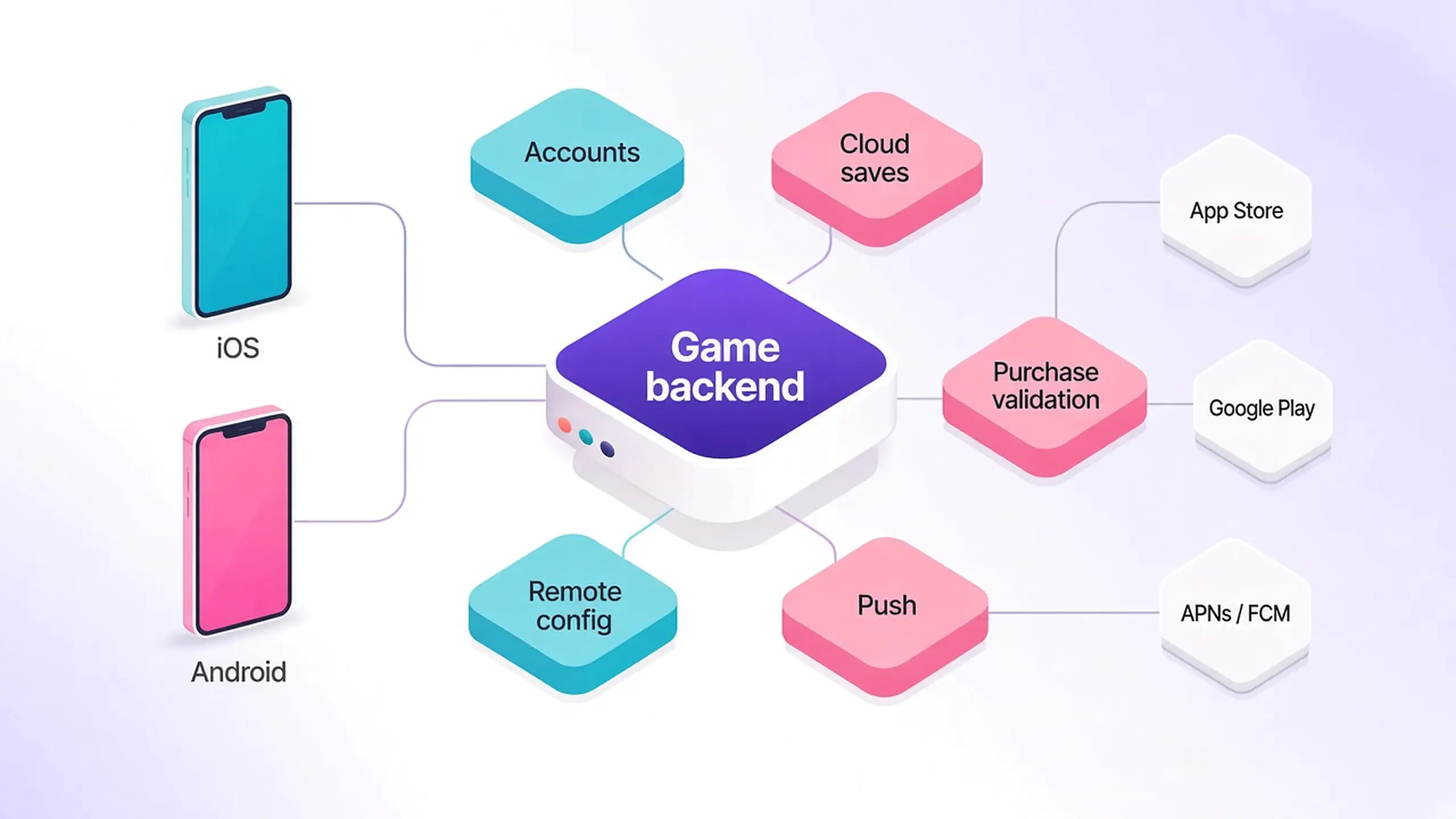
A mobile game backend is the server-side system behind an iOS or Android game. It keeps player accounts, saved progress, purchases, and live content on servers you control instead of on the phone. A live mobile game needs that backend to do six jobs well: sign players in without friction, keep saved progress safe across phones and offline sessions, reach them with push notifications, validate every in-app purchase on the server, change the game without waiting on store review, and deliver LiveOps events and offers to clients that are often offline, out of date, or sitting in a player’s pocket.
Our guide to what a game backend is covers the general category. This is the mobile cut: what changes when players are on phones, releases go through two app stores, and revenue depends on receipts you can’t trust from the client.
What is a mobile game backend?
A mobile game backend is the same category of software as any game backend: accounts, storage, social, multiplayer, and server logic. What makes it “mobile” is the set of platform edges it has to handle. Phones change hands, apps get suspended in the background, players arrive through Game Center or Google Play Games instead of a launcher, every purchase comes back from a store, and every client release waits on Apple and Google.
For a publisher running several live titles, the backend is also where operations live. It is where the LiveOps team changes a store price at 9 a.m. on launch day without filing a client build, and where finance gets a purchase history that matches what the stores actually paid out.
What does a live mobile game need from a backend?
Here is the short checklist. The rows that mobile makes hardest each get a section below.
| Need | Why mobile makes it harder | What the backend should do |
|---|---|---|
| Player accounts | Players reinstall, switch phones, and rarely type passwords | Silent device sign-in first, then link Game Center, Google Play Games, or Sign in with Apple |
| Cloud saves | Phones go offline and old sessions write stale data | Keep the save on the server and reject stale writes with a version check |
| Push and inbox | Push needs APNs on iOS and FCM on Android, plus player permission | Store device tokens per player, send by segment, and keep an in-game inbox |
| Multiplayer and social | A modified client can fake a win or a leaderboard score | Server-owned matchmaking, leaderboards, and match results |
| In-app purchases | Client-side checks can be faked, replayed, or shared | Server-side purchase validation with Apple and Google, plus refund and subscription notifications |
| Release cadence | Every client change waits on store review and slow player updates | Remote config and feature flags so most changes skip a build |
| LiveOps | Events and offers have to land on many client versions at once | Segment-aware events and experiments driven from the server |
| Scale | A good event or a store feature can multiply traffic in minutes | Capacity that expands under load without downtime |
Player accounts that survive a new phone
Mobile players won’t fill in a registration form before they’ve played a level. Most live mobile games use two steps.
- Sign in silently on first launch. Generate a random ID on first launch, store it in the app’s private storage, and use it to create the account. The player is in the game in seconds.
- Link a platform identity later. Once the player has progress worth keeping, link Game Center, Google Play Games, Sign in with Apple, or another social login to the same account. That linked identity brings their progress back after a reinstall or a new phone.
The backend has to treat these as one account with several identifiers, not as separate users. In our Nakama authentication model, an account can hold several device IDs and one ID per social provider, and any of them signs the player into the same account.
Two store rules belong in your account design from day one. If you offer third-party social login on iOS, Apple’s review guidelines expect an equivalent privacy-focused login option, which Sign in with Apple covers. And both stores require apps that let players create an account to offer account deletion: Apple requires it inside the app, and Google Play requires an in-app path plus a web link where players can request deletion. Account deletion needs to be a backend feature, not a support ticket.
Sessions matter more on mobile than on PC, because iOS and Android suspend apps in the background and drop the socket. Issue a short-lived session token plus a longer-lived refresh token, so a returning player resumes without signing in again and the client reconnects to fetch anything it missed.
Cloud saves and offline play
Phones go offline in tunnels, on planes, and in the background, so a mobile game backend has to accept progress that arrives late. Keep the authoritative save on the server, let the client queue changes while offline, and use a version check so a stale write from an old session can’t overwrite newer progress. Nakama storage supports this with conditional writes. Anything that touches currency or purchases should be decided on the server, not merged from the client.
Push notifications and the in-game inbox
Push is the one channel that reaches a player who isn’t in your game. On iOS it goes through Apple Push Notification service (APNs). On Android it goes through Firebase Cloud Messaging (FCM). Both need a device token, both need the player’s permission (Android has required a runtime permission since Android 13), and tokens change, so the client should send a fresh one to the backend on each launch.
What the backend adds is targeting. When it stores each device token against the player record, you can send “your energy is full” to one player, or a tournament reminder to everyone in a segment, without exporting lists into a separate tool. Our Satori player messaging works this way: messages go to an audience on a schedule or tied to a live event, through APNs, FCM, OneSignal, or a webhook.
Plan for players who decline push. An in-game inbox, with messages stored on the server until the player opens the app, covers them. Nakama’s in-app notifications can be persistent for exactly this reason: they wait until the player is back online.
In-app purchase validation on the server
For many free-to-play mobile games, in-app purchases are the main revenue line, which makes the purchase path the part of the backend you can least afford to get wrong. A purchase checked only on the client can be faked, replayed for a second reward, or shared between players.
Server-side purchase validation fixes that, and it is what Google itself documents: verify each purchase from a backend you control with the Play Developer API. The flow:
- The player buys through the App Store or Google Play SDK.
- The client sends the purchase receipt or token to your backend.
- The backend verifies it with Apple or Google.
- The backend stores the result against the player and returns it.
- Only then does the game grant the item, currency, or subscription.
- After a successful grant, acknowledge the Google Play purchase (or consume a consumable, which also acknowledges it), and finish the App Store transaction in StoreKit. Google Play refunds purchases that stay unacknowledged for three days.
The details separate a real in-app purchase backend from a thin proxy. Every validated purchase should be stored, so the backend can tell a fresh purchase from a replay. Nakama’s IAP validation returns a seenBefore flag for this and covers App Store validation, Google Play purchase validation, and Huawei. Refunds and subscription changes arrive later as server-to-server notifications from the stores, so the backend should update purchase state and let your game logic revoke access or send a win-back message. And on iOS, App Review expects a way to restore non-consumable purchases and subscriptions. StoreKit handles the restore on the device, and a server-side purchase history lets the backend re-grant those items to the same account on a new phone.
Shipping around store review
Every mobile client change goes through App Store or Google Play review and then waits for players to update, so a hotfix that ships in hours on PC can take days to reach most mobile players. Apple says App Review typically handles at least 50% of submissions in under 24 hours and 90% in under 48 hours, so plan your event calendar around a two-day review window. After approval, Apple’s phased release spreads automatic updates over seven days, and Google Play’s staged rollout releases to a percentage of players you choose. Even after full rollout, some players stay on old versions for weeks.
So a live mobile game always has several client versions talking to the same backend. Two things follow.
- Move tuning to the server. Store prices, reward amounts, event schedules, and difficulty values belong in remote config, not in the build. Nakama can serve remote config from server code or its storage engine, and our Satori remote configuration adds feature flags with variants per audience and a console, so the LiveOps team can change a value without a client release or a store update.
- Keep the server compatible with old clients. Add fields instead of renaming them, and use a minimum-version flag to send players on very old builds to the store when a change truly needs new client code.
LiveOps for mobile games
Game LiveOps on mobile runs on a tight cadence: daily rewards, weekly events, monthly seasons, and offers tuned by segment. The backend has to make that cadence cheap. Events and offers should be scheduled on the server, targeted at audiences (new players, lapsed spenders, a region), and measured, so the team can test a store layout on 10% of players before rolling it out. Because a player on an old build may not have the new art or UI, target by client version as well as by audience, so nobody gets an offer their build can’t render.
The other mobile reality is spikes. Gram Games, a Zynga studio running Merge Dragons on Nakama, saw well-timed events push concurrent users to as much as four times their usual numbers almost instantly. Your own push campaigns can cause the same spike, so send large campaigns in batches instead of hitting every player at once. Size capacity for the event peak, not the daily average. Our guide to game backend scalability covers how.
Do iOS and Android games need the same backend?
Yes. One game backend should serve both, with one account per player and one economy. Separate backends per platform split your player data, double your server logic, and make cross-platform progress hard to add later. What differs is the edge of the system:
| Edge | iOS | Android |
|---|---|---|
| Platform sign-in | Game Center, Sign in with Apple | Google Play Games, Sign in with Google |
| Push service | APNs | FCM |
| Purchase validation | App Store signed transactions and App Store Server Notifications | Google Play purchase tokens and real-time developer notifications |
| Release path | App Review, then phased release | Play review, then staged rollout |
A good mobile backend hides these differences behind one set of APIs, so your game code calls “authenticate”, “validate purchase”, and “send message” the same way on both. Cross-platform identity, where one player signs in on a phone and a PC, works the same way: link each platform’s login to the same account.
Build, buy, or both
You can build all of this yourself, and it is reasonable when the backend is your product. The useful split is ownership: build the systems that make your game different, and buy the ones whose failure modes are already known, like receipt replays, missed refund notifications, expired push tokens, and clients three versions behind.
Our guide to choosing a game backend scores platforms on scale, multiplayer, ownership, pricing, and engine fit. If your mobile game is also multiplayer, how to make an online multiplayer game covers the realtime side.
Where Heroic fits
Heroic Labs builds the backend stack that live mobile games run on.
- Nakama is our open-source game backend: device and social authentication with account linking, storage, social features, realtime multiplayer, in-app notifications, remote config, and server-side purchase validation for Apple, Google, and Huawei. It has client libraries for Unity, Unreal, Godot, Java and Android, Swift, and more, so one backend covers every engine your studio uses.
- Hiro adds metagame systems on top of Nakama, including the economy, virtual store, energy, and progression features most mobile games need.
- Satori is our LiveOps platform for games: audiences, feature flags and remote config, experiments, live events, and player messaging through push and the in-game inbox.
- Heroic Cloud runs it in production for you, on dedicated resources that expand within seconds without downtime, on GCP or AWS in North America, Europe, and Asia, with SOC 2 Type II certification.
Nakama is used by over 1 million game developers, and our customers bring in over $5 billion in annual games revenue. Publishers already ship mobile games on this stack. Bandai Namco Mobile uses Nakama and Hiro for its iOS, Android, and Apple Arcade titles. TapSlots runs Vegas Cherry Slots on Nakama, Hiro, and Satori, with Heroic Cloud handling the infrastructure. Because Nakama is the same open-source server whether you self-host or run on Heroic Cloud, you can start on one path and move to the other without rewriting your game.
FAQ
What is a mobile game backend?
What does a live mobile game need from a backend?
Why validate in-app purchases on the server?
How do mobile games update content without an app store update?
What happens to players on old app versions?
How is a mobile game backend different from a general mobile BaaS?
Can a mobile game backend send push notifications?
How much traffic should a mobile game backend plan for?
Enterprise game backends
See how studios ship multiplayer at scale without rebuilding infrastructure.
Walk through Nakama and Heroic Cloud: org-level access control and managed ops without rewriting your stack. Book a demo to see it in action.
- SOC 2 Type II certified
- Proven at 2M concurrent users
- Dedicated capacity, no CCU limits
