
How Player Segmentation Powers Game LiveOps

What a LiveOps audience is, which player segments to start with, and what happens when players move between them.
Player segmentation in game LiveOps is the practice of splitting your player base into groups, called audiences, based on what players do and who they are, and then using those groups to decide who receives each live event, feature flag, experiment, and message. It is the game audience targeting layer of a live game. Without it, every change you ship hits every player at once. With it, a lapsed spender, a player on day two, and a 300-session veteran can each see a different version of the same game, without a new client build.
That makes segmentation less like a report and more like a switch. A segment in an analytics dashboard tells you something about players. A LiveOps audience changes what those players experience. The retention tactics built on top of it, such as win-back offers, live in our Guide on how to reduce game churn rate, so this one stays on the targeting primitive underneath them.
How does player segmentation power game LiveOps?
Every LiveOps change answers two questions: what changes, and for whom. The live event, the feature flag value, the experiment variant, or the push message answers the first. The audience answers the second. Our Satori docs put it in one line: audiences define who receives content, and feature flags define what they receive.
The leverage comes from reuse. You define an audience once, from data, and attach it to every lever in your game LiveOps toolkit:
| LiveOps lever | What the audience decides | Example |
|---|---|---|
| Live events | Who is enrolled in a time-boxed event | A weekend tournament open only to players past level 30 |
| Feature flags and remote config | Which value of a flag each player receives | A gentler difficulty curve for players who failed a level three times |
| Experiments | Who participates, and how they split across variants | A 50/50 test of a new starter bundle, run only on non-spenders |
| Messages and offers | Who receives a push, inbox message, or personalized offer | A win-back offer for players who spent before but have not played in 14 days |
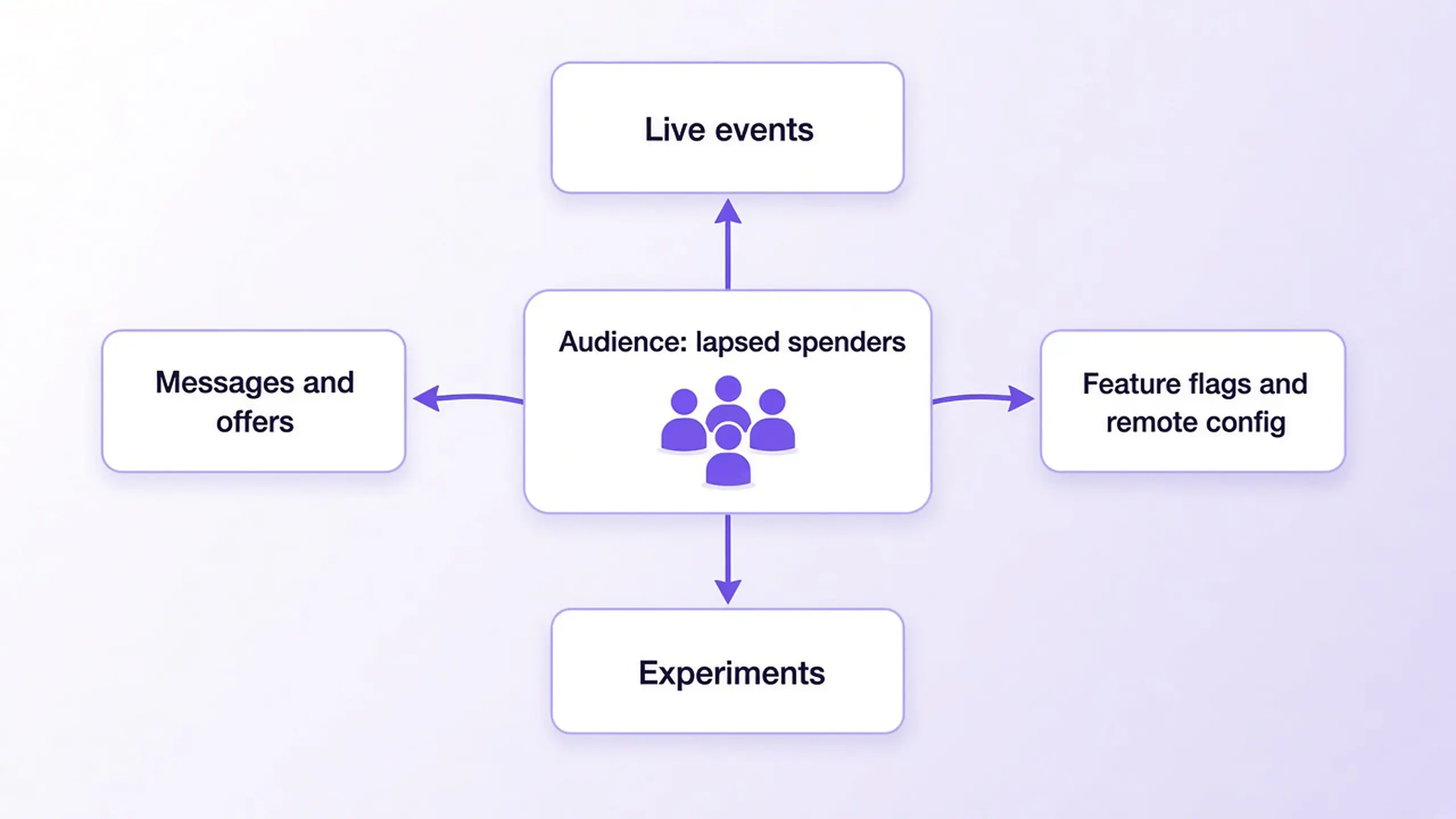
Because one definition feeds all four, tightening “lapsed spenders” from 14 days to 30 updates every event, flag, and message that targets it.
What is a LiveOps audience?
A LiveOps audience is a named group of players defined by a rule, such as “spent at least once and has not played in 14 days”, whose membership updates as players play. Think of it as a saved question about your players, not a saved list of them: a list goes stale the moment a player changes, while the question keeps getting re-asked. Three properties separate a real LiveOps audience from a CRM segment dump:
- It is defined from player data, not hand-picked. Rules filter on player properties, and includes and excludes override the rule for specific players when you need to force one account in or out. In Satori those come in three types: default properties available from authentication (country, platform, client version), computed properties derived from events (how many times a player started a session, when they last purchased, their lifetime spend), and custom properties your game defines (character class, subscription status, guild membership).
- Membership stays current. Players cross into and out of an audience as their behavior changes. A player who returns and buys falls out of “lapsed spenders” on their own.
- The game reads it at request time. When the client fetches its configuration, the platform checks which audiences that player belongs to and returns the right flag values and events. The game code does not need to know which segment the player is in.
An audience is also not a cohort. A cohort is fixed by a shared start point, such as everyone who installed in the same week, and it exists to measure retention over time. An audience is defined by a rule that players move in and out of, and it exists to change what they see. You read cohorts; you target audiences.
Most targeting power sits in computed properties: every event you send becomes a count, first and last time seen, and value aggregates such as total spend. That is why behavioral segmentation for games starts with event design. If the client never sends a purchaseCompleted event, there is no “spenders” audience to build.
What player segments should a live game start with?
Start with a handful of segments tied to the player lifecycle, not dozens of micro-segments. These seven cover most first-season LiveOps for a mobile or cross-platform title:
| Segment | Example rule | What it usually drives |
|---|---|---|
| New players | Account created in the last 2 days | Starter bundle, onboarding rewards, early difficulty tuning |
| Engaged non-spenders | 20+ sessions, no purchases | First-purchase offers, ad-free trials, experiments on pricing |
| Spenders | At least one completed purchase | Premium events, value bundles, exclusion from first-purchase offers |
| Lapsed spenders | Spent before, no activity in 14 days | Win-back offers and return rewards |
| Veterans | 100+ sessions | Hard-mode events, tournaments, early access to new content |
| Top-revenue countries | Players in your strongest revenue regions | Events timed to local peak hours, offers priced for the region |
| Internal and QA | Flagged test accounts | Testing events and flags in the live build before players see them |
The thresholds are starting points, not rules. Tune them to your game’s session cadence: 14 days without a session means something different in a daily puzzle game than in a competitive shooter played on weekends.
Two segments on that list are easy to skip and expensive to miss. The QA audience lets your team play the live game in a different configuration from players: Well Played Games, for example, segments players by lifecycle stage (new, returning, engaged non-spender, spender) and uses feature flags to test live events internally before general release. Spenders also matter as an exclusion, so a player who paid last week never sees a first-purchase discount.
Add a soft-launch audience (a client version range plus a few countries) when you gate a feature before global rollout, and game-specific segments only once the basics run.
What happens when a player changes segment?
Players move between audiences constantly, and each LiveOps lever handles that differently. Most targeting bugs start here:
- Feature flags re-evaluate on the next request. A player who crosses into “veterans” gets the veteran value of a flag the next time the client fetches its config.
- Experiments should not move players mid-test. Satori keeps a player in their assigned variant for the whole phase, even if their audience membership changes, so a non-spender who buys mid-experiment does not jump groups and pollute the result.
- Live events usually keep players in once they qualify. With sticky membership on (Satori’s default), a player who levels past the event’s range still finishes the event they started. Turn it off when you want players to graduate to a better-suited event instead.
- Messages stop when the player leaves the segment. A player who returns before a scheduled win-back push is dropped from it.
Freshness matters too. In Satori, audiences recompute on a schedule (every 10 minutes by default), a player’s membership updates immediately when they send an analytic event, and flags, events, and experiments check eligibility against the player’s current properties at request time. The practical rule: if a player must qualify instantly, for example right after a purchase, make sure the client sends the event that changes their membership before it fetches config again.
Common player segmentation mistakes
- Too many tiny segments. Twenty overlapping audiences of a few hundred players are impossible to reason about and too small to measure. Check audience size before you attach one.
- Overlapping variants with no priority. When a player matches two variants of the same flag, something has to win. In Satori the first matching variant in priority order wins, so order matters.
- Segmenting from a stale export. An audience built from last month’s CSV targets last month’s players. Prefer live rules, and when segments already exist in your analytics stack, import them as managed audiences rather than copying them by hand.
- Client-writable entitlements. If the client can set “has premium” on itself, so can a cheater. Keep entitlement properties read-only and set them from the server or console.
- No control group. A win-back offer that “worked” may have reached players who were coming back anyway. Run the change as an experiment with a control variant before you call it a win.
- QA accounts in production audiences. Test accounts that qualify for real segments distort metrics.
Who owns segmentation on a LiveOps team?
On publisher and larger studio teams, engineering owns event design and the live team owns audiences. In practice, a designer asks for a segment the data cannot express yet, say “players who abandoned a guild”, an engineer adds the event or custom property to the client, and from then on the analyst and designers build and change audiences in a console without a code deploy. That split is what lets a LiveOps team run several events a week across a portfolio of titles. Shared audiences keep the player engagement work consistent: the analyst who defines “lapsed spenders” once saves every designer from rebuilding it per campaign.
Where Satori fits
Our Satori is a LiveOps platform for games with event capture, segmentation, experiments, feature flags, and analytics, so its player segmentation tool is wired straight into the levers above. In Satori, a segment is called an audience, and one audience definition works across live events, experiments, feature flags, and message schedules: update it once and it applies everywhere it is referenced. Default audiences such as New Players, Tier-1 Countries, and All Spenders exist from the first integration. The segmentation docs cover the details.
For publishers and larger studios, Heroic Cloud runs Satori fully managed, alongside our Nakama game backend if you use it, with multi-region deployment and SOC 2 Type II compliance, or in your own cloud account through Private Cloud. Either way, the player data behind your audiences stays yours, and Satori can export raw events to your own warehouse, such as BigQuery or Snowflake.
FAQ
How does player segmentation power game LiveOps?
What is a LiveOps audience?
What player segments should a live game start with?
What is the difference between a player segment and a cohort?
What data do you need for behavioral segmentation in games?
How often should player segments update?
Can I use segments from my existing analytics tool?
What is a player segmentation tool?
Built for live games
See how Heroic Labs helps studios run LiveOps that move retention and revenue.
Walk through Satori: retention and RoAS analytics, audiences, A/B tests, and live events in one LiveOps workflow. Book a demo to see it in action.
- SOC 2 Type II certified
- Audiences, A/B tests & live events in one platform
- Supporting $5B+ in games revenue
