
What Does a Game LiveOps Team Do? Roles, Calendar, and Tools

The people, the schedule, and the feature-flag tools that keep a live game changing after launch.
Launch is the start line for a live game, not the finish. A game LiveOps team owns everything that happens after it. The build you ship on day one is the first version players ever see. Everything after that is the team’s work: the events they run, the offers they drop, and the features they test on a slice of players first.
In games, LiveOps means live operations: the practice of operating your game as a live service after launch, to drive retention, engagement, and monetization. A LiveOps game earns its money from players who already installed it, and keeping those players is cheaper than buying new ones. Depending on the study and the industry, acquiring a new player costs five to 25 times more than keeping one. That math is why studios staff a team for this at all.
The team’s edge is speed without a code deploy. Game feature flags and remote configuration let them change what players see from a console, so a change goes live without waiting on an app-store build. Your engineers stay on the game.
What does a game LiveOps team do?
A game LiveOps team plans, ships, and measures live changes to a running game. Day-to-day work means scheduling a weekend tournament, dropping a limited-time offer, and rolling a new feature to a test group. Then the team reads whether any of it moved the numbers. None of it ships in the original build. All of it lands on players who are already in a game you shipped months or years ago.
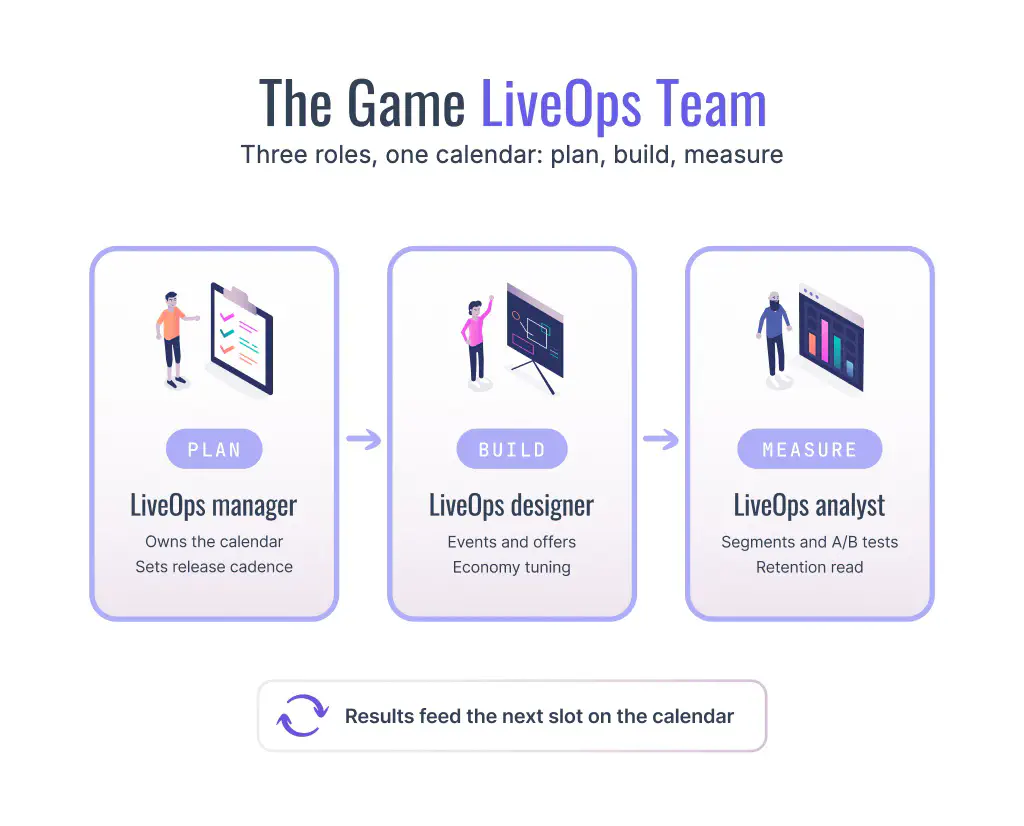
Most teams split the work across three roles. A manager owns the plan and the calendar. A designer builds the events, offers, and economy changes. An analyst reads player behavior and calls what worked. Small studios fold all three into one or two people. Publishers and larger studio orgs run a full team per title, sometimes a shared team across a portfolio.
| Role | What they own | A day-in-the-life example | What they watch |
|---|---|---|---|
| LiveOps manager | The plan, the calendar, and the release cadence | Locks the December event schedule and the prize pools | Live event coverage and slippage |
| LiveOps designer | The events, offers, rewards, and economy tuning | Builds a weekend tournament and its reward curve | Participation and spend per event |
| LiveOps analyst | Segmentation, experiments, and the retention read | Runs an A/B test on a new reward and reports the winner | Seven-day retention and conversion |
Team size follows the stage of the studio more than the genre. A common shape looks like this.
| Stage | Typical LiveOps headcount | How the roles combine |
|---|---|---|
| Small studio | One or two people | One person plans and designs; the analyst role is shared with a producer or founder |
| Mid-size studio | Three to five per live title | Dedicated manager and designer; analytics often shared across titles |
| Publisher or portfolio | A full team per title, plus shared specialists | Manager, designers, and analysts per game, with a central data or LiveOps group across the portfolio |
What is a LiveOps manager in gaming?
A LiveOps manager in gaming owns the live plan and the calendar. They decide what runs, when it runs, and which players see it. They line up the seasonal beats, set the cadence of events and offers, and keep the schedule from colliding with itself. When a live event underperforms, the manager is the one who reworks the next one.
A manager’s week has concrete outputs. They lock the next calendar window, run the post-mortem on the event that just ended, and review cadence against signs of player fatigue. In a publisher org the role often reports to the game’s producer or to a central LiveOps lead who sets priorities across the portfolio. On a small team, the manager is often the designer and the analyst too.
What does a LiveOps designer do?
A LiveOps designer builds the content that goes live. They author live events, tune the economy, shape the offers that go out to each segment, and write the in-game messages and push notifications that announce them. A designer decides that players who cleared a hard level get a harder optional challenge, and that lapsed spenders see a comeback bundle. The work is config, not a code release, so a designer ships most of it without waiting on engineering.
What does a LiveOps analyst do?
A LiveOps analyst reads the results and decides what worked. They define player segments, run experiments, and watch retention. An analyst groups players who failed a boss three times, tests a difficulty tweak against a control, and reports whether it lifted completion. Retention is the metric that pays the bills, and a small lift compounds over a game’s life.
Testing also finds wins that expert judgment misses. One shelved headline idea at Bing, tried only because an engineer ran a quick A/B test, lifted revenue 12 percent, worth more than 100 million dollars a year. The analyst’s job is to find those wins and prove them before the team rolls a change wide.
What is a LiveOps calendar?
A game LiveOps calendar is the schedule of every live event, offer, and test a game will run. It maps each entry to dates and player segments, and it is the team’s core artifact. The manager owns it, the designer fills it, and the analyst reads what each entry produced. A LiveOps calendar for a live-service game looks weeks or months ahead, from seasonal events to the experiments running quietly underneath.
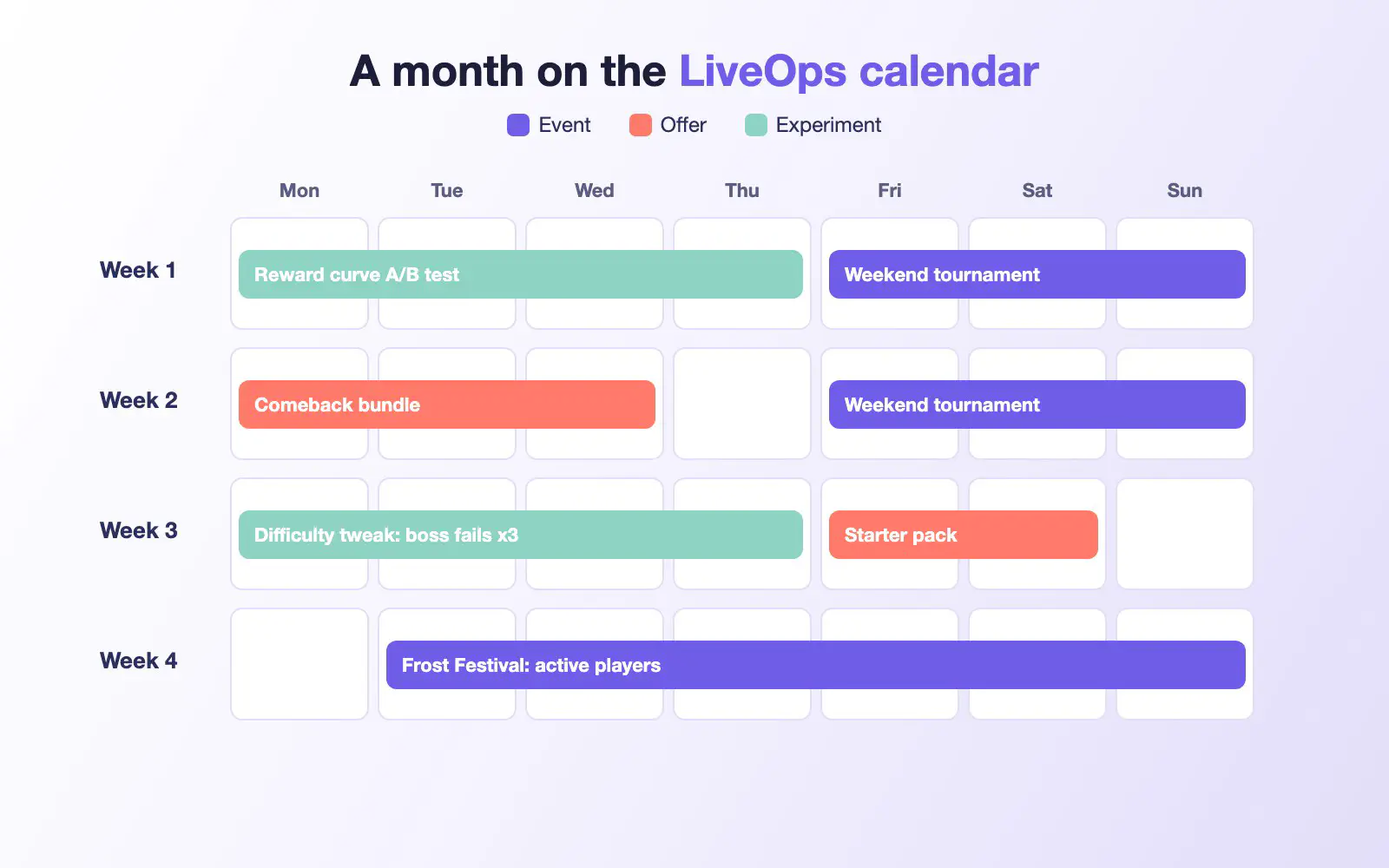
The same month as a table:
| Week | Event | Offer | Experiment | Segment |
|---|---|---|---|---|
| Week 1 | Weekend tournament | None | Reward curve A/B test | All active players |
| Week 2 | Weekend tournament | Comeback bundle | None | Lapsed spenders (offer) |
| Week 3 | None | Starter pack | Difficulty tweak | Players who failed a boss three times (test) |
| Week 4 | Frost Festival | Festival bundle | None | Active players, excluding last month’s lapsed |
The calendar is also how a team ships without chaos. Here is the path from idea to live for a single event, following the six stages of the Satori LiveOps lifecycle.
- Target. The manager slots a Frost Festival onto the calendar for the last week of December, and the analyst defines the audience: active players, excluding anyone who lapsed last month.
- Configure. The designer builds the event in the console, with its rewards and its offer bundle.
- Test. The analyst runs an experiment on two reward amounts with a slice of that audience before the full launch.
- Launch. The team sets the start and end dates, so the event turns on and off on its own.
- Operate. While the event runs, the team adjusts reward values or targeting from the console, with no new build.
- Analyze. The analyst reads participation and retention for the event, and the team keeps what worked for the next slot.
Because the whole thing is scheduled, the team can set changes ahead of time and adjust them from the console based on what the data shows, not through a new build.
What are game feature flags?
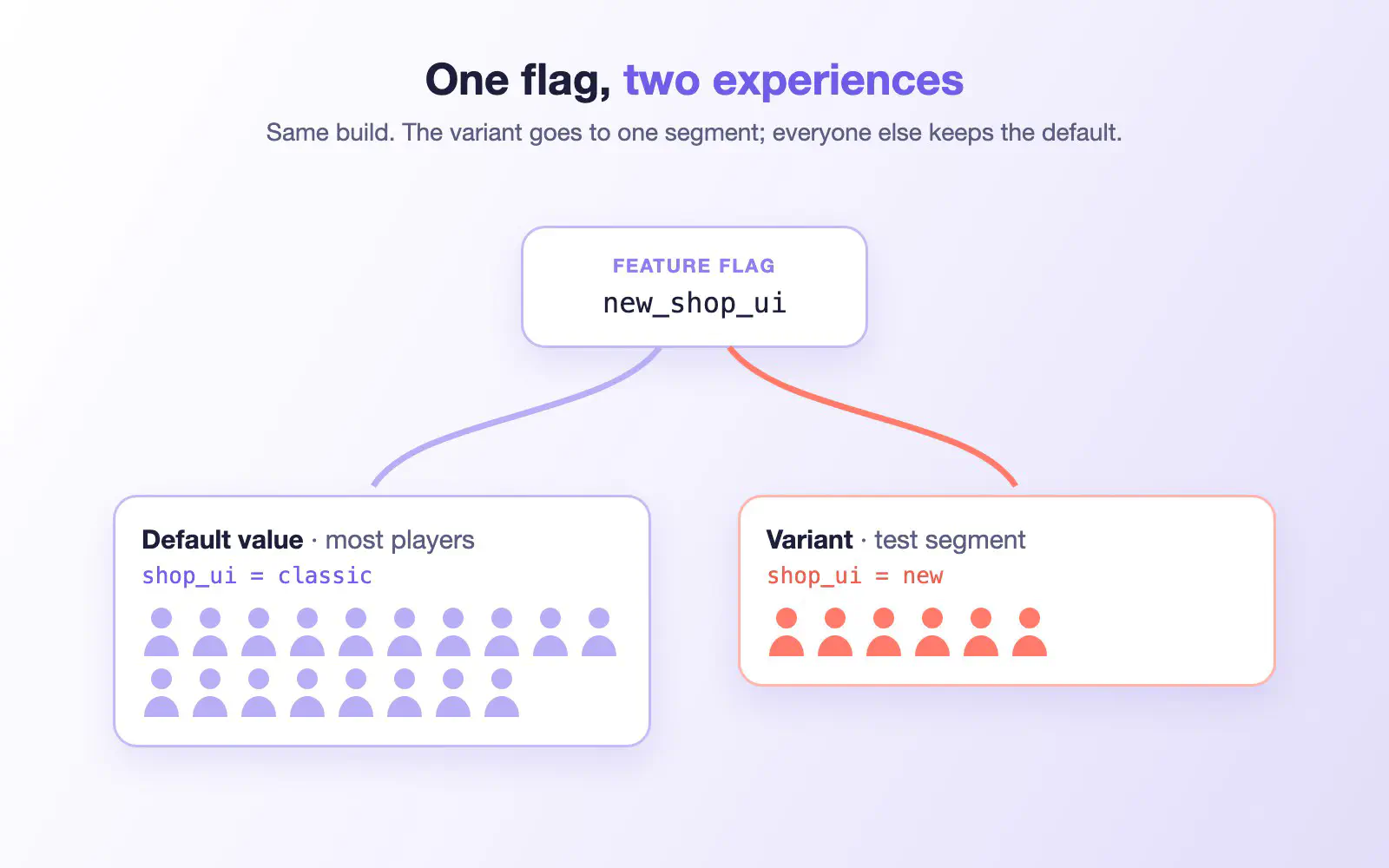
A game feature flag is a named setting with a value that your game reads from the server at runtime, so you can change a piece of your game for chosen players without shipping new code. At its simplest, a flag is an if-statement around a bit of functionality. In a live game, a flag can carry anything from an on/off toggle to a full reward configuration. Every player gets the default value, and a variant serves a different value to a specific audience, so the same build behaves differently for different players.
Remote configuration, or remote config for games, is what feature flags make possible: because a flag carries a value, the team can adjust a reward amount, a price, or an event’s targeting while the game runs. Live events and experiments can also override a flag’s value on their own schedules, then hand it back. That is what LiveOps without an app store update means in practice. The team changes what players see from a console, and no one downloads a new build to get it.
Three primitives cover most of the toolkit.
| Tool | What it does | When to use it | Example |
|---|---|---|---|
| Feature flag / remote config | Sets a value or toggles a feature per segment | A permanent or long-lived setting | Ship a new UI to 10% of players, then widen it |
| Live event | Runs scheduled content for a fixed window | A recurring or seasonal beat | A weekly tournament that turns on Friday |
| Experiment | Tests variants against a goal metric | A change you want to prove first | An A/B test on two reward curves |
A team promotes a winning experiment variant into a permanent feature flag once the data proves it. That is the difference between a flag in a live game and a plain on-off toggle. The flag is backed by a segment and a result, not a manual guess.
Where do LiveOps tools come from?
You have three broad ways to get this tooling. You can self-host an open-source stack and build the event pipeline, the segmentation, and the experiments yourself. You can buy a managed LiveOps platform and configure it instead of building it. You can also use the LiveOps service tied to your game engine’s cloud, which is convenient but couples you to that engine.
The real question is build versus buy.
| Path | Time to ship | Ops burden | Customization | Lock-in |
|---|---|---|---|---|
| Build in-house | Often a year or more before the first event | You run the pipeline and on-call | Total, if you can maintain it | Your own code and upkeep |
| Buy a platform | Typically weeks to first live event | The vendor runs the platform | Config-deep, plus your own logic | Portable if the core stays open |
| Hybrid | Months, core bought, edges built | Shared | High on the parts you build | Lower with an open core |
Buy scales with the org. A small studio through a publisher can adopt a platform and grow into it without giving up ownership of its data.
Where this runs
Our Satori is the LiveOps platform for games, and the buy path built for them. It gives a LiveOps team event capture, audiences, a live events calendar, experiments, feature flags, and player messaging in one console, with performance monitoring to read the results. The live team works without pulling in engineers for every change. Sergei Vasiuk, Director of LiveOps at Wargaming, calls Satori “a highly sophisticated and scalable LiveOps product to personalise player experiences without the need to constantly engage the engineering team.” Satori works on its own or paired with our Nakama backend. You run it fully managed on Heroic Cloud or in your own cloud account through Private Cloud, and either way your player data stays yours.
For larger studios, publishers, and enterprise teams, our Heroic Cloud is the managed path. It runs your Satori LiveOps and your enterprise game backend on dedicated, multi-region clusters, with the production ops and compliance a live title needs. You do not rewrite your stack to get there. Real studios run this in production. Remedy launched FBC: Firebreak, their first ever multiplayer experience, on our full Heroic game stack.
A game LiveOps team is three roles, one calendar, and a set of feature-flag tools that change a live game without a new build. If you want that in one console you run on your own terms, start with our Satori platform.
FAQ
Is game LiveOps only for mobile games?
How big is a game LiveOps team?
Do you need engineers to run day-to-day LiveOps?
Can a LiveOps team change a live game without an app-store update?
What is the difference between a feature flag and a live event?
What LiveOps tools do games use?
Where does a game LiveOps platform run?
Built for live games
See how Heroic Labs helps studios run LiveOps that move retention and revenue.
Walk through Satori: retention and RoAS analytics, audiences, A/B tests, and live events in one LiveOps workflow. Book a demo to see it in action.
- SOC 2 Type II certified
- Audiences, A/B tests & live events in one platform
- Supporting $5B+ in games revenue
