
Game Backend Scalability Best Practices for Live Games

Seven steps we work through with studios, publishers, and larger studio orgs before a launch spike. Drawn from live titles and a public two million CCU scale test.
Most game backend scalability best practices you’ll read were written for web traffic. Games don’t behave like web traffic. A launch spike lands in minutes, every connected player holds an open socket all session, and a daily event drags your whole population into the same fifteen minutes. We’ve watched that pattern break backends for a decade. What follows is the order we work through with studios building a scalable game backend, with the real decision at each step called out.
How do I scale a game backend?
Start with a load test on a production-class deployment running your own server code. Then fix the data model so writes spread across rows and nodes. Size compute and database separately, and leave headroom on both. Cache in process, deploy close to your players, and alert on 95th percentile latency. Hardware comes last.
1. Load test the deployment you’re actually shipping
Development instances run on shared, burstable resources and can’t be scaled, so their numbers tell you nothing about launch day. Our load testing guide says it plainly: use a production-type deployment dedicated to the test. We recommend Artillery because it drives WebSocket connections, and k6 works too. Writing TypeScript or JavaScript server code? Raise the JSVM pool counts first. The default of 64 concurrent VM-based requests won’t survive a high-concurrency test.
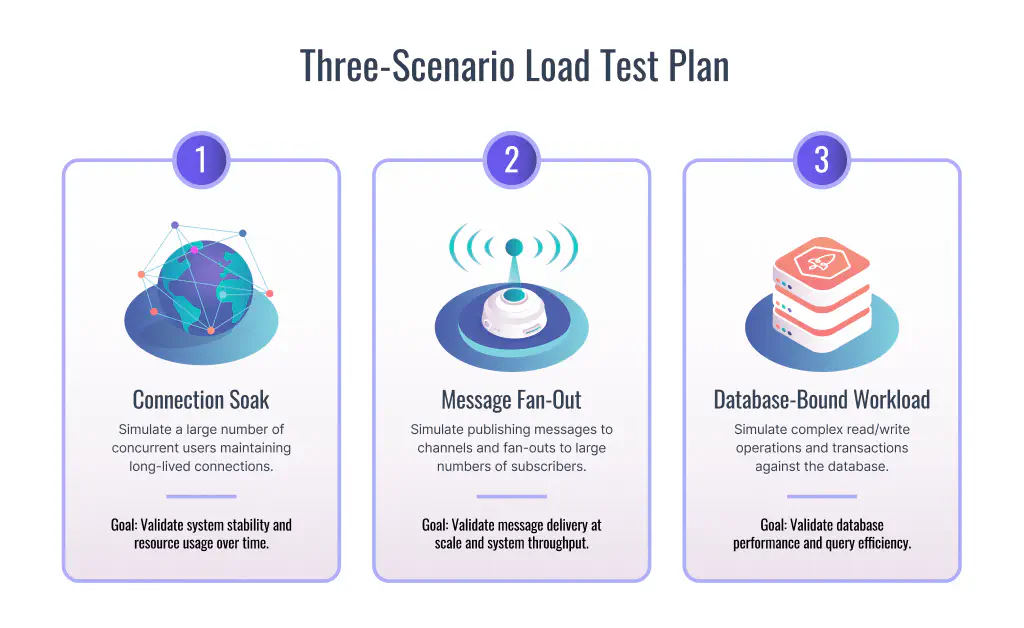
The decision here is scenario design. Authenticate, open a socket, and idle is a connection test, not a load test. Code Wizards ran three scenarios against our Nakama on Heroic Cloud and published the results.
| Scenario | Workload | Headline result | Duration |
|---|---|---|---|
| Stability run | Connection soak and account creation | 2.05 million connected clients, zero percent error rate, 683 new accounts per second | 4 hours |
| Realtime run | Chat message fan-out across channels | 400,000 chat channels | 4 hours |
| Database-bound run | Database read and write throughput | 22,300 requests per second, 95th percentile under 26.7ms | 4 hours |
That’s what a real test looks like.
2. Model your data before you buy hardware
The most expensive scaling mistake happens in your schema, not your cluster. Studios pull the whole save tree out of the engine, serialize it to JSON, and write it back constantly. Our CEO Chris Molozian walked through the consequence with Cockroach Labs. Rows that hot leave the SQL engine tracking many versions of one row on disk, and performance drops unless garbage collection is tuned for it.
Our modeling guide names the second trap. Don’t run a nightly cron job that walks every player to settle streaks and progression. That work grows linearly with your install base and stacks into one window. React to player events instead, using after hooks, so progression code runs only when it affects someone.
Player identifiers matter more than they look. An incrementing ID leaves one node doing all the incrementing, and that node becomes the bottleneck once the database distributes. Our Nakama uses UUIDs, and Chris has described how the pseudo-random v4 format turns that cost into an advantage. You dive straight into the B-tree index and range scan 100 or 150 accounts. Filter those in memory and you have opponents. Sharding runs on the same logic. Distributed SQL splits your key space into ranges across nodes, so key shape decides how evenly load lands. Cockroach Labs documents the rest of the performance practices worth reading.
3. Size Nakama and the database separately
Our game backend cloud sizes infrastructure by CPU cores, and the two halves scale independently. Nakama tiers run from Nano at 1 CPU and 3.75 GB of RAM up to 7XLarge at 120 CPU and 360 GB. Database tiers stop at 3XLarge, 64 CPU and 240 GB, and that ceiling matters: you can size the database up, but you can’t downgrade its CPU later, since CPU and memory are tied to the underlying disk allocation.
Our published benchmarks give you a floor. One node at 1 CPU held around 20,000 connected users. Two nodes at 2 CPU each held around 35,700. Both runs used the server without custom code, so they’re a starting point, not a formula.
Provision at least 2 vCPUs for any production deployment. That’s the threshold where we place two Nakama nodes on separate physical VMs, and the load balancer spots a failed node in under a minute. One node means one hardware failure takes your game offline.
4. Scale ahead of the spike, not during it
Scale up when utilization hits roughly 75 percent, leaving 25 percent headroom on both Nakama CPU and database CPU. Node scaling completes in about two minutes. Database CPU scaling finishes in under five minutes but causes brief downtime, usually under a minute, so it’s worth scaling the database ahead of a known event rather than mid-spike.
Tier changes trigger a rolling reboot, one pod at a time, and each node drains its WebSocket connections before restarting. With two or more nodes, players don’t notice. Authoritative multiplayer needs your cooperation to stay invisible. Set a graceful shutdown period so your module finishes in-flight work, and add match migration so players move to another node first. Auto-scaling is available on request. We still tell studios to scale before a known event, because scaling game backend capacity reactively starts after players are already queuing.
5. Keep the cache inside the server
Bolting Redis onto a game backend adds a network hop, a failure mode, and another thing to operate. Our Nakama runs its own in-memory data system in place of an external store, and our backend architecture uses Bluge for full-text search across arbitrary JSON fields. Matchmaker queries stay fast without a separate cache tier.
Storage indexes are the piece studios misread. An index isn’t a mirror of your collection. It holds a configured maximum number of entries, evicts the oldest past that threshold, and exists to pull cohorts of players for cases like offline matchmaking. Switch one to index-only mode and results return with no extra database read.
Pixel Flow from Loom Games shows the pattern under real load. It passed 10 million players. Its two daily events, Fire Quest and Pixel Arena, run on 24-hour cycles. Both sit on our Tournaments API and Storage Engine, with storage indexes and custom TypeScript underneath. Daily events concentrate traffic on purpose. The read path has to hold.
6. Deploy in the region your players are in
Latency is a design constraint for realtime multiplayer, not an optimization. We run Heroic Cloud on GCP and AWS across North America, Europe, and Asia, with more regions on request. This decision is permanent. Your deployment zone is set when you create the instance and can’t be changed after, so pick it against your player geography, not your office location.
7. Watch the metrics that predict the outage
Our Nakama exports metrics to Prometheus, and a few warn you before players do. Track active sessions and presences for real occupancy. Track authoritative match count for match host pressure. Watch dropped events and rejected storage writes, because both mean work is being thrown away under load. Snapshot latency and request rate give you the trend line. Alert on the 95th percentile, never the mean.
How to handle millions of players without a rewrite
Handle millions of players by scaling out on hardware you control, with a backend whose source you can read. Our Nakama is performance tested to 2M+ CCU, and Code Wizards’ public scale test held 2.05 million connected clients against it with a zero percent error rate.
Our open source core is what makes the rest defensible. You can read the code that routes your messages, run it on your own infrastructure, and move it later. Production deployments on our cloud aren’t overprovisioned either. Your load balancer, your nodes, and your database sit on hardware reserved for your title, so a neighbour’s spike never lands in your latency graph. Scaling advice from a closed platform asks you to trust a marketing page. We’d rather you test ours.
Larger studios and publishers can add Nakama Enterprise, which Heroic Cloud bundles directly into your deployment for clustering and automatic failover — the enterprise game backend path for teams that want that scale without running it themselves.
FAQ
What are the most useful game backend scalability tips for a first live title?
How to handle millions of players on a game backend cloud?
Can I scale Nakama without downtime?
Do I need auto-scaling for a scalable game backend?
Enterprise game backends
See how studios ship multiplayer at scale without rebuilding infrastructure.
Walk through Nakama and Heroic Cloud: org-level access control and managed ops without rewriting your stack. Book a demo to see it in action.
- SOC 2 Type II certified
- Proven at 2M concurrent users
- Dedicated capacity, no CCU limits
